

A single vendor-held credential for a backup application has handed attackers a way into Microsoft 365 tenants belonging to MSP partners and their customers. In the ConnectWise Cloud Backup breach, an unknown threat actor signed in to customer environments as the application itself, ConnectWise Cloud Backup (formerly SkyKick Backup). No user password was needed. No MFA prompt appeared.
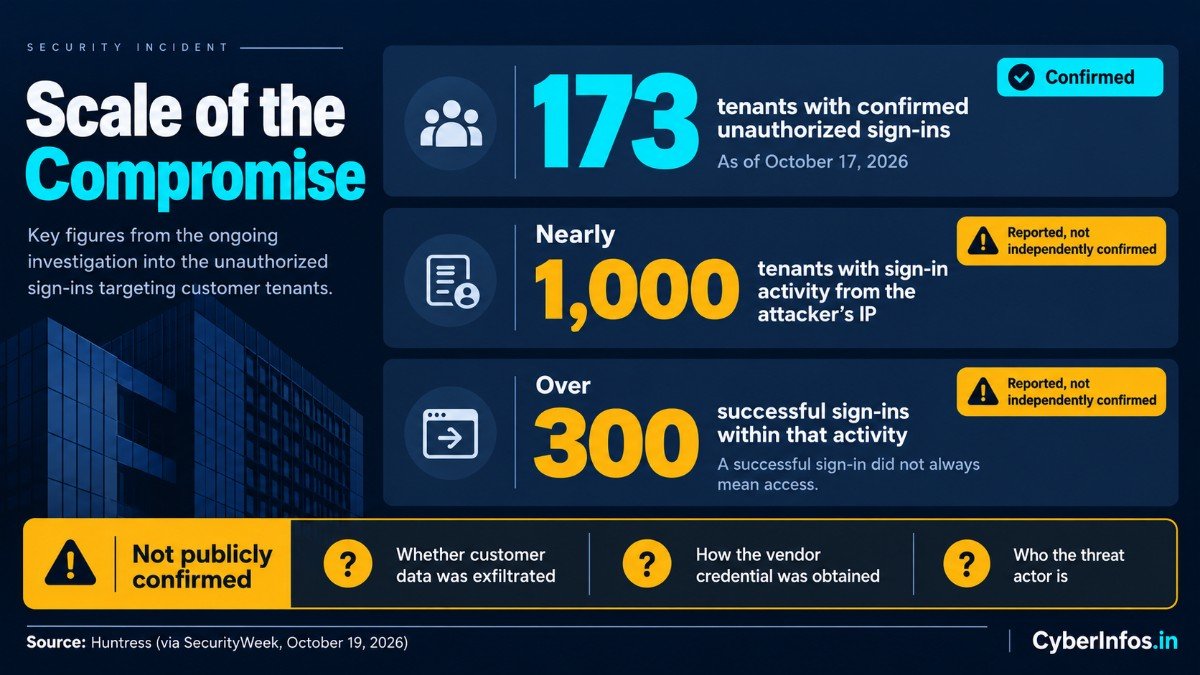
Huntress has confirmed unauthorized sign-ins across 173 tenants as of October 17, 2026. ConnectWise has shut down Cloud Backup, SaaS Security and Cloud Management while it remediates.
The warning defenders most need to hear is this: disabling the ConnectWise apps does not finish the job. In at least one tenant, a related ConnectWise app gave itself Global Administrator and added new credentials to other applications. Those credentials survive the vendor shutdown.
Quick Answer
The ConnectWise Cloud Backup breach is a multi-tenant OAuth compromise and supply-chain attack in which attackers obtained a credential belonging to the ConnectWise Cloud Backup application and used it to request Microsoft Graph tokens in customer Microsoft 365 tenants. Huntress confirmed unauthorized sign-ins in 173 tenants.
What to do now: check Entra ID service principal sign-ins for application ID 506e08f9-6e9a-4da4-942b-a099a03644ae, look for sign-ins from 144.172.64[.]128, and audit every application credential added since October 13, 2026. Whether data was stolen has not been publicly confirmed.
What Happened
ConnectWise Cloud Backup is a Microsoft 365 backup product built for managed service providers (MSPs). To copy mailboxes, SharePoint sites and Teams data, it runs as a multi-tenant Microsoft Entra ID application that customers consent to. The catch is structural. The application’s own credential, held by the vendor and not the customer, can authenticate into every tenant where the app is installed.
The Huntress ConnectWise investigation is the main public source for the technical detail. It reports that, in this SkyKick Microsoft 365 attack, the credential was compromised and used to obtain Microsoft Graph access tokens in customer tenants.
Huntress described the credential type as a client assertion, meaning it lives in the vendor’s own tenant, and said nothing a customer did in their environment could have produced the sign-ins. Microsoft Threat Intelligence is tracking the incident as an active supply-chain attack.
This multi-tenant OAuth compromise is notable for its reach: one secret, held by one vendor, opened doors in many unrelated organizations. Microsoft assessed that the attacker likely abused existing permissions, including Directory.ReadWrite.All.
Confirmed Facts and Open Questions
Here is where the public record stands, split by how well each point is established.
Confirmed (per Huntress, ConnectWise and Microsoft)
- The Cloud Backup application credential was compromised and used for unauthorized sign-ins to Microsoft 365 tenants.
- Huntress confirmed unauthorized sign-ins in 173 partner and customer tenants as of October 17, 2026, up from 162 on October 16.
- ConnectWise shut off Cloud Backup access, revoked certificates and invalidated shared credentials. It later suspended SaaS Security and Cloud Management as well.
- In one Huntress partner tenant, the separate ConnectWise Cloud Management – MS Teams app (
24205314-2b89-4e07-a2a4-579e898a5640) assigned itself Global Administrator and added credentials to two other applications.
Reported but not independently confirmed
- Huntress saw attacker-IP sign-in activity in nearly 1,000 tenants, with over 300 successful sign-ins. A successful sign-in did not always mean access, though. Tenants without the relevant ConnectWise service principal could not be entered.
- Huntress is highly confident the actor also abused the Cloud Management Exchange Online, MS Teams and SharePoint Online apps.
Not publicly confirmed
- How the vendor credential was obtained.
- Whether any customer data was exfiltrated. ConnectWise says it cannot tell whether an individual customer’s tenant was accessed, and it has no evidence its backup archives were accessed.
- The identity of the threat actor. Attribution is unknown.
Verified Timeline
| Date (UTC) | Event | Source |
|---|---|---|
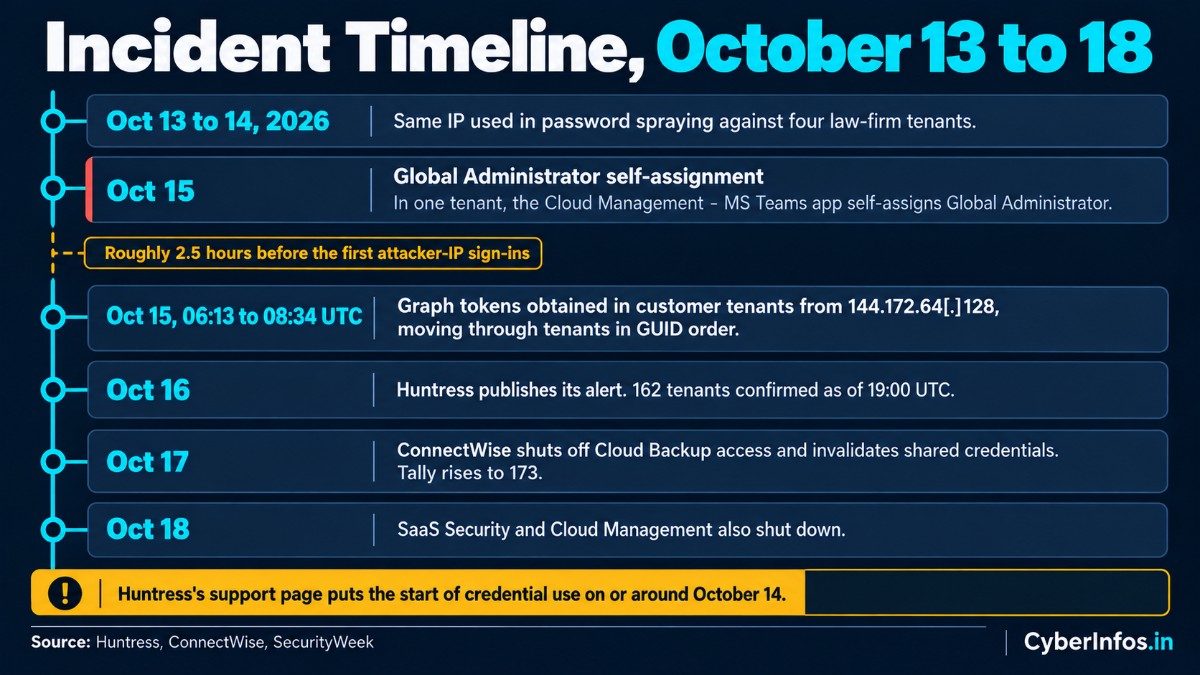
| Oct 13 to 14, 2026 | The same IP is used in password spraying against four law-firm tenants. | Huntress via SecurityWeek |
| Oct 15, 06:13 to 08:34 | Graph tokens obtained in customer tenants from 144.172.64[.]128, moving through tenants in GUID order. | Huntress |
| Oct 15 | In one tenant, the Cloud Management – MS Teams app self-assigns Global Administrator roughly 2.5 hours before the first attacker-IP sign-ins. | Huntress |
| Oct 16 | Huntress publishes its alert; 162 tenants confirmed as of 19:00. | Huntress |
| Oct 17 | ConnectWise shuts off Cloud Backup access and invalidates shared credentials; tally rises to 173. | ConnectWise, Huntress |
| Oct 18 | SaaS Security and Cloud Management also shut down. | SecurityWeek |
One caveat on dates. Huntress’s support page puts the start of credential use “on or around October 14,” so treat October 14 to 15 as the window for the first Graph token activity.
How the Attack Worked
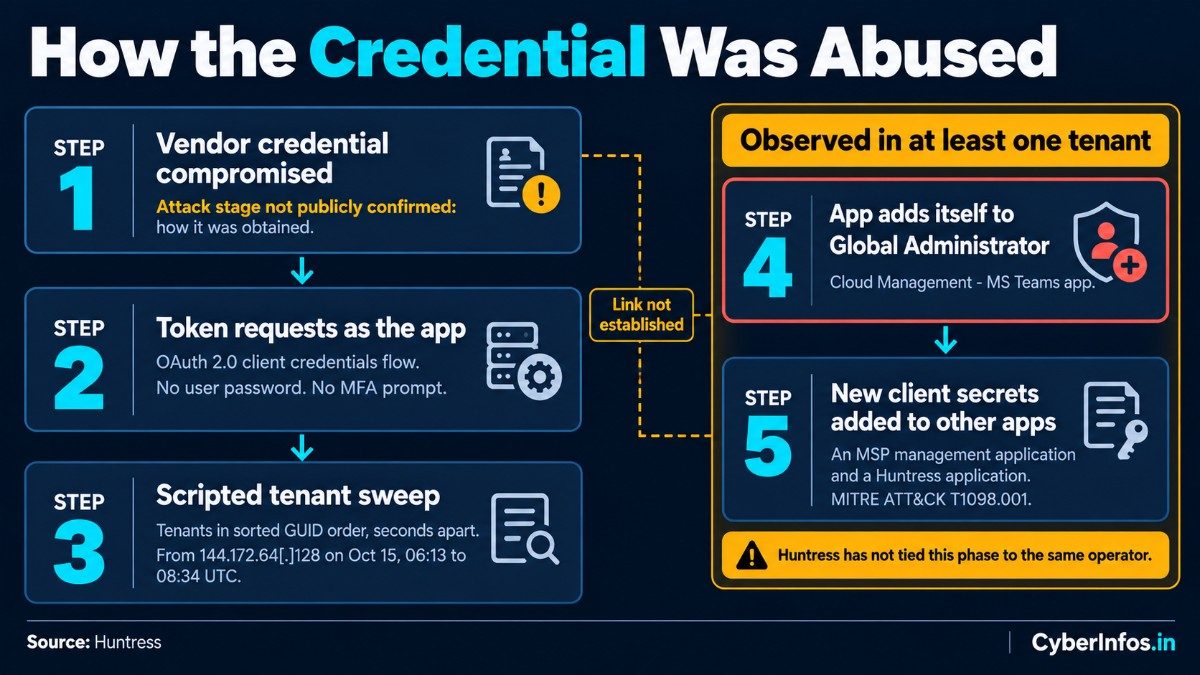
1. Token requests as the application. The attacker used the OAuth 2.0 client credentials flow, authenticating as the Cloud Backup app itself. Because this is app-only authentication, there is no user password and no interactive MFA challenge to defeat. Conditional Access policies built for users do not apply in the same way.
2. Scripted tenant sweep. Huntress observed the actor moving through tenants in sorted GUID order, seconds apart. That pattern points to a script working from a target list. Directory reads through Microsoft Graph leave little trace, which makes impact assessment for directory data difficult.
3. Privilege and persistence in at least one tenant. In the tenant Huntress examined closely, the Cloud Management – MS Teams app added itself to the Global Administrator role. It then added new client secrets to an MSP management application and to a Huntress application. Huntress notes that adding credentials to an existing app is a known persistence technique, MITRE ATT&CK T1098.001 (Additional Cloud Credentials). Huntress also observed ConnectWise Cloud Management apps assigning directory roles, mostly Exchange Administrator, in nearly 50 monitored tenants.
CyberInfos analysis: Huntress has not tied the self-assigned Global Administrator activity to the same operator as the Cloud Backup sign-ins. Treat them as two observed phases that may or may not be linked, and audit for both.
Why Disabling the ConnectWise Apps Is Not Enough
Most administrators will reach for the vendor application first and switch it off. In the ConnectWise Cloud Backup breach, that closes only the entry point.
- Planted credentials survive. Any Entra ID service principal backdoor of this kind is untouched by the vendor shutdown. Huntress states that disabling apps will not remove credentials that were already added, so review credentials on all of your applications.
- The vendor shutdown does not clean your tenant. Secrets added to unrelated service principals remain valid until you delete them.
- Role changes persist. An app that granted itself a directory role keeps that role until it is removed.
- Do not re-enable early. Huntress advises waiting until ConnectWise confirms all credentials have been reset.
Indicators to Hunt For
| Type | Value | Notes |
|---|---|---|
| Application ID | 506e08f9-6e9a-4da4-942b-a099a03644ae |
ConnectWise Cloud Backup; confirmed by Huntress and Microsoft |
| Application ID | 24205314-2b89-4e07-a2a4-579e898a5640 |
Cloud Management – MS Teams; self-assigned Global Administrator in one tenant |
| IPv4 | 144.172.64[.]128 |
Hosting-provider IP used for Graph token requests on Oct 15 |
| User agent | Python-urllib/3.12, curl/7.88.1 |
Reported by the Cloud Security Alliance as attacker agents; legitimate ConnectWise traffic uses kiota-dotnet. Confirm against the Huntress blog before alerting on these. |
| Audit event | Add service principal credentials | New secret or certificate on an app |
| Audit event | Add member to role | Look for ConnectWise or SkyKick apps adding themselves |
| Naming | “SkyKick Cloud Manager” | Older tenants may list Cloud Management apps under this name |
Expect noise if you alert on network ranges alone. In this SkyKick Microsoft 365 attack, legitimate ConnectWise traffic and unrelated customer traffic can share internal Microsoft cloud ranges, so do not block on range alone. For the complete application list and any further IPs, go to the ConnectWise Trust Center advisory and its technical remediation guide.
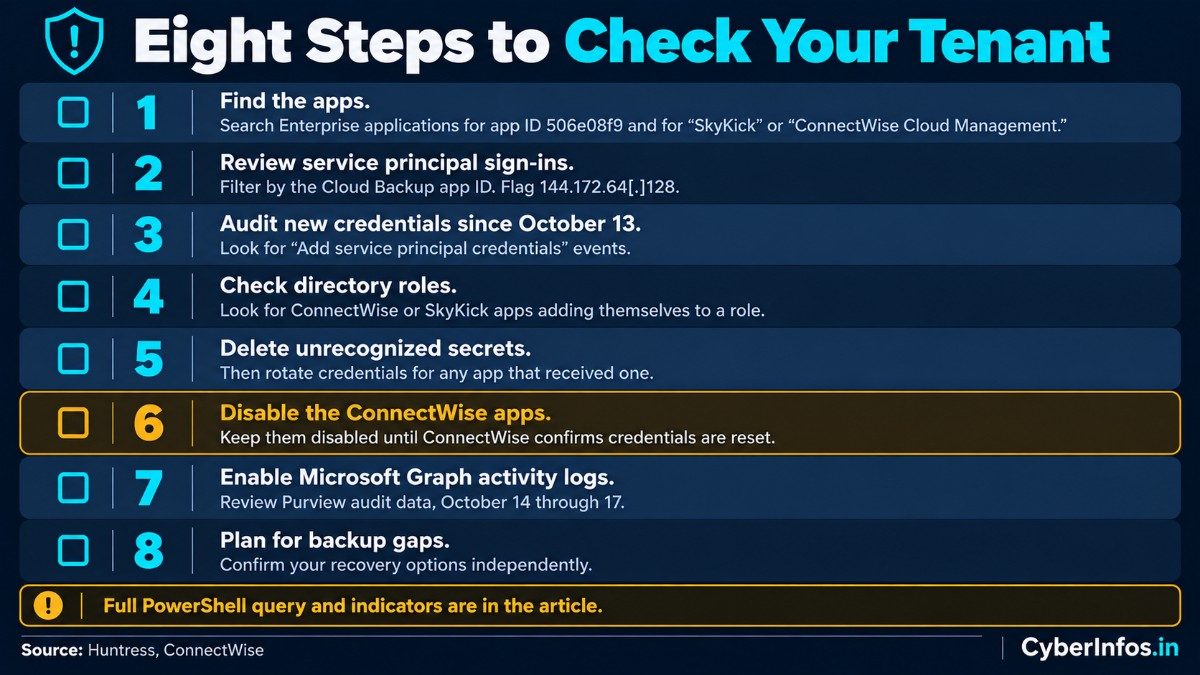
Emergency Response Checklist
Work through these in order. The early steps tell you whether you were touched; the later ones clean up.
- Find the apps. In the Entra admin center, search Enterprise applications for application ID
506e08f9and for “SkyKick” or “ConnectWise Cloud Management.” - Review service principal sign-ins. Go to Monitoring > Sign-in logs > Service principal sign-ins and filter by the Cloud Backup app ID. Flag sign-ins from
144.172.64[.]128. - Audit new credentials since October 13. Example with Microsoft Graph PowerShell (verify the filter in your tenant):
Get-MgAuditLogDirectoryAudit -All `
  -Filter "activityDisplayName eq 'Add service principal credentials' and activityDateTime ge 2026-10-13T00:00:00Z" |
  Select-Object ActivityDateTime, ActivityDisplayName, InitiatedBy, TargetResources
- Check directory roles. Search audit logs for ConnectWise or SkyKick apps adding themselves to a role, especially Global Administrator or Exchange Administrator.
- Delete unrecognized secrets on every application, since each one is a potential Entra ID service principal backdoor, then rotate credentials for any app that received one.
- Disable the ConnectWise apps and keep them disabled until ConnectWise confirms credentials are reset.
- Enable Microsoft Graph activity logs and review Purview audit data for mail access and file downloads by non-interactive identities from October 14 through 17.
- Plan for backup gaps. Cloud Backup, SaaS Security and Cloud Management are offline with no restoration timeline, so confirm your recovery options independently.
What Indian Organizations Should Know
CERT-In’s directions of April 2022, issued under Section 70B(6) of the Information Technology Act, 2000, require covered entities to report specified cyber incidents within six hours of noticing them. Unauthorized access to IT systems or data is among the listed incident types. That means confirmed rogue application access in a Microsoft 365 tenant may be reportable.
If you find it, preserve Entra and Purview logs and record your forensic timeline. Then take legal advice on whether your situation triggers the obligation. This article is not legal advice.
CyberInfos Analyst Insight
These are CyberInfos assessments, not confirmed facts.
- Workload identities are the weak flank. Organizations invest heavily in user MFA, yet vendor-owned application identities can hold tenant-wide permissions, skip MFA by design, and receive little monitoring. A multi-tenant OAuth compromise like this one exploits exactly that gap.
- Backup tools are privileged infrastructure. After the ConnectWise Cloud Backup breach, expect closer scrutiny of vendor consent. A product that can read every mailbox and site is a high-value target, and consent decisions made years ago deserve periodic review.
- Hunt beyond the breached vendor. Persistence on unrelated apps outlives the vendor’s own remediation, so an Entra ID service principal backdoor can remain after the original app is gone.
Frequently Asked Questions
What is the ConnectWise Cloud Backup breach?
A supply-chain compromise in which attackers used a vendor-held credential for ConnectWise Cloud Backup (formerly SkyKick) to sign in to customer Microsoft 365 tenants as the application, without user passwords or MFA.
How many tenants were affected?
Huntress confirmed unauthorized sign-ins in 173 tenants as of October 17, 2026. It also saw attacker-IP activity in nearly 1,000 tenants, but many of those attempts did not result in access.
Was data stolen?
Not confirmed. ConnectWise says it cannot determine whether individual customer tenants were accessed, and public reporting has not established data theft.
Does disabling the ConnectWise app protect my tenant?
In a SkyKick Microsoft 365 attack of this type, disabling stops further sign-ins through that app. It does not remove credentials already added to other applications, so audit all application credentials.
How do I check whether I was targeted?
Review service principal sign-ins for the Cloud Backup app ID, look for sign-ins from 144.172.64[.]128, and search audit logs for credential additions and role self-assignments since October 13.
Final Thoughts
The ConnectWise Cloud Backup breach shows how one vendor credential can reach into many tenants at once. If your organization uses cloud backup or MSP-managed integrations, audit your service principals today, remove credentials you cannot account for, and monitor non-human identities as closely as user accounts.
Follow CyberInfos.in on LinkedIn, X and our WhatsApp Channel for updates as the Huntress ConnectWise investigation and ConnectWise advisories evolve.
