


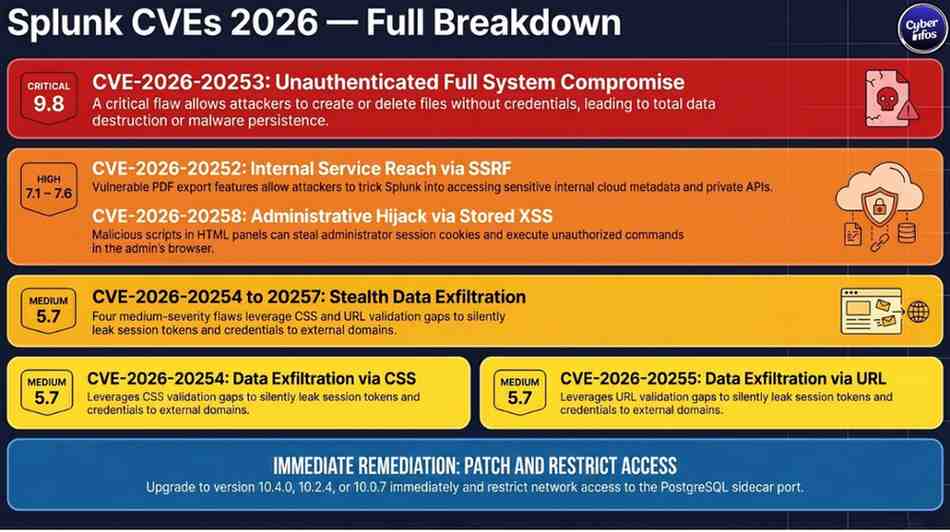
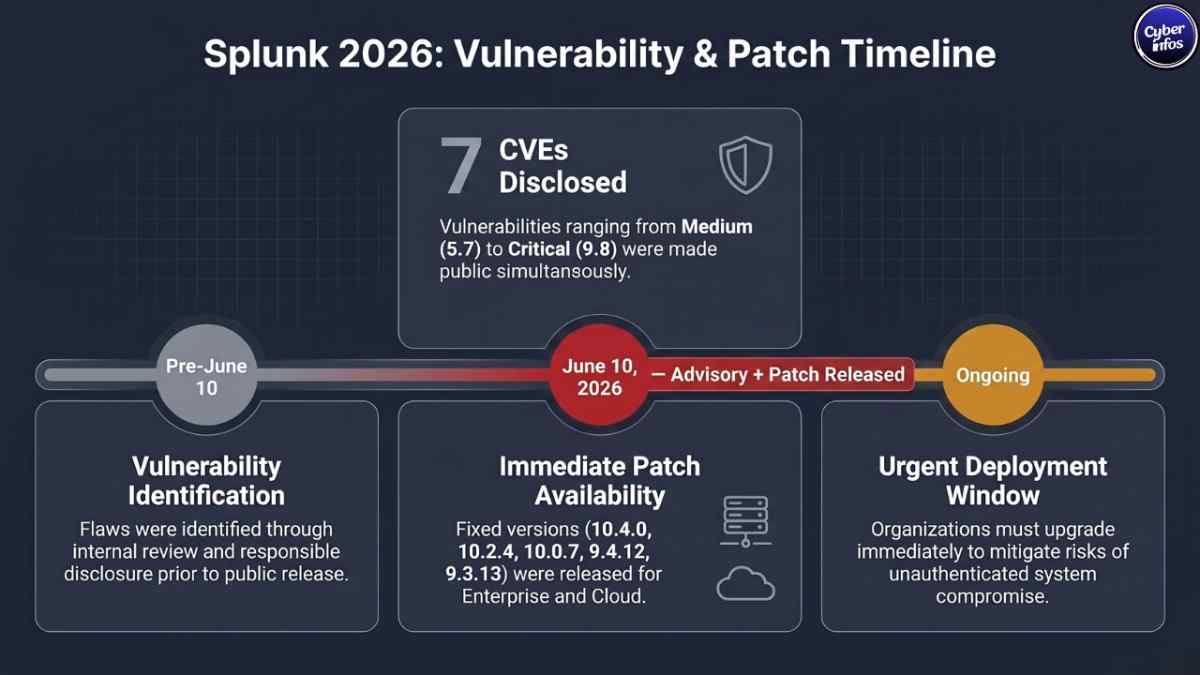
On June 10, 2026, Splunk released a series of security advisories disclosing seven vulnerabilities in Splunk Enterprise, ranging from medium to critical in severity. Splunk Enterprise Vulnerabilities 2026, The most severe flaw CVE-2026-20253 carries a CVSS score of 9.8 and allows unauthenticated attackers to create or delete arbitrary files on affected systems, potentially enabling full system compromise without any user interaction.
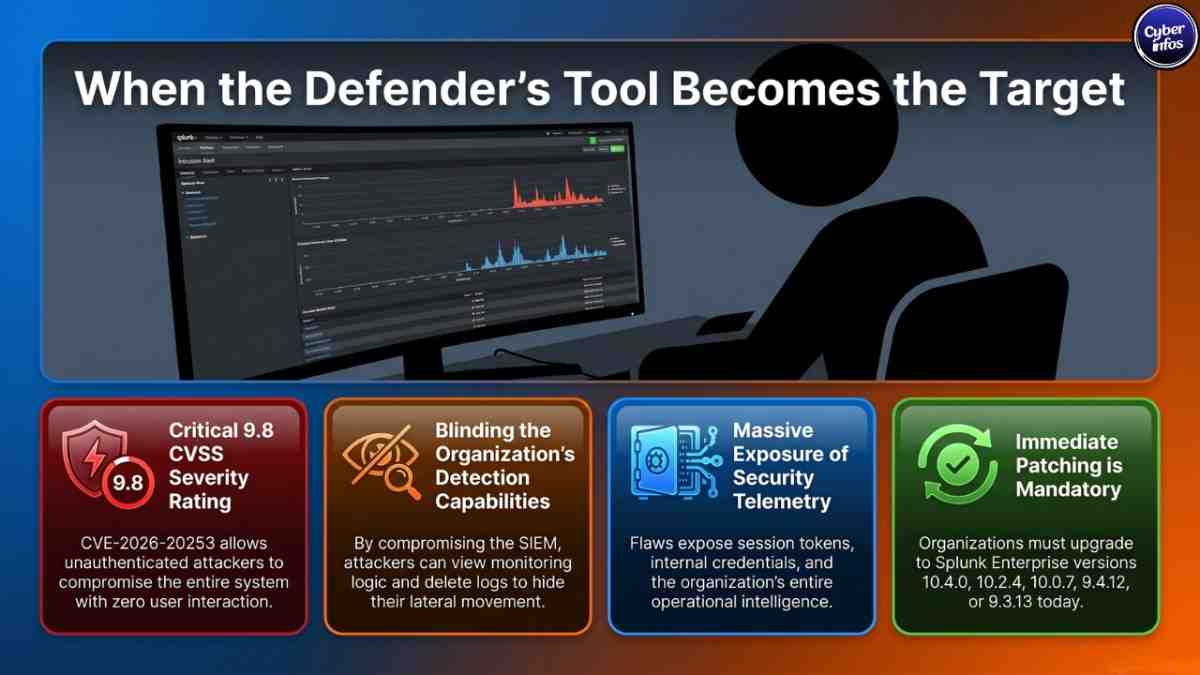
Because Splunk is widely deployed as the backbone of security operations centers (SOCs) and IT monitoring environments, these vulnerabilities carry outsized risk. A compromised Splunk instance can expose an organization’s entire security telemetry, log data, and operational intelligence to attackers.
Executive Summary
| Key Facts | Details |
|---|---|
| Company | Splunk Inc. |
| Incident Type | Multiple Security Vulnerabilities (CVEs) |
| Advisory Released | June 10, 2026 |
| Severity Range | Medium (5.7) to Critical (9.8) |
| CVEs Disclosed | 7 (CVE-2026-20252 through CVE-2026-20258) |
| Affected Versions | Splunk Enterprise below 10.2.4 and 10.0.7 |
| Data at Risk | Session tokens, credentials, internal service data, operational logs |
| Current Status | Patches available — immediate upgrade required |
| Recommended Action | Upgrade to 10.4.0, 10.2.4, 10.0.7, 9.4.12, or 9.3.13 immediately |
What Happened?
Splunk Enterprise, one of the most widely used platforms for security information and event management (SIEM), log analysis, and operational intelligence, disclosed seven vulnerabilities across its web-facing components on June 10, 2026.
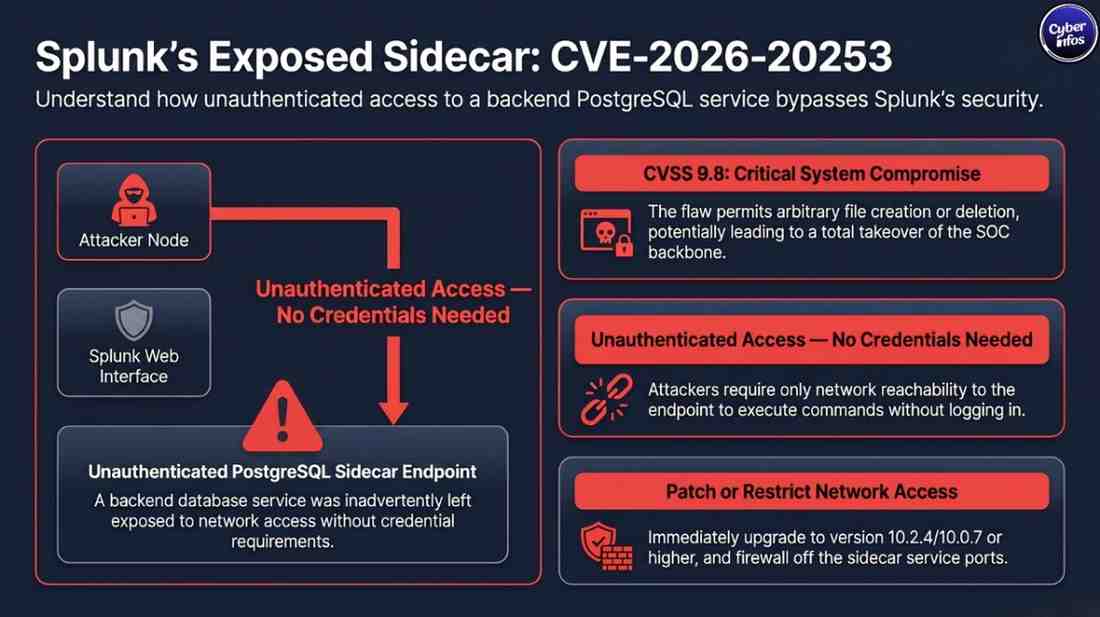
The flaws affect multiple areas of the Splunk Web interface, particularly classic dashboards and the Dashboard Studio PDF export feature. The most dangerous vulnerability stems from a missing authentication check in a backend database service specifically a PostgreSQL sidecar that was inadvertently left exposed to unauthenticated network access.
Unlike a traditional data breach where an attacker exfiltrates a database, these vulnerabilities represent a different but equally serious threat: they allow attackers to gain a foothold inside the Splunk infrastructure itself. From there, they can read sensitive security logs, steal session tokens, inject persistent malicious code, or destroy data entirely.
The vulnerabilities affect both on-premises Splunk Enterprise deployments and Splunk Cloud Platform instances.
Detailed Timeline
| Date | Event |
|---|---|
| Prior to June 10, 2026 | Vulnerabilities identified internally or through responsible disclosure |
| June 10, 2026 | Splunk publishes seven security advisories covering CVE-2026-20252 through CVE-2026-20258 |
| June 10, 2026 | Patches released: Enterprise versions 10.4.0, 10.2.4, 10.0.7, 9.4.12, 9.3.13 |
| June 10, 2026 | Corresponding Splunk Cloud Platform patches also released |
| Ongoing | Organizations advised to upgrade; no detection signatures available |
Note: No public evidence of active exploitation has been confirmed at the time of this advisory. However, given the critical nature of CVE-2026-20253, proof-of-concept exploit development is likely to follow quickly.
Vulnerability Breakdown: What Was Exposed?
| CVE ID | Severity | Vulnerability Type | Potential Impact |
|---|---|---|---|
| CVE-2026-20253 | Critical (9.8) | Unauthenticated file creation/truncation via PostgreSQL sidecar | Full system compromise, data destruction, malware persistence |
| CVE-2026-20252 | High (7.6) | SSRF in Dashboard Studio PDF export | Access to internal services, sensitive data exposure |
| CVE-2026-20258 | High (7.1) | Stored XSS in Classic Dashboard HTML panel | Arbitrary JavaScript execution in administrator’s browser |
| CVE-2026-20257 | Medium (5.7) | CSS input validation flaw | Data exfiltration to external attacker-controlled domains |
| CVE-2026-20256 | Medium (5.7) | Protocol-relative URL validation flaw | Redirect-based data exfiltration |
| CVE-2026-20255 | Medium (5.7) | External content dialog validation flaw | Data exfiltration to untrusted domains |
| CVE-2026-20254 | Medium (5.7) | CSS restriction bypass | Credential and session data exfiltration |
How Did These Vulnerabilities Occur?
CVE-2026-20253: The Critical Flaw (CVSS 9.8)
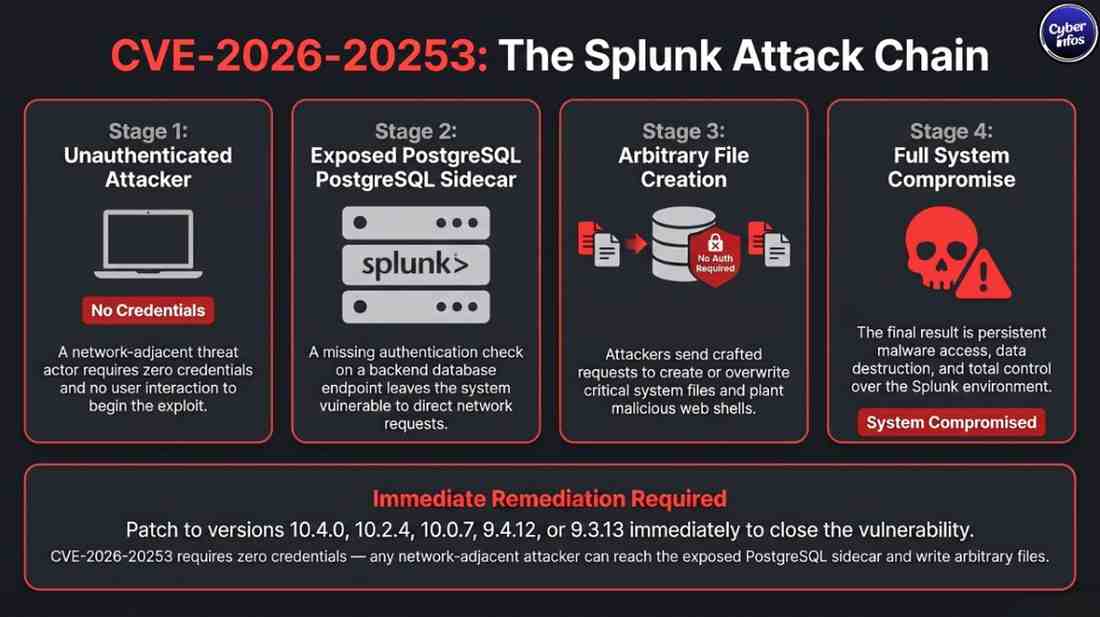
This is the most dangerous of the seven vulnerabilities. A PostgreSQL sidecar service a supporting backend component used internally by Splunk was missing authentication controls on one of its endpoints. This means anyone who can reach that endpoint over the network can interact with it without providing credentials.
What this means in practice: An attacker on the same network (or with any network access to the Splunk server) could send crafted requests to this endpoint to create new files anywhere on the system or overwrite (truncate) existing files. This could be used to plant a web shell for persistent access, corrupt Splunk’s configuration files, or destroy critical log data before an investigation.
No user interaction is required. This is a “fire and forget” exploit if reachable.
CVE-2026-20252: Server-Side Request Forgery (CVSS 7.6)
The Dashboard Studio PDF export feature does not properly validate which domains it is allowed to contact. By crafting a subdomain or using redirect chains, an attacker can trick Splunk into making requests to internal systems such as cloud metadata services (AWS IMDSv1, Azure IMDS), internal APIs, or databases that should never be reachable from the outside world.
What this means in practice: This can expose cloud instance credentials, internal service tokens, or data from systems that are normally firewall-protected.
CVE-2026-20258: Stored Cross-Site Scripting (CVSS 7.1)
A low-privileged Splunk user can inject malicious JavaScript into an HTML panel within a classic dashboard. When a higher-privileged user such as an administrator opens that dashboard, the script runs in their browser automatically.
What this means in practice: The attacker’s script can steal the administrator’s session cookie, capture keystrokes, redirect the admin to a phishing page, or perform administrative actions silently on their behalf.
CVE-2026-20254 through CVE-2026-20257: Dashboard Data Exfiltration (CVSS 5.7 each)
These four vulnerabilities share a common root cause: insufficient validation of user-supplied content in classic dashboard components. Attackers with low privileges can craft dashboards that, when viewed by higher-privileged users, silently send sensitive data including session tokens, credentials, and other information visible in the Splunk interface to attacker-controlled external servers.
The techniques vary: CSS injection, protocol-relative URLs (e.g., //attacker.com/steal), and external content dialogs are each leveraged differently, but the outcome is the same data leaves the organization without any visible alert.
Who Is Affected?
These vulnerabilities affect organizations running Splunk Enterprise below versions 10.2.4 or 10.0.7, as well as corresponding Splunk Cloud Platform builds.
Given Splunk’s widespread deployment in enterprise environments, the potential impact is broad. Splunk is particularly common in:
- Security Operations Centers (SOCs)
- Financial services and banking
- Healthcare organizations
- Government and defense agencies
- Critical infrastructure operators
- Large-scale e-commerce and technology companies
There is no confirmed public report of large-scale exploitation at the time of this writing. However, the severity of CVE-2026-20253 means that unpatched systems facing any network exposure are at high risk once proof-of-concept exploits circulate.
What Affected Organizations Should Do
This is the most important section. If you run Splunk Enterprise, act on these steps immediately.
Step 1: Determine Your Exposure
- Identify all Splunk Enterprise deployments in your environment (on-premises and cloud).
- Check version numbers against the affected range: below 10.2.4 and 10.0.7.
- Determine whether Splunk Web is exposed to the internet, an internal network, or restricted subnets.
- Check whether embeddable HTML content is enabled (
dashboard_html_allow_embeddable_content).
Step 2: Immediate Actions
☐ Patch immediately. Upgrade to one of the patched versions: 10.4.0, 10.2.4, 10.0.7, 9.4.12, or 9.3.13.
☐ Restrict network access. If patching cannot happen immediately, restrict access to the Splunk server especially the PostgreSQL sidecar port to trusted hosts only using firewall rules.
☐ Disable Splunk Web if not needed. For indexers and search heads that do not require direct user access, disabling Splunk Web eliminates the attack surface for XSS, SSRF, and dashboard-based exfiltration flaws.
☐ Disable embeddable HTML content. Set dashboard_html_allow_embeddable_content = false in your Splunk configuration to reduce XSS risk from CVE-2026-20258.
☐ Restrict dashboard creation. Limit who can create and modify classic dashboards to reduce the blast radius of the medium-severity exfiltration CVEs.
☐ Enforce trusted domain policies. Configure strict trusted-domain lists to prevent outbound requests to unknown external domains from Dashboard Studio.
☐ Review active dashboards. Audit existing dashboards for suspicious HTML panels, external content dialogs, or unexpected CSS referencing external URLs.
☐ Rotate session tokens. Given the risk of token exfiltration via XSS and CSS injection, consider rotating admin session tokens and resetting active sessions post-patch.
Step 3: Long-Term Hardening
- Implement network segmentation. Splunk servers should not be accessible from arbitrary internal hosts. Limit access to dedicated analyst workstations and management nodes.
- Enable MFA for all Splunk accounts. Stolen session cookies are less useful if session-bound MFA is enforced.
- Regular permission audits. Ensure low-privileged users cannot create dashboards visible to administrators unless necessary.
- Continuous monitoring. While no detection signatures exist for these CVEs at this time, monitor for anomalous outbound network connections from Splunk hosts and unexpected file changes.
- Establish a patch cadence. These vulnerabilities underscore the importance of a structured patching program for all security tooling not just endpoints.
Step 4: Regulatory and Reporting Considerations
If your Splunk deployment handles personal data, health records, payment card information, or other regulated data categories, assess whether a compromise via these vulnerabilities would trigger notification obligations under GDPR, HIPAA, PCI-DSS, or regional breach notification laws. Consult your legal and compliance teams if exploitation cannot be ruled out.
Company Response
Splunk acted responsibly in coordinating the disclosure of these vulnerabilities by releasing patches simultaneously with the advisories on June 10, 2026. Patched versions are available across all supported release trains, including legacy 9.x versions, indicating a commitment to customers who have not yet migrated to current releases.
However, Splunk has not provided detection signatures or indicators of compromise (IoCs) for these vulnerabilities. This places the burden of detection entirely on affected organizations and increases the importance of proactive patching over reactive detection.
Similar Historical Incidents
| Incident | Similarity | Key Lesson |
|---|---|---|
| Splunk Enterprise RCE (CVE-2023-46214, 2023) | Unauthenticated remote code execution via file upload | SIEM platforms are high-value targets; past Splunk RCEs were weaponized rapidly |
| SolarWinds Orion (2020) | Compromise of a monitoring/logging platform used for lateral movement | Security tools themselves need rigorous security review |
| Log4Shell (CVE-2021-44228) | Unauthenticated RCE via a broadly-used logging library | Logging infrastructure vulnerabilities can cascade across entire organizations |
| Atlassian Confluence OGNL Injection (CVE-2022-26134) | Unauthenticated RCE on widely-deployed enterprise software | Rapid exploitation follows disclosure; patch windows are extremely short |
The pattern is clear: widely-deployed enterprise software that handles sensitive data or provides visibility into infrastructure is a prime target. Attackers know that compromising a SIEM gives them insight into an organization’s entire detection capability and the ability to blind defenders.
What This Means for the Industry
Security Tools Are Attack Targets
These vulnerabilities reinforce a growing trend: attackers actively target security tooling itself. A compromised Splunk instance doesn’t just expose data it can allow attackers to understand exactly what is being monitored, adjust their tactics to avoid detection, and erase evidence of their activity from logs.
The “Trust But Don’t Verify” Problem
Several of these vulnerabilities stem from insufficient input validation and missing authentication on internal service endpoints basic security hygiene issues. This serves as a reminder that even mature, enterprise-grade security products can harbor fundamental weaknesses.
No Detection Signatures – A Dangerous Gap
The absence of detection signatures for these CVEs is a significant concern. Organizations that rely on Splunk as their primary SIEM cannot use it to detect exploitation of Splunk itself a circular dependency problem. Complementary monitoring (network-based IDS, endpoint detection, out-of-band logging) is essential.
Cyber Insurance Implications
Insurers are increasingly scrutinizing patching timelines. Organizations that fail to patch critical vulnerabilities within reasonable windows may face coverage challenges if a claim arises from exploitation of a known, patchable flaw.
Cyber Infos Expert Analysis
Key Lessons
- Authentication is not optional – anywhere. CVE-2026-20253 exists because an internal service endpoint lacked authentication. Every endpoint, regardless of whether it is considered “internal,” should require authentication.
- SIEM security is security operations security. The tools you use to detect attackers must themselves be protected. Splunk deployments deserve the same vulnerability management rigor applied to other critical systems.
- Low-privilege users can cause critical damage. Several of these vulnerabilities require only low-privileged Splunk access to trigger. Least-privilege and permission segmentation are not just best practices — they are essential mitigations.
Immediate Actions (Today)
- Patch to a fixed version or disable Splunk Web if patching is not yet possible.
- Restrict network-level access to Splunk hosts, especially sidecar service ports.
- Disable embeddable HTML content in dashboard configurations.
Next 30 Days
- Audit all dashboards for suspicious content.
- Review and tighten dashboard creation permissions.
- Implement or validate network segmentation around Splunk infrastructure.
- Assess whether any evidence of prior exploitation exists (anomalous outbound connections, unexpected file changes, unusual admin activity).
Long-Term Protection
- Establish a documented patch SLA for all security tooling.
- Implement complementary, out-of-band monitoring for Splunk infrastructure.
- Periodically review Splunk configuration hardening guides against your deployed settings.
- Include SIEM/logging platforms in your attack surface management program.
Resources
Splunk Official Resources
- Splunk Security Advisories Portal: https://www.splunk.com/en_us/product-security.html
- Splunk Enterprise Upgrade Documentation
- Splunk Configuration Hardening Guide
Government and Industry Resources
- CISA Known Exploited Vulnerabilities Catalog: https://www.cisa.gov/known-exploited-vulnerabilities-catalog
- NIST NVD CVE Database: https://nvd.nist.gov
- NCSC Cyber Alerts (UK): https://www.ncsc.gov.uk/section/keep-up-to-date/alerts-advisories
Incident Reporting
- US CISA: Report incidents at https://www.cisa.gov/report
- UK NCSC: https://report.ncsc.gov.uk
- CERT-In (India): https://www.cert-in.org.in
Frequently Asked Questions
Q: Are these vulnerabilities being actively exploited?
No active exploitation has been publicly confirmed as of the advisory date (June 10, 2026). However, given that CVE-2026-20253 is rated 9.8 (Critical) and requires no authentication, exploitation attempts are likely to emerge quickly once technical details circulate. Organizations should treat this as urgent.
Q: Do I need to be on the internet to be at risk from CVE-2026-20253?
Not necessarily. The critical flaw in the PostgreSQL sidecar service only requires network access to the affected endpoint. Organizations with improperly segmented internal networks where the Splunk server is broadly accessible from many hosts face meaningful internal risk, especially from insider threats or compromised workstations.
Q: What if I can’t patch immediately?
Apply compensating controls as quickly as possible: use firewall rules to restrict access to Splunk and its backend service ports, disable Splunk Web if it is not required, and set dashboard_html_allow_embeddable_content = false. These reduce but do not eliminate risk. Patching remains the only full remediation.
Q: Are Splunk Cloud Platform customers affected?
Yes. Corresponding Splunk Cloud Platform versions are also affected. Splunk has released patches for those versions as well. Check Splunk’s advisory portal for specific version guidance.
Q: Which Splunk versions are safe?
The patched, safe versions are: 10.4.0, 10.2.4, 10.0.7, 9.4.12, and 9.3.13, and their corresponding Splunk Cloud Platform releases.
Q: Can an attacker with read-only access exploit these vulnerabilities?
Most of the medium-severity dashboard vulnerabilities (CVE-2026-20254 through CVE-2026-20257) require the attacker to have dashboard creation privileges, which is a level above pure read-only access. CVE-2026-20253, however, requires no Splunk account at all only network access.
Q: Should I review past logs for signs of exploitation?
Yes, and this is challenging precisely because no detection signatures exist. Review logs for unexpected outbound connections from Splunk hosts, anomalous file creation or modification events on the Splunk server filesystem, and unusual administrative actions in Splunk audit logs. Engage your incident response team if anything suspicious is found.
Q: Is this a data breach requiring regulatory notification?
It depends on your jurisdiction and the nature of the data processed. If you have evidence that Splunk was exploited and sensitive personal, health, or payment data was accessed or exfiltrated, consult your legal team regarding GDPR, HIPAA, or other applicable notification obligations. At this stage, no confirmed exploitation has been reported publicly.
