

Most developers don’t ignore vulnerability alerts on purpose. They ignore them because nothing tells them what to actually do next.
Dependabot opens a pull request. A CI scanner blocks a merge hours after the code review is done. A dashboard lists CVE IDs with no clear fix path. The result is alert fatigue, and teams quietly learn to tune the noise out until one of those overlooked findings becomes the entry point for an attacker.
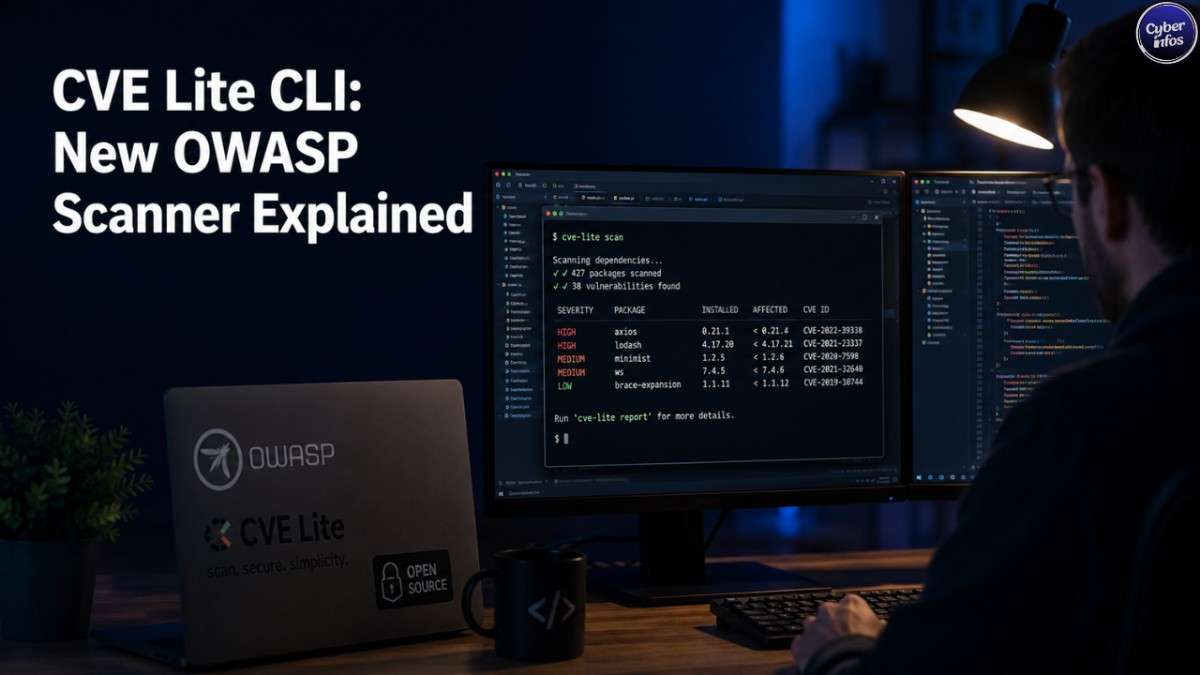
CVE Lite CLI takes a different approach. It’s a free, open-source scanner that just earned OWASP Incubator Project status, and it runs in the terminal before code gets pushed not after. It scans your lockfile, checks it against the OSV database, and hands back validated, copy-and-run fix commands for npm, pnpm, Yarn, and Bun projects.
Better still, it works as a genuinely local-first vulnerability scanner: no source code, dependency tree, or credentials ever leave your machine.
In this breakdown, we’ll walk through how CVE Lite CLI works, what a real scan output looks like, and how it stacks up against Dependabot and npm audit.
What Is CVE Lite CLI?
CVE Lite CLI is a free, open-source dependency vulnerability scanner that has just been accepted as an OWASP Incubator Project. Instead of living inside a CI pipeline or a SaaS dashboard somewhere, it runs directly in a developer’s terminal scanning project lockfiles and handing back a remediation plan rather than just another list of CVE IDs.
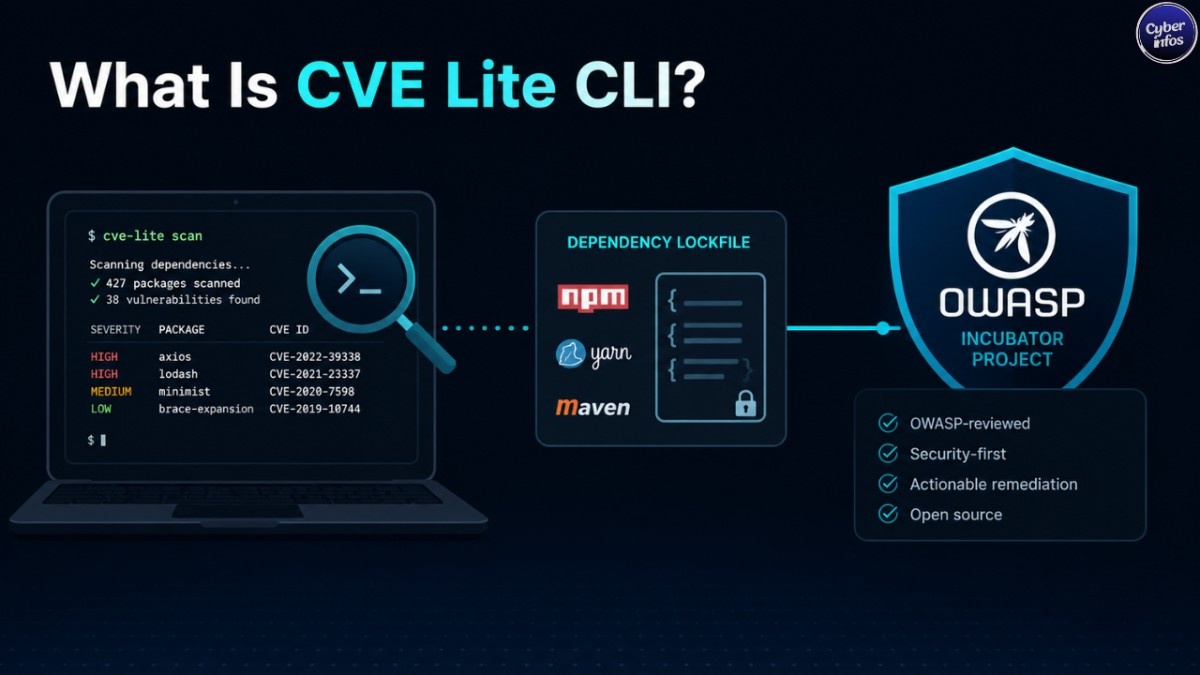
The project is maintained by Sonu Kapoor and sits under the same OWASP umbrella that produces the OWASP Top 10. For SOC analysts and AppSec teams sizing up new tooling, that affiliation is worth noting. It points to community governance and peer review, not a single vendor’s marketing roadmap driving the project’s future.
What really sets CVE Lite CLI apart from most free scanners, though, is its remediation-first approach. Every finding ships with a validated, copy-and-run fix command. And the tool is careful to distinguish between direct and transitive dependencies a distinction that often determines whether a one-line npm update clears an issue, or whether a parent package needs a full major-version bump.
Why OWASP Incubator Status Matters
OWASP Incubator Projects go through a review process before landing under the OWASP banner. For CVE Lite CLI, that means the tool runs under vendor-neutral, community-driven governance rather than being tied to a commercial roadmap that could change pricing or disappear entirely overnight.
For security teams evaluating new tooling, this status is a useful trust signal. But it’s not a substitute for your own due diligence. Incubator status confirms the project meets OWASP’s baseline criteria for community contribution and transparency. It doesn’t mean the tool has been formally audited for production use in every environment. Think of it as a strong starting point rather than a final verdict.
The Alert Fatigue Problem With Traditional Scanners
Most dependency scanners are built for pipelines, not people. Dependabot opens pull requests that quietly pile up in a queue. CI scanners block merges hours after a developer has already moved on. Security dashboards surface long lists of CVE IDs with no obvious path to resolution.
The result, as OWASP put it, is that the goal is to make dependency security part of the everyday developer workflow, not just a CI check or enterprise-only concern. That framing is really the core thesis behind CVE Lite CLI: catch the problem before code gets pushed, and hand the developer a fix they can run right then not a backlog item to revisit “eventually.”
How CVE Lite CLI Works
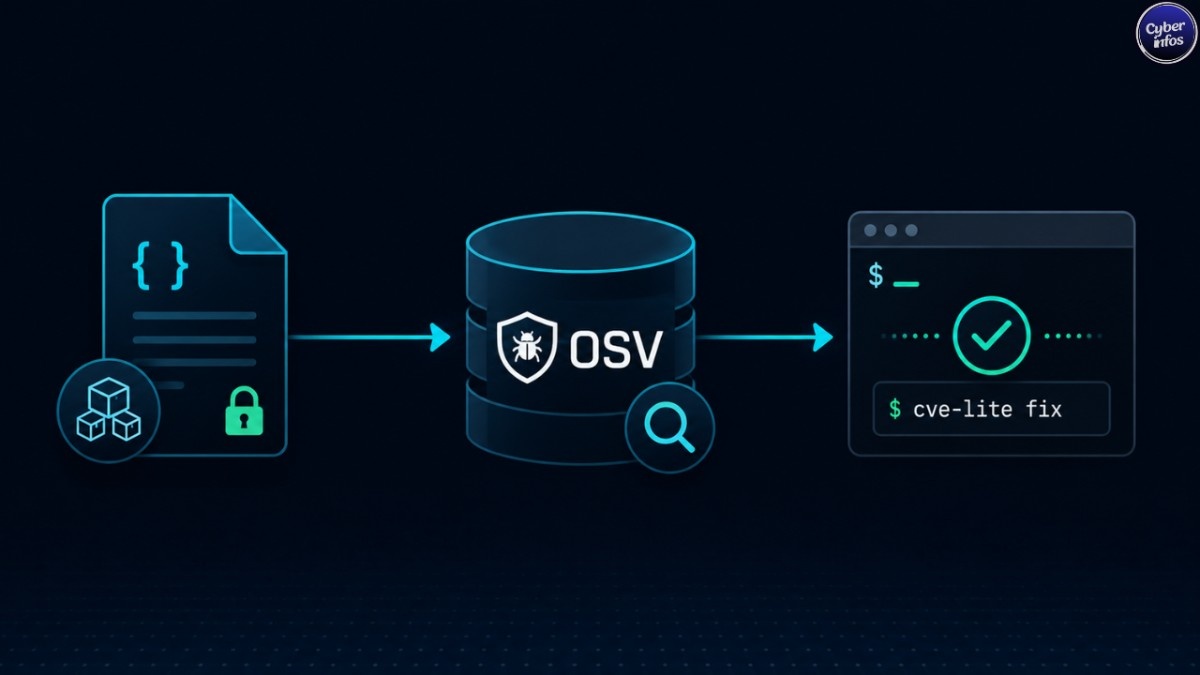
CVE Lite CLI reads a project’s lockfile locally and queries the Open Source Vulnerabilities (OSV) database for advisory data. It supports all four major JavaScript package managers npm, pnpm, Yarn, and Bun and tailors its output commands to whichever one a project actually uses.
Here’s the part privacy-conscious teams will care about: nothing leaves the developer’s machine during a scan. No source code, no dependency tree, no credentials get transmitted anywhere. The scan itself happens entirely locally; only advisory lookups touch the OSV database.
For organizations navigating India’s DPDP Act, this local-first design is genuinely useful. A scanner that never transmits a project’s dependency graph or source structure removes an entire category of data-handling questions from a vendor risk assessment one less thing to explain to a compliance team.
Key Features Breakdown
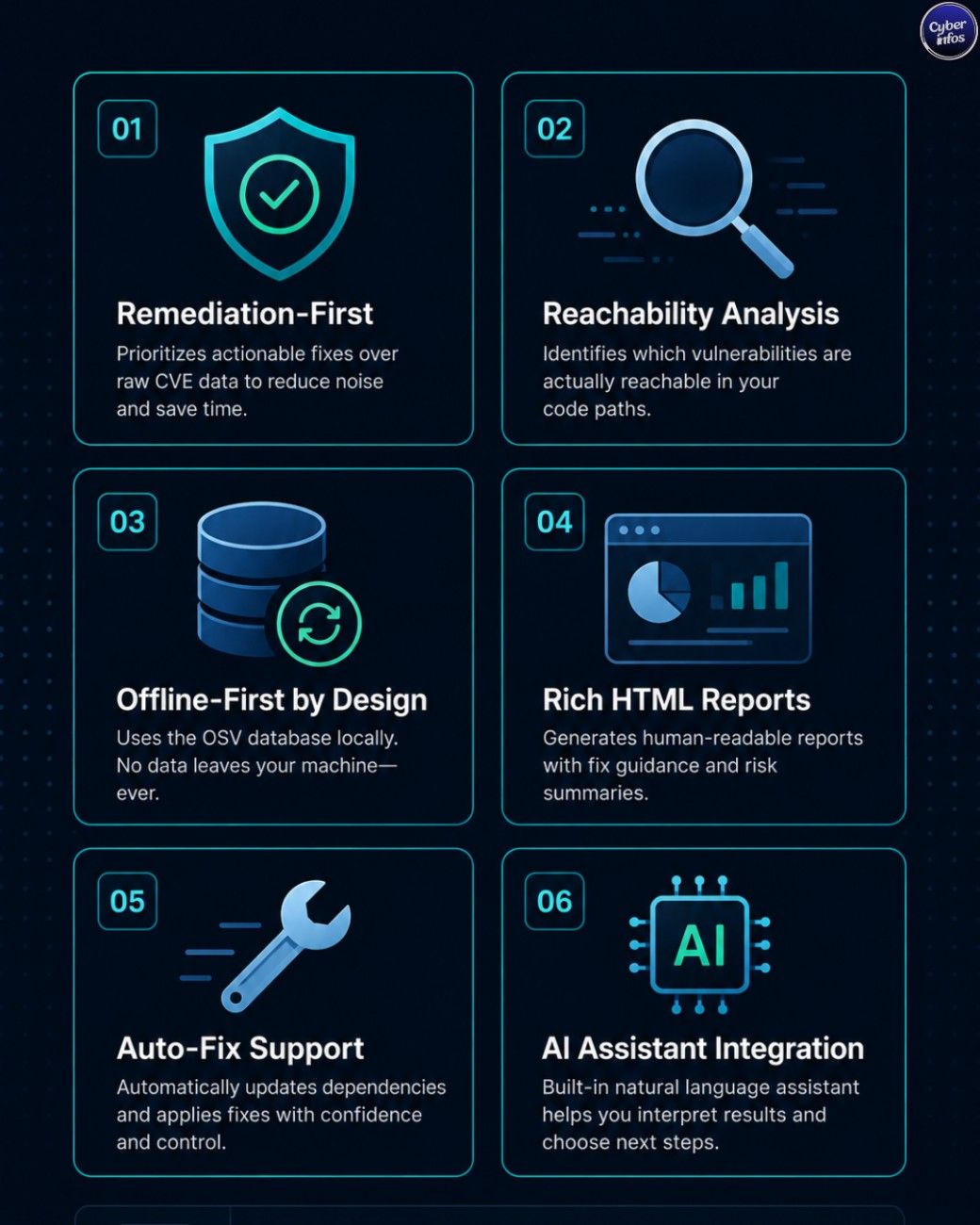
Remediation-first output. Every finding comes with a validated, copy-and-run fix command not just a CVE ID and a severity score sitting there unresolved.
Usage-aware reachability (--usage). Static analysis checks whether a vulnerable package is actually imported anywhere in your source code. This cuts down significantly on false-positive noise from dependencies that exist in the lockfile but never get called.
Offline advisory database. Running cve-lite advisories sync pulls down roughly 217,065 advisory records in under 9 seconds, which makes the tool workable in air-gapped or enterprise environments with restricted internet access.
Interactive HTML report (--report). Generates a self-contained dashboard with severity cards, a searchable findings table, and copy-ready fix commands. Handy when you need to share scan results with someone who isn’t going to open a terminal.
Auto-fix mode (--fix). Applies validated direct dependency fixes using whichever package manager the project uses, then automatically rescans to confirm the fix actually worked.
CI/CD integration flags. --fail-on high exits non-zero when findings cross a severity threshold, --sarif writes SARIF 2.1.0 output for GitHub Code Scanning, and --cdx generates a CycloneDX 1.4 SBOM.
AI assistant integration (install-skill). Writes skill files for Claude Code, Codex CLI, Gemini CLI, Cursor, and GitHub Copilot, so AI coding assistants can read scan output directly and build a prioritized fix plan.
Installing and Running CVE Lite CLI
Installation requires no account, no configuration step, and no API key. A global install via npm looks like this:
npm install -g cve-lite-cli
cve-lite /path/to/project
For a one-off scan without a global install, npx works just as well:
npx cve-lite-cli /path/to/projectIf you’re working in an offline or restricted environment, sync the advisory database before your first scan:
cve-lite advisories syncThis pulls the full OSV-derived advisory set locally, so later scans don’t depend on live network access at all.
Reading a Real Scan Result
To get a feel for what the output actually looks like: one documented scan detected 39 vulnerable packages across 1,620 parsed dependencies, with three critical findings.
Two of those findings show the direct-versus-transitive distinction in action. jsonwebtoken@0.1.0 turned up as a transitive dependency, with the fix path running through an express-jwt upgrade. marsdb@0.6.11, meanwhile, showed up as a direct dependency.
This is where the tool’s remediation logic earns its keep. For the transitive jsonwebtoken issue, a developer doesn’t have to dig through the dependency tree to work out which parent package needs upgrading CVE Lite CLI has already done that resolution and points straight to the fix.
CyberInfos Analyst Insight: In our experience reviewing SOC workflows, transitive dependency vulnerabilities are the single biggest source of “known but unfixed” findings sitting in backlog. It’s not that teams don’t care — it’s that resolving them usually means manually tracing the dependency graph, and nobody has time for that mid-sprint. A tool that pre-resolves “does npm update <parent> fix this, or do we need a major version bump” removes the most time-consuming part of triage. That’s often the difference between a finding that gets fixed this week and one that sits for months.
CVE Lite CLI vs Dependabot vs npm audit
| Factor | CVE Lite CLI | Dependabot | npm audit |
|---|---|---|---|
| Workflow placement | Pre-push, local terminal | Post-push, PR-based | Local or CI |
| Remediation depth | Validated fix commands, direct/transitive resolution | Opens PRs, doesn’t always resolve transitive issues cleanly | Lists vulnerabilities, basic npm audit fix |
| Data handling | Fully local, OSV lookups only | GitHub-hosted, cloud-based | Sends package data to npm registry |
| Offline support | Yes, via advisory sync | No | Limited |
| Package manager support | npm, pnpm, Yarn, Bun | Primarily npm/Yarn | npm only |
| Reachability analysis | Yes (--usage) |
No | No |
| SBOM/SARIF output | Yes (CycloneDX, SARIF) | Limited | No |
Here’s the honest takeaway: these tools aren’t really replacements for each other. Dependabot’s PR-based workflow is useful for ongoing dependency hygiene across many repos. npm audit is a zero-setup baseline check that’s already sitting there. CVE Lite CLI’s value is in the pre-push moment catching issues before they’re committed, with a fix the developer can run on the spot, without any data leaving the machine in the process.
CI/CD Integration: SARIF, CycloneDX, and Fail-On Gates
For teams that want to enforce dependency security as a pipeline gate rather than just a local check, CVE Lite CLI’s CI/CD flags map fairly cleanly onto common workflows:
--fail-on highmakes the command exit non-zero if any finding meets or exceeds “high” severity, which can fail a build step outright.--sarifproduces SARIF 2.1.0 output the format GitHub Code Scanning consumes natively so findings surface directly in a repo’s Security tab.--cdxgenerates a CycloneDX 1.4 SBOM, useful for organizations that need software bill of materials documentation for supply-chain security or procurement.
A simple GitHub Actions step might run npx cve-lite-cli . --fail-on high --sarif results.sarif, then upload that SARIF file using GitHub’s code-scanning upload action. The result: a local-first tool that still plugs into existing pipeline gates without needing a separate SaaS integration layer.
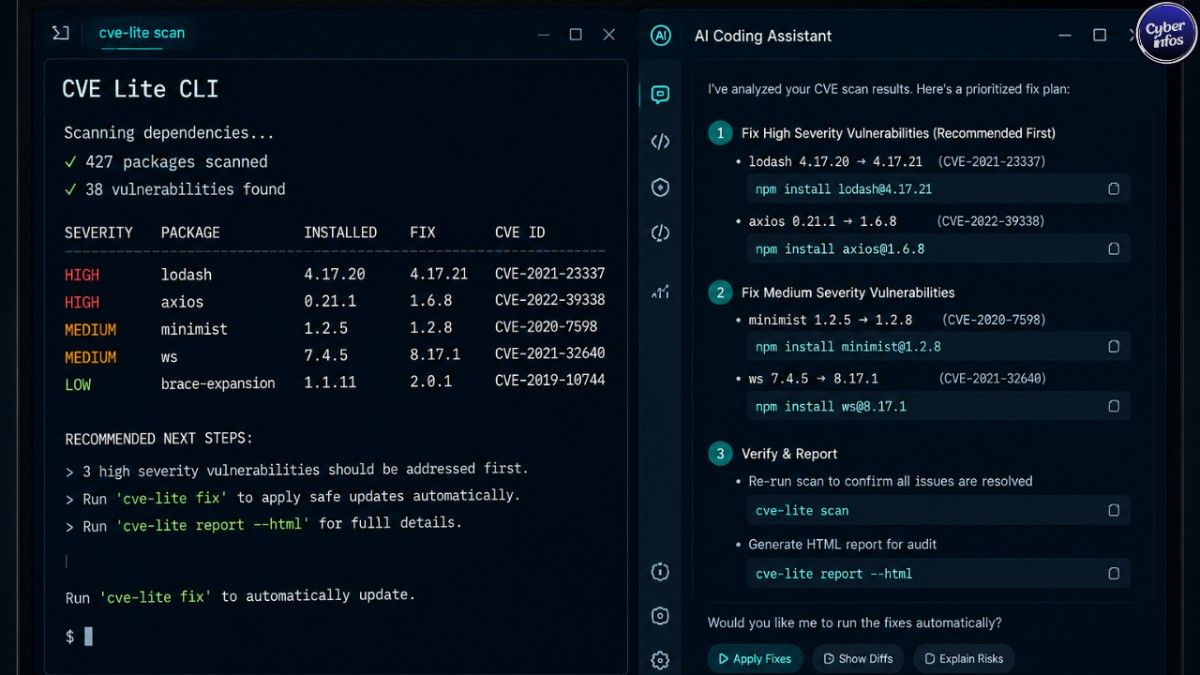
AI Assistant Integration for Automated Fixes
The install-skill command writes skill files for Claude Code, Codex CLI, Gemini CLI, Cursor, and GitHub Copilot. In practice, this means an AI coding assistant can read a CVE Lite CLI scan’s output and build a prioritized fix plan sequencing which vulnerabilities to address first based on severity, reachability, and whether the fix is a simple update or something that could break the build.
This reflects a broader shift in how dependency security tooling gets designed now. Rather than treating AI assistants as an afterthought, tools are increasingly built to hand structured findings directly to an assistant that’s already part of the developer’s workflow. For teams already using Claude Code or Cursor day to day, this closes the loop between “vulnerability found” and “fix applied” without an extra triage step in between.
Security and Trust Considerations
CVE Lite CLI has a minimal runtime footprint just four dependencies: yaml, yarn-lockfile, better-sqlite3, and fflate. That’s a deliberate choice, and for a security-oriented tool, it matters more than it might seem. Every additional dependency is itself a potential supply-chain risk, and a tool whose entire job is finding vulnerabilities shouldn’t be carrying an outsized attack surface of its own.
The tool has also been validated against real-world codebases including OWASP Juice Shop, Visual Studio Code, NestJS, Ghost CMS, Gatsby, Storybook, and the Vercel AI SDK, with documented scans showing real findings rather than curated demo output. For teams sizing up new tooling, that kind of validation against widely-used open-source projects tells you more than any marketing page it means the tool has been run against codebases with real, messy dependency trees, not hand-picked test cases.
Should Your Team Adopt CVE Lite CLI?
For teams already running Dependabot or relying on npm audit, CVE Lite CLI is best thought of as a complementary layer rather than a wholesale replacement. It fits naturally into the pre-push moment a developer runs it before opening a PR, gets a concrete fix command, and resolves the issue before it ever becomes a Dependabot PR or a CI failure.
For organizations with air-gapped environments, or fintech and healthcare teams under compliance restrictions where “no data leaves the machine” is a hard requirement, the local-first design is the standout feature here. Paired with offline advisory sync, it’s one of the few free scanners that works fully without internet access after initial setup.
The realistic limitation is simply that it’s new. OWASP Incubator status means it’s community-governed, but it also means the tool is still maturing. Teams adopting it now are early adopters of a genuinely useful approach — worth pairing with existing scanning rather than treating as the sole source of truth on day one.
Actionable Checklist
☐ Install CVE Lite CLI globally or run via npx for a first scan
☐ Run cve-lite advisories sync before scanning in offline/restricted environments
☐ Use --usage to filter out unreachable vulnerable packages
☐ Review direct vs. transitive findings separately transitive fixes often need parent upgrades
☐ Add --fail-on high --sarif results.sarif to CI pipelines for GitHub Code Scanning
☐ Generate a CycloneDX SBOM with --cdx if your organization requires supply-chain documentation
☐ Run install-skill if your team uses Claude Code, Cursor, or Copilot for fix triage
☐ Treat findings as a complement to, not a replacement for, existing Dependabot/CI scanning
FAQ
What is CVE Lite CLI and who maintains it?
CVE Lite CLI is a free, open-source dependency vulnerability scanner accepted as an OWASP Incubator Project, maintained by Sonu Kapoor under OWASP’s vendor-neutral governance model.
Is CVE Lite CLI an official OWASP project?
It’s an OWASP Incubator Project, meaning it has gone through OWASP’s review process for community-driven projects and operates under the same organizational umbrella as the OWASP Top 10.
How is CVE Lite CLI different from Dependabot?
CVE Lite CLI runs locally before code is pushed and provides validated fix commands with direct/transitive resolution, while Dependabot operates post-push via pull requests on GitHub’s infrastructure.
Does CVE Lite CLI send any data to external servers?
No. Scans run entirely locally against your lockfile, with only advisory data queried from the OSV database. No source code, dependency trees, or credentials are transmitted.
What package managers does CVE Lite CLI support?
It supports all four major JavaScript package managers: npm, pnpm, Yarn, and Bun, with fix commands scoped to whichever manager a project uses.
How does CVE Lite CLI handle transitive dependencies?
It identifies whether a simple npm update <parent> resolves a vulnerable transitive dependency within the current version range, or whether the parent package needs a major version upgrade.
Can CVE Lite CLI automatically fix vulnerabilities?
Yes, via --fix, which applies validated direct dependency fixes using the detected package manager and then rescans to confirm.
What does the --usage flag do?
It runs static analysis to check whether a vulnerable package is actually imported in your source code, reducing false positives from unused dependencies.
How do I integrate CVE Lite CLI into GitHub Actions?
Use --fail-on high to fail builds on severity thresholds and --sarif to output SARIF 2.1.0 results that GitHub Code Scanning can consume directly.
What is CycloneDX and why does CVE Lite CLI support it?
CycloneDX is a software bill of materials (SBOM) standard. CVE Lite CLI’s --cdx flag generates a CycloneDX 1.4 SBOM, useful for supply-chain documentation and compliance requirements.
How fast does CVE Lite CLI sync its offline advisory database?
Running cve-lite advisories sync syncs approximately 217,065 advisory records in under 9 seconds.
Which AI coding assistants does CVE Lite CLI support?
The install-skill command writes skill files for Claude Code, Codex CLI, Gemini CLI, Cursor, and GitHub Copilot.
Has CVE Lite CLI been tested on real-world projects?
Yes it’s been validated against codebases including OWASP Juice Shop, Visual Studio Code, NestJS, Ghost CMS, Gatsby, Storybook, and the Vercel AI SDK with documented real findings.
Is CVE Lite CLI free to use?
Yes, it’s free and open source with no account or configuration required to run a scan.
Does CVE Lite CLI replace the need for Dependabot or npm audit?
No it’s best used as a complementary pre-push check rather than a sole source of dependency security truth.
Final Thoughts
CVE Lite CLI takes a genuinely different approach to dependency security. Instead of another dashboard generating CVE lists that pile up unread, it gives developers a remediation plan they can act on immediately before the code is ever pushed. Its OWASP Incubator status, four-dependency footprint, and validation against major real-world codebases give it credibility well beyond a typical side-project tool.
For SOC analysts and AppSec teams, the practical next step is simple: run npx cve-lite-cli /path/to/project against an existing repo and compare its findings to what your current scanner reports. And for any India-based team thinking through DPDP-aligned tooling choices, the local-first, no-data-leaves-the-machine design is worth a closer look.
If you found this breakdown useful, subscribe to the CyberInfos newsletter for weekly coverage of new open-source security tooling, CVE roundups, and CISA KEV updates.
