

A widespread kernel driver ransomware attack is actively being used by threat actors to shut down security defenses before ransomware is deployed. What makes this campaign especially dangerous isn’t flashy malware or zero-day exploits it’s the quiet misuse of trust. Attackers are loading legitimate drivers to pull the plug on security tools, clearing the path for encryption and long-term compromise.
In the first stages of this kernel driver ransomware attack, victims often see nothing unusual, even as protection is systematically dismantled behind the scenes.
Incident Overview and Timeline
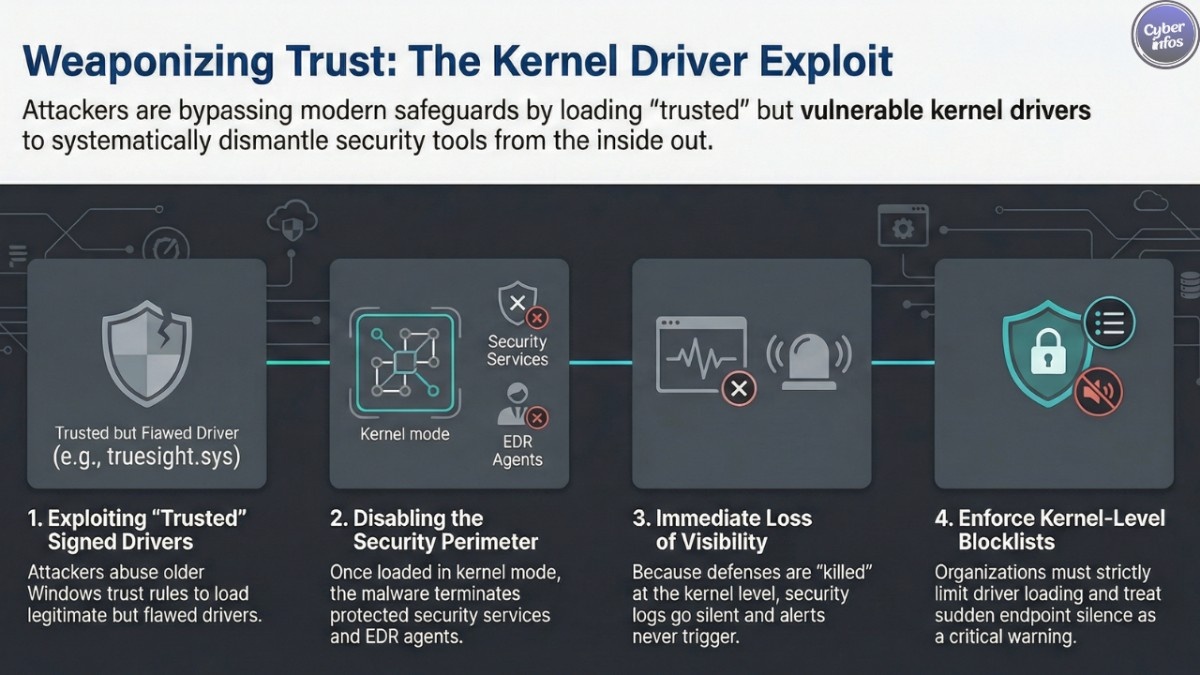
Here’s the thing: this activity didn’t appear overnight. Researchers first noticed attackers relying on weaponized signed drivers to bypass modern Windows safeguards by abusing older trust rules that still exist for compatibility reasons. This behavior quickly escalated as more actors realized how effective it was.
At the center of the campaign is the TrueSight driver exploit, which abuses a legitimate driver originally distributed with security software. Although the driver itself is validly signed, a truesight.sys security flaw allows attackers to interact with it in ways it was never meant to support.
Once this method became public, new samples began appearing almost weekly. That pace alone signaled that the technique wasn’t experimental it was operational.
Kernel Driver Ransomware Attack and the Shift in Threat Tactics
This kernel driver ransomware attack reflects a broader shift in attacker behavior. Instead of trying to sneak past endpoint tools, attackers are now turning them off entirely. By abusing a legacy driver signing exploit, they load trusted components that Windows allows by design.
The result is vulnerable Windows drivers abuse at scale. Because the drivers are signed, many traditional security checks don’t raise alarms. From the attacker’s point of view, it’s clean, reliable, and fast.
Who Is Being Targeted
The victims aren’t limited to one industry or region. Manufacturing firms, healthcare providers, IT services companies, and educational institutions have all appeared in telemetry tied to this campaign. Both small organizations and large enterprises are affected, largely because the attack doesn’t depend on which security product is installed.
If an environment relies heavily on endpoint tools without strict kernel-level controls, it’s a viable target. That’s why this campaign is spreading so quickly across different regions and networks.
What Happens After Defenses Go Dark
Once the EDR killer malware is executed, the situation changes immediately. Security agents stop reporting. Alerts don’t trigger. Logs go silent. In other words, defenders lose visibility right when they need it most.
This is where ransomware disables endpoint protection becomes more than a phrase—it becomes reality. Attackers can deploy ransomware, install remote access trojans, or quietly move laterally without resistance. In many cases, organizations only realize something is wrong after files are encrypted or data has already left the network.
Technical Breakdown: Why This Works
From a technical perspective, the attackers are playing the long game. The vulnerable driver exposes a control interface that accepts attacker-supplied input. By abusing this, malware can terminate almost any process on the system, including protected security services.
Because everything happens in kernel mode, user-mode protections never get a chance to respond. This is a textbook example of ransomware evasion techniques evolving beyond simple obfuscation or packing.
The approach also scales well. One driver flaw can be reused across thousands of campaigns, especially when paired with automated loaders and modular malware.
Infection Chain Explained, Step by Step
Most infections start in very ordinary ways. A phishing email. A fake installer. A link shared in a messaging channel. Nothing that immediately looks sophisticated.
After that initial click, the chain unfolds quickly:
- A small loader runs and pulls down additional components.
- Persistence is established so the malware survives reboots.
- The TrueSight driver exploit is deployed if the driver isn’t already present.
- The EDR killer malware executes and disables security processes.
- Final payloads, including ransomware or remote access tools, are launched.
From start to finish, the entire sequence can complete in under half an hour.
Current Status and Defensive Challenges
The campaign is ongoing. Despite improvements to Windows driver blocklists, attackers continue to find ways around them using signed but vulnerable components. This is why weaponized signed drivers remain such a persistent problem.
Defenders are now being pushed toward deeper monitoring looking not just at files, but at behavior, driver loading events, and sudden loss of endpoint telemetry. Without that visibility, these attacks blend into normal system activity far too easily.
What Organizations Should Do Now
There’s no single fix, but there are practical steps that help:
- Enforce vulnerable driver blocklists consistently
- Limit who and what can load kernel drivers
- Treat sudden endpoint silence as a serious warning sign
- Strengthen phishing detection and user awareness
Ignoring kernel-level risks is no longer an option in a world shaped by kernel driver ransomware attack campaigns.
Expert Perspective and Broader Implications
Security professionals are increasingly concerned about the long-term implications. As long as legacy trust mechanisms remain, attackers will continue to exploit them. This isn’t just about one driver it’s about how much implicit trust still exists in modern operating systems.
FAQ
1. Is this attack limited to one group?
No. Multiple financially motivated and advanced actors are using similar methods.
2. Does patching alone stop it?
Patching helps, but it doesn’t fully prevent vulnerable Windows drivers abuse without additional controls.
3. Is this technique going away soon?
Unlikely. As long as legacy driver signing exploit paths exist, attackers will keep using them.
Final Thoughts
This campaign shows just how effective modern ransomware evasion techniques have become. By turning trusted components into weapons, attackers are staying ahead of many traditional defenses. The lesson is clear: endpoint security can no longer stop at user mode.
Cyber Infos will continue monitoring this threat closely and will publish updates as new indicators, mitigations, and developments emerge.
