

Modern business collaboration means moving files across corporate perimeters without exposing intellectual property, regulated customer records, or financial data to interception. Traditional cloud drives often keep decryption keys on vendor servers.
That creates a single point of failure under subpoena, insider threat, or supply chain compromise. Finding the best secure file sharing platforms takes more than comparing storage capacity. You have to examine zero-knowledge client-side encryption, granular permission controls, data sovereignty, and tamper-evident auditing.
Security architects and IT leaders face a familiar dilemma. Strict cryptographic boundaries protect the data, but friction pushes employees toward unsanctioned shadow IT. A good solution balances defense-grade protection with workflows that external clients and cross-functional teams will actually use.
This guide offers an evidence-based evaluation of the leading solutions available today. We look at how each platform handles zero-knowledge file sharing, cryptographic key custody, regulatory compliance, and total operational cost.
Whether your organization needs defense-grade compliance, self-hosted data sovereignty, or frictionless client portals, this comparative ranking shows which software best fits your security posture.
Quick Picks: Best Secure File Sharing Platforms by Use Case
Short on time? These are the best secure file sharing platforms matched to the use case where each one performs strongest.
- Best Overall for Encrypted Enterprise Collaboration: Tresorit (Editorial Score: 9.2/10). Unmatched combination of audited zero-knowledge architecture, enterprise policy enforcement, and dynamic digital rights management.
- Best for Enterprise Governance & Ecosystem Scale: Box with Box Shield (Editorial Score: 9.1/10). Premier compliance catalog, automated data loss prevention, and over 1,500 enterprise integrations.
- Best for Defense, Government & Regulated MFT: Kiteworks (Editorial Score: 9.1/10). Hardened Private Content Network meeting FedRAMP Moderate and CMMC 2.0 Level 2 standards.
- Best for Zero-Knowledge Privacy & Open-Source Security: Proton Drive (Editorial Score: 8.8/10). Swiss privacy jurisdiction, open-source audited code, and seamless integrated document editing.
- Best for Hybrid Cloud Deployments & Ransomware Resilience: Egnyte (Editorial Score: 8.9/10). Unified on-premises and cloud governance with signature behavioral AI threat detection.
- Best Value for Certified Zero-Knowledge Teams: Sync.com (Editorial Score: 8.7/10). Default client-side encryption with Canadian PIPEDA and HIPAA compliance at budget-friendly pricing.
- Best for Client Portals & Professional Services: ShareFile (Editorial Score: 8.6/10). Streamlined external document collection, native e-signatures, and FINRA/accounting workflow specialization.
- Best for Self-Hosted Sovereign Data Control: Nextcloud Hub (Editorial Score: 8.8/10). 100% open-source on-premises infrastructure that eliminates third-party cloud trust.
Quick Comparison Table
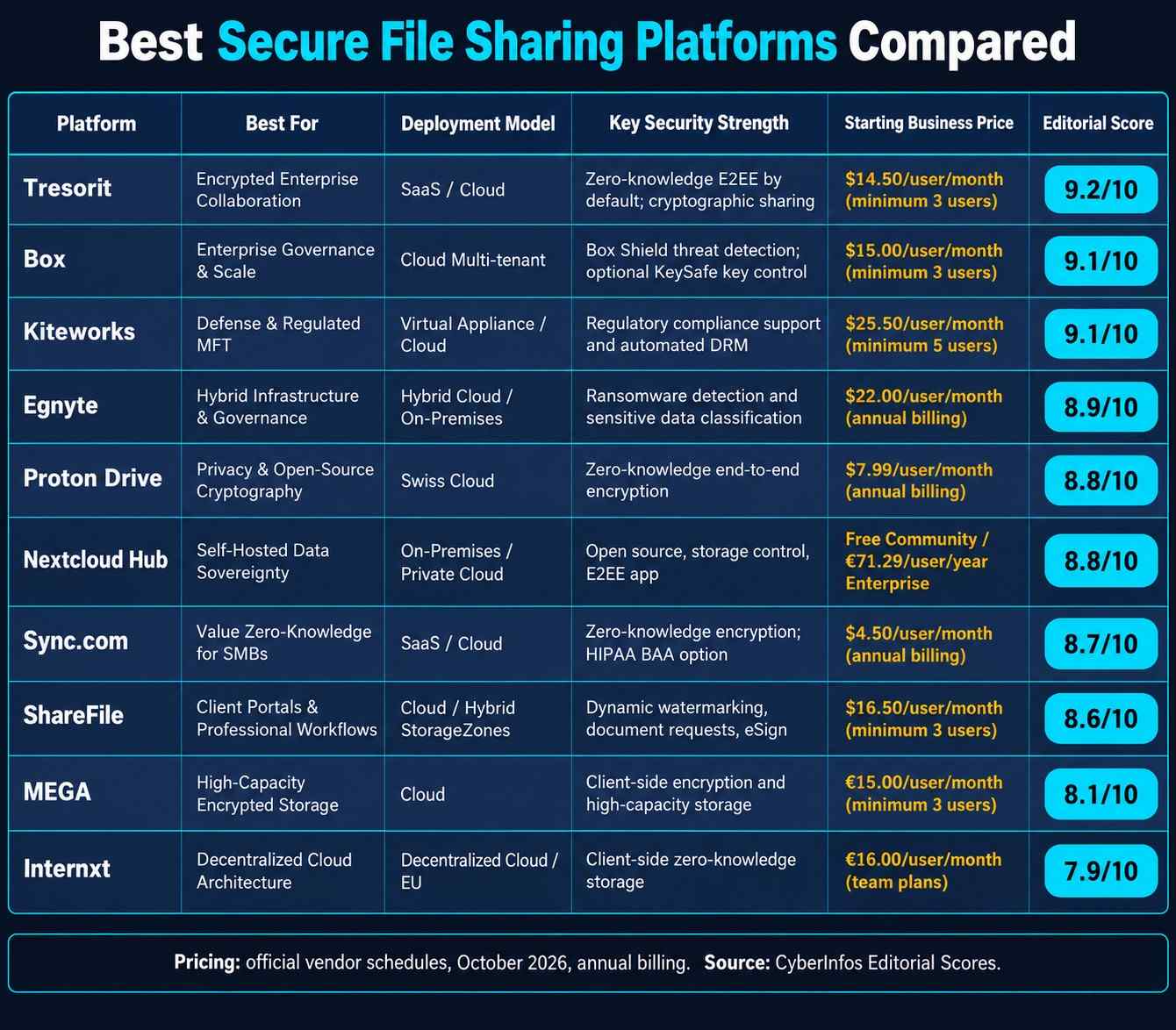
This table lines up the best secure file sharing platforms on deployment model, security strength, price, and editorial score.
| Platform | Best For | Deployment Model | Key Security Strength | Starting Business Price | Editorial Score |
|---|---|---|---|---|---|
| Tresorit | Encrypted Enterprise Collaboration | SaaS / Cloud | Zero-knowledge E2EE by default; cryptographic sharing | $14.50/user/month (minimum 3 users) | 9.2/10 |
| Box | Enterprise Governance & Scale | Cloud Multi-tenant | Box Shield threat detection; optional KeySafe key control | $15.00/user/month (minimum 3 users) | 9.1/10 |
| Kiteworks | Defense & Regulated MFT | Virtual Appliance / Cloud | Regulatory compliance support and automated DRM | $25.50/user/month (minimum 5 users) | 9.1/10 |
| Egnyte | Hybrid Infrastructure & Governance | Hybrid Cloud / On-Premises | Ransomware detection and sensitive data classification | $22.00/user/month (annual billing) | 8.9/10 |
| Proton Drive | Privacy & Open-Source Cryptography | Swiss Cloud | Zero-knowledge end-to-end encryption | $7.99/user/month (annual billing) | 8.8/10 |
| Nextcloud Hub | Self-Hosted Data Sovereignty | On-Premises / Private Cloud | Open source, storage control, E2EE app | Free Community / €71.29/user/year Enterprise | 8.8/10 |
| Sync.com | Value Zero-Knowledge for SMBs | SaaS / Cloud | Zero-knowledge encryption; HIPAA BAA option | $4.50/user/month (annual billing) | 8.7/10 |
| ShareFile | Client Portals & Professional Workflows | Cloud / Hybrid StorageZones | Dynamic watermarking, document requests, eSign | $16.50/user/month (minimum 3 users) | 8.6/10 |
| MEGA | High-Capacity Encrypted Storage | Cloud | Client-side encryption and high-capacity storage | €15.00/user/month (minimum 3 users) | 8.1/10 |
| Internxt | Decentralized Cloud Architecture | Decentralized Cloud / EU | Client-side zero-knowledge storage | €16.00/user/month (team plans) | 7.9/10 |
Note: Pricing reflects official vendor schedules as of October 2026 on annual billing terms. CyberInfos Editorial Scores come from our transparent six-factor weighted evaluation framework.
How CyberInfos Evaluated the Products
Enterprise file sharing software needs its own methodology, one built around cryptographic integrity, administrative oversight, and regulatory defensibility. Instead of applying a generic productivity rubric, CyberInfos built a category-specific framework to rank the best secure file sharing platforms, weighted to reflect modern security priorities.
Evaluation Mode & Verification Scope
Evaluation Mode: Mode B, Research-Based Evaluation.
Research Date: Information verified as of October 2026.
Verification Sources: Official vendor technical architecture whitepapers, published compliance audit summaries (SOC 2, ISO 27001, FedRAMP Marketplace), independent cryptographic penetration reports (e.g., Securitum, Ernst & Young), current pricing portals, and verified customer implementation histories.
Evaluation Limitations: CyberInfos did not run destructive cryptographic penetration tests or benchmark throughput in a physical lab. Scores reflect published technical specifications, verified cryptographic models, and enterprise feature completeness.
Scoring Criteria & Weighting Distribution
Each product was scored on a 10-point scale across six weighted criteria:
- Encryption Architecture & Cryptographic Custody (25% Weight): Whether the platform enforces client-side zero-knowledge encryption, where keys are generated and held, use of AES-256 or ChaCha20, post-quantum readiness, and whether metadata (file names, directory trees) is encrypted.
- Access Control & Sharing Governance (20% Weight): Granular role-based permissions, dynamic digital watermarking, link expiration, download prevention, password protection, view-only DRM, and instant revocation.
- Compliance & Regulatory Attestations (15% Weight): Verified third-party certifications, including HIPAA (with signed Business Associate Agreements), GDPR, SOC 2 Type II, ISO 27001, FedRAMP, CMMC, and FIPS 140-2 validation.
- Enterprise Administration & Ecosystem Integration (15% Weight): Single Sign-On (SAML 2.0 / Okta / Azure AD), SCIM automated provisioning, central policy enforcement, and integrations with standard productivity tools (Microsoft 365, Google Workspace, Slack).
- Threat Protection & Auditability (15% Weight): Immutable audit trails, SIEM streaming (Splunk, Microsoft Sentinel), automated data loss prevention (DLP), anomalous access alerts, and ransomware remediation.
- Price-to-Value & Operational Overhead (10% Weight): Total cost of ownership, minimum seat requirements, onboarding ease for external non-technical clients, and transparent licensing.
The Scoring Formula
Editorial Score=∑(Criterion Score×Weight)
Top 10 Best Secure File Sharing Platforms: In-Depth Reviews
#1. Tresorit: Best Overall for Encrypted Enterprise Collaboration
CyberInfos Editorial Score: 9.2 / 10
- Encryption & Cryptography: 9.8 / 10
- Access Governance: 9.4 / 10
- Regulatory Compliance: 9.2 / 10
- Enterprise Administration: 8.8 / 10
- Threat Protection & Auditing: 9.0 / 10
- Price-to-Value: 8.0 / 10
Quick Take
Tresorit leads our 2026 rankings because it delivers end-to-end zero-knowledge encryption without the administrative friction that usually cripples encrypted file sharing platforms.
Why It Stands Out
Most enterprise file sharing tools force administrators to pick between client-side encryption and collaborative usability. Tresorit largely removes that trade-off through a patented cryptographic key-sharing protocol. When users share files or folders (known as “Tresors”), encryption keys are exchanged with public-key cryptography directly between endpoints. Vendor servers see only scrambled ciphertext, so Tresorit engineers cannot decrypt customer contents, even under legal compulsion. Its desktop, mobile, and web clients also make zero-knowledge file sharing approachable for non-technical staff engaged in enterprise file sharing.
Key Features
- Client-Side Zero-Knowledge Architecture: Files and directory structures are encrypted locally before transmission using AES-256-GCM and HMAC-SHA-512 authentication.
- Dynamic Digital Watermarking: Recipient email addresses and timestamps are overlaid on viewed documents to deter unauthorized screen captures.
- Detailed Link Governance: Administrators can limit downloads, set expiration timers, mandate access passwords, and revoke access instantly.
- Tresorit eSign: An integrated zero-knowledge digital signature tool for secure document sharing and legally binding execution without decrypting files on vendor servers.
- Email Add-ons: Native Outlook and Gmail integrations automatically convert sensitive attachments into encrypted links.
Security & Privacy
Tresorit operates under Swiss and Austrian data privacy jurisdictions, and its cryptographic design has undergone independent audits by Ernst & Young. US-based multi-tenant cloud providers are subject to the CLOUD Act. Tresorit is not, which gives it high jurisdictional confidentiality for sensitive corporate legal records and IP.
Ease of Use & Administration
A clean, centralized dashboard supports SAML 2.0 SSO, Azure Active Directory synchronization, and granular policy templates, such as restricting file sharing to specific internal domains or enforcing 2FA.
Integrations & Compatibility
Tresorit runs on Windows, macOS, Linux, Android, and iOS. Plugins for Microsoft 365 and Google Workspace bring everyday email workflows into encrypted file sharing pipelines.
Pricing & Plans
- Basic: Free tier limited to 3 GB personal storage.
- Business Standard: $14.50 per user/month (billed annually, 3-user minimum), with 1 TB encrypted storage per seat and email plugins.
- Business Plus: $19.00 per user/month, adding custom branding and advanced admin policies.
- Enterprise: Custom quote, with dedicated customer success, SIEM integration, and customizable data residency across European and North American data centers.
Pros
- Uncompromising zero-knowledge encryption applied to both data and metadata.
- Outstanding Outlook and Gmail integrations that replace insecure email attachments.
- Sophisticated dynamic watermarking and digital rights management controls.
- Strong European privacy protections.
Cons
- Higher per-seat entry price for small teams ($43.50/month minimum entry on Business Standard).
- No real-time collaborative document co-authoring of the kind native to Microsoft 365 or Google Docs.
- File indexing and full-text search are restricted because of client-side encryption.
Best For
Mid-sized to large organizations, legal practices, financial consultancies, and research laboratories that handle sensitive intellectual property and need verified zero-knowledge file sharing.
Limitations
Teams that depend on simultaneous, multi-user live editing will feel the trade-off. Zero-knowledge architectures require local file locking during edits.
CyberInfos Verdict
Tresorit earns our top recommendation among the best secure file sharing platforms because it pairs rigorous zero-knowledge cryptography with enterprise-grade administration. It offers the most balanced, defensible security posture for secure document sharing and enterprise compliance in 2026.
#2. Box (with Box Shield): Best for Enterprise Governance & Ecosystem Scale
CyberInfos Editorial Score: 9.1 / 10
- Encryption & Cryptography: 8.4 / 10
- Access Governance: 9.8 / 10
- Regulatory Compliance: 9.8 / 10
- Enterprise Administration: 9.9 / 10
- Threat Protection & Auditing: 9.6 / 10
- Price-to-Value: 7.2 / 10
Quick Take
Box is a market benchmark for enterprise file sharing and cloud content management. It combines massive integration scale with machine learning threat detection through Box Shield.
Why It Stands Out
Box is not a default zero-knowledge platform, and it treats enterprise file sharing as a governance problem first. Its focus is centralized data governance, compliance certifications, and deep workflow integration. For multinational enterprises managing millions of documents across distributed teams, that means unmatched role-based access controls and automated data classification. Pair Box with Box Shield and Box KeySafe and organizations reach a high tier of security governance for secure document sharing, while keeping broad compatibility with enterprise ecosystems.
Key Features
- Box Shield Threat Detection: Machine learning monitors user behavior in real time, flagging anomalous downloads, compromised accounts, and potential ransomware execution.
- Seven Granular Access Levels: Role segregation (Co-owner, Editor, Viewer Uploader, Previewer Uploader, Viewer, Previewer, Uploader) helps prevent accidental over-permissioning.
- Box KeySafe: Lets enterprises keep exclusive control of their encryption keys, stored in dedicated Hardware Security Modules (AWS KMS or GCP Cloud KMS).
- Dynamic Watermarking & Vector Classification: Confidential documents are marked automatically, and policy tags are applied based on file content and sensitivity.
- Automated Retention & Governance: Box Governance automates legal holds, records management schedules, and defensible disposition.
Security & Privacy
Box holds an extensive compliance catalog: FedRAMP High, DoD IL4 authorization, HIPAA compliance with BAA, FINRA Rule 4511, SOC 1/2/3, ISO 27001, and GxP readiness. Data can be localized across regional zones through Box Zones.
Ease of Use & Administration
The end-user experience is intuitive on desktop and mobile. The administrative portal gives unmatched visibility into user activity, external sharing links, and real-time security alerts.
Integrations & Compatibility
Box offers over 1,500 turnkey integrations, including native bi-directional workflows with Microsoft Teams, Microsoft 365, Google Workspace, Salesforce, ServiceNow, and Slack.
Pricing & Plans
- Business: $15.00 per user/month (billed annually, 3-user minimum), with unlimited storage and 5 GB file upload limits.
- Business Plus: $25.00 per user/month, offering expanded external collaboration controls and 15 GB upload limits.
- Enterprise: $35.00 per user/month, adding Box Sign, full content tracking, and 50 GB file uploads.
- Enterprise Plus: $50.00 per user/month, bundling Box Shield, Box Governance, and 150 GB file uploads.
Pros
- Unsurpassed enterprise compliance catalog (FedRAMP High, DoD IL4, HIPAA, FINRA).
- Over 1,500 deep software integrations that power large enterprise IT stacks.
- Intelligent threat detection and automated classification in Box Shield.
- Robust role-based permission tiers that prevent accidental data leakage.
Cons
- The core platform uses vendor-managed encryption, not client-side zero-knowledge.
- Advanced security features (Box Shield, Box KeySafe) require premium enterprise licensing or add-ons.
- High total cost of ownership for organizations that want complete security capabilities.
Best For
Large enterprises, healthcare networks, financial institutions, and global corporations that need automated data governance, enterprise file sharing, and broad SaaS integrations.
Limitations
If your policy mandates strict zero-knowledge architecture, where vendor infrastructure has no cryptographic access to files, Box requires a complex KeySafe HSM design or third-party client encryption layers.
CyberInfos Verdict
Box ranks among the best secure file sharing platforms for organizations that put automated data governance, regulatory breadth, and ecosystem interoperability ahead of pure client-side zero-knowledge isolation.
#3. Kiteworks: Best for Defense, Government & Regulated MFT
CyberInfos Editorial Score: 9.1 / 10
- Encryption & Cryptography: 9.2 / 10
- Access Governance: 9.6 / 10
- Regulatory Compliance: 10.0 / 10
- Enterprise Administration: 8.5 / 10
- Threat Protection & Auditing: 9.8 / 10
- Price-to-Value: 6.5 / 10
Quick Take
Kiteworks consolidates secure file sharing, managed file transfer (MFT), SFTP, and email into a hardened Private Content Network built for strict defense and regulatory compliance.
Why It Stands Out
Kiteworks was re-architected from the ground up as a security-first virtual appliance platform. It does not present itself as a collaborative office suite. Instead, it acts as a fortified encrypted file sharing layer for sensitive third-party communications. It is designed for the cybersecurity standards of defense industrial base contractors, aerospace suppliers, and regulated organizations that need zero-knowledge file sharing and strict compliance.
Key Features
- Private Content Network Architecture: Unifies ad-hoc file sharing, automated MFT, web forms, and secure email under centralized zero-trust governance.
- Next-Gen Digital Rights Management (DRM): Enforces document protection even after download, with remote access revocation, watermarking, and print disabling.
- Centralized Content Firewall: Inspects ingress and egress data streams with integrated antivirus, DLP, and content disarm and reconstruction (CDR) engines.
- Automated CMMC & FedRAMP Compliance: Built-in policy templates map directly to NIST SP 800-171 controls and CMMC 2.0 Level 2 certification requirements.
- Hardened Virtual Appliance Deployment: Runs as a dedicated virtual machine (VMware, Hyper-V, AWS, Azure) for complete tenant isolation.
Security & Privacy
Kiteworks carries the most rigorous certification profile in this evaluation: FedRAMP Moderate Authorized, FIPS 140-2 Level 1 validation, CMMC 2.0 Level 2 compliance, SOC 2 Type II, and ITAR compliance support. Encryption keys can be managed through on-premises HSMs.
Ease of Use & Administration
The administrative console is built for compliance officers and CISOs. End-user interfaces emphasize secure document sharing rather than creative collaboration.
Integrations & Compatibility
Kiteworks connects directly to enterprise storage repositories (SharePoint, Windows File Shares, Documentum), leading SIEMs (Splunk, IBM QRadar), and identity providers.
Pricing & Plans
- Business Tier: From $25.50 per user/month (5 to 100 users, capped at 2 GB file sizes and 1 TB storage).
- Enterprise & Gov: Custom annual contracts based on deployment model (private cloud, hosted, or on-premises appliance), data volume, and security modules.
Pros
- Industry-leading regulatory accreditation (FedRAMP Moderate, CMMC 2.0 Level 2, FIPS 140-2).
- A hardened single-tenant virtual appliance prevents cross-tenant cloud risks.
- Persistent DRM protects files beyond the organizational perimeter.
- Immutable, consolidated audit logs across SFTP, email, and web transfers.
Cons
- Premium pricing with high minimum contract thresholds.
- Not designed for real-time collaborative document editing.
- Steeper administrative learning curve and deployment overhead.
Best For
Defense contractors, government agencies, aerospace manufacturers, and healthcare organizations under strict regulatory audits and CMMC standards that require encrypted file sharing.
Limitations
Kiteworks is not meant for general workplace collaboration. It is purpose-built as an encrypted file sharing and governance layer for high-risk external transfers.
CyberInfos Verdict
Kiteworks stands among the best secure file sharing platforms for high-risk defense workflows and regulated environments, where a compliance failure carries severe legal penalties.
#4. Egnyte: Best for Hybrid Cloud Deployments & Ransomware Resilience
CyberInfos Editorial Score: 8.9 / 10
- Encryption & Cryptography: 8.0 / 10
- Access Governance: 9.4 / 10
- Regulatory Compliance: 9.5 / 10
- Enterprise Administration: 9.2 / 10
- Threat Protection & Auditing: 9.6 / 10
- Price-to-Value: 7.5 / 10
Quick Take
Egnyte bridges on-premises storage arrays with cloud collaboration, pairing industry-leading AI-driven ransomware detection with enterprise file sharing governance.
Why It Stands Out
Many organizations run hybrid environments where massive design files, financial records, or engineering models sit on local network-attached storage (NAS) devices. Egnyte shines by uniting those on-premises servers with encrypted cloud repositories for unified encrypted file sharing. Its behavioral AI engine watches file access patterns to detect and halt active ransomware attacks within minutes.
Key Features
- Hybrid Storage Synchronization: Bi-directionally syncs local file servers with cloud storage, giving fast local network speeds and secure remote cloud access.
- AI-Powered Ransomware Defense: Detects signature anomalies, blocks compromised endpoints, and snapshots impacted directories for instant rollbacks.
- Granular Sensitive Content Discovery: Scans file contents across repositories for PII, PCI, HIPAA, and proprietary data to enforce automated protection policies.
- NTFS-Style Permission Architecture: Mirrored folder permission inheritance familiar to enterprise system administrators.
- Life Sciences & GxP Compliance: Specialized pre-validated environments for pharmaceutical clinical trials and FDA submissions.
Security & Privacy
Egnyte encrypts data with AES-256 at rest and TLS 1.3 in transit. It supports customer-managed encryption keys (CMEK) and maintains compliance with HIPAA, FINRA, GDPR, SOC 2 Type II, and FDA 21 CFR Part 11.
Ease of Use & Administration
Users get a mapped network drive experience through the Egnyte Desktop App, which minimizes retraining. Administrators get comprehensive dashboards for data classification and external link auditing.
Integrations & Compatibility
Egnyte integrates natively with Microsoft 365, Google Workspace, Procore, Salesforce, Autodesk, and major NAS vendors (NetApp, Synology, QNAP).
Pricing & Plans
- Business Plan: $22.00 per user/month (billed annually, supports up to 100 users, 1 TB shared storage plus 10 GB per user).
- Enterprise Lite & Enterprise Plans: Custom annual pricing with advanced AI governance, ransomware freeze, CMEK, and automated compliance workflows.
Pros
- Best-in-class hybrid cloud architecture bridging on-premises NAS with remote teams.
- Proactive behavioral AI detects and mitigates ransomware outbreaks.
- Exceptional specialized compliance support for Life Sciences and AEC industries.
- Familiar mapped drive interface for end users.
Cons
- Not a zero-knowledge platform by default; the vendor maintains access for support scanning.
- The entry business plan is billed annually, with no monthly payment flexibility.
- Advanced governance and ransomware recovery require upper-tier enterprise licensing.
Best For
Architecture, engineering, construction (AEC) firms, life sciences companies, and enterprises with distributed hybrid infrastructure that demand enterprise file sharing.
Limitations
Egnyte relies on automated content scanning for compliance indexing and malware detection. Because of that, it does not use client-side zero-knowledge encryption across standard cloud tiers.
CyberInfos Verdict
Egnyte is the standout recommendation for businesses that must reconcile legacy on-premises file servers with modern cloud collaboration. Formidable ransomware resilience backs its secure document sharing across hybrid teams.
#5. Proton Drive: Best for Zero-Knowledge Privacy & Open-Source Security
CyberInfos Editorial Score: 8.8 / 10
- Encryption & Cryptography: 9.9 / 10
- Access Governance: 8.4 / 10
- Regulatory Compliance: 8.8 / 10
- Enterprise Administration: 7.6 / 10
- Threat Protection & Auditing: 8.2 / 10
- Price-to-Value: 9.2 / 10
Quick Take
Developed by the CERN scientists behind Proton Mail, Proton Drive brings open-source, audited zero-knowledge file sharing to modern workplace collaboration and document editing.
Why It Stands Out
Proton Drive applies client-side zero-knowledge encryption to file contents and also to metadata, including file names, folder titles, file sizes, and upload timestamps. All cryptographic code is 100% open-source and publicly verifiable. With the expansion of Proton Docs and Proton Sheets, teams can now run encrypted file sharing and real-time document editing without giving up privacy.
Key Features
- Comprehensive Metadata Encryption: Protects folder hierarchies and file names against server-side leakage using authenticated OpenPGP cryptography.
- Proton Docs & Sheets: Built-in encrypted collaborative document and spreadsheet editors with real-time end-to-end encryption.
- Audited Open-Source Codebase: Desktop, mobile, and web applications undergo regular third-party security audits by Securitum.
- Password-Protected Public Links: Share files with external recipients using customizable passwords and automated expiration timers.
- Proton Drive CLI: A command-line interface for automated server backups and scriptable enterprise workflows.
Security & Privacy
Proton is headquartered in Geneva, Switzerland, and operates under the Swiss Federal Act on Data Protection (FADP). Its physical servers sit in secure underground Swiss facilities. Proton Drive complies with GDPR and offers signed HIPAA BAAs on business tiers.
Ease of Use & Administration
The modern, minimalist interface is easy for non-technical users. Administration covers basic multi-user management, domain allocation, and 2FA enforcement.
Integrations & Compatibility
Proton Drive is available on web, Windows, macOS, Android, and iOS, with tight integration across the broader Proton ecosystem (Mail, Calendar, Pass, and VPN).
Pricing & Plans
- Proton Free: 5 GB storage with full end-to-end encryption.
- Drive Professional: $7.99 per user/month (billed annually at $95.88/yr), with 1 TB storage per seat and the Proton Drive CLI.
- Workspace Standard: $9.99 per user/month, adding Proton Mail and custom domains.
- Workspace Premium: $19.99 per user/month, with 3 TB storage per seat and video meeting tools.
Pros
- Total zero-knowledge encryption covering both file data and metadata.
- Open-source, audited cryptographic foundation backed by strict Swiss privacy laws.
- Highly competitive entry price ($7.99/user/mo) for 1 TB of dedicated encrypted storage.
- Real-time collaborative document and spreadsheet editing with native E2EE.
Cons
- The administrative console lacks advanced enterprise IAM/SCIM provisioning.
- Fewer third-party enterprise integrations than Box or Microsoft 365.
- No enterprise-grade dynamic screen watermarking.
Best For
Privacy-conscious teams, journalists, legal professionals, and small-to-medium businesses that want verified zero-knowledge file sharing in a Swiss-hosted ecosystem.
Limitations
Large enterprises that need automated Active Directory integration or deep SIEM log streaming will find Proton Drive’s administrative features limited for now.
CyberInfos Verdict
Proton Drive is our top choice for teams that want verified open-source privacy and zero-knowledge protection at an attractive price, backed by robust Swiss legal protections. It earns its place among the best secure file sharing platforms.
#6. Nextcloud Hub: Best for Self-Hosted Sovereign Data Control
CyberInfos Editorial Score: 8.8 / 10
- Encryption & Cryptography: 9.5 / 10
- Access Governance: 8.6 / 10
- Regulatory Compliance: 9.0 / 10
- Enterprise Administration: 8.5 / 10
- Threat Protection & Auditing: 8.4 / 10
- Price-to-Value: 8.6 / 10
Quick Take
Nextcloud Hub is the leading open-source content collaboration platform. It gives organizations total physical sovereignty over enterprise file sharing and data storage.
Why It Stands Out
Some institutions cannot legally or philosophically store sensitive data on third-party US cloud servers. For them, Nextcloud Hub offers complete digital autonomy. Organizations deploy it on their own on-premises bare-metal servers or private cloud instances. It couples server-side encryption with an optional native End-to-End Encryption (E2EE) module that secures sensitive folders on client devices using AES-256-GCM. The cryptographic keys never touch the host server, which enables true zero-knowledge file sharing on self-hosted nodes.
Key Features
- Total Infrastructure Autonomy: Removes vendor lock-in and multi-tenant cloud exposure by deploying directly to organization-owned servers.
- Native Client-Side E2EE App: End-to-end encrypted folder sharing where cryptographic keys never touch the Nextcloud host server.
- File Access Control Rules: An automated policy engine that restricts sharing by user group, file type, geographical IP range, or system tags.
- Comprehensive Collaboration Suite: Bundles Nextcloud Files, Talk (encrypted chat/video), Groupware (calendar/mail), and integrated OnlyOffice / Collabora suites.
- Extensive App Ecosystem: Over 500 community and enterprise apps cover anti-virus scanning (ClamAV), ransomware protection, and two-factor authentication.
Security & Privacy
Nextcloud provides 100% data sovereignty. Because files live on customer infrastructure, compliance with GDPR, HIPAA, and regional sovereignty mandates depends entirely on internal operational policies.
Ease of Use & Administration
Web, desktop, and mobile synchronization are seamless. Administrative complexity is higher than on SaaS platforms, and it requires in-house Linux system administration and database management expertise.
Integrations & Compatibility
Nextcloud natively supports LDAP/Active Directory, SAML 2.0 SSO, Kerberos, and WebDAV protocols.
Pricing & Plans
- Nextcloud Community Edition: Free, open-source under AGPLv3 (self-managed, unlimited users).
- Nextcloud Enterprise Standard: €71.29 per user/year (approximately $6.40/user/month, minimum 100 users), including enterprise bug fixes, SLA support, and migration tools.
- Nextcloud Enterprise Premium: €104.99 per user/year, adding 24/7 mission-critical support.
- Managed Hosting: Available through certified hosting partners (e.g., MassiveGRID, Contabo) starting at $6 to $15 per user/month.
Pros
- Absolute data sovereignty with zero reliance on external cloud providers.
- Fully open-source codebase with strong global community security audits.
- No software licensing costs for self-hosted community installations.
- Rich application ecosystem that extends functionality to chat, video, and office suites.
Cons
- Requires in-house infrastructure, server hardening, and backup maintenance.
- The native E2EE module is folder-based and disables web-based collaborative editing for those folders.
- Enterprise commercial support requires a 100-user minimum commitment.
Best For
Government bodies, research universities, financial institutions, and European enterprises that need strict on-premises data isolation and open-source transparency in enterprise file sharing.
Limitations
Self-hosting shifts every operational security responsibility to internal IT staff. That includes patching, SSL certificate renewal, intrusion detection, and disaster recovery.
CyberInfos Verdict
Nextcloud Hub is the premier choice for organizations that want sovereign encrypted file sharing and absolute ownership of their physical infrastructure.
#7. Sync.com: Best Value for Certified Zero-Knowledge Teams
CyberInfos Editorial Score: 8.7 / 10
- Encryption & Cryptography: 9.6 / 10
- Access Governance: 8.5 / 10
- Regulatory Compliance: 8.9 / 10
- Enterprise Administration: 7.2 / 10
- Threat Protection & Auditing: 8.0 / 10
- Price-to-Value: 9.5 / 10
Quick Take
Sync.com delivers default client-side zero-knowledge encryption on every plan, at some of the most accessible pricing in the industry for zero-knowledge file sharing.
Why It Stands Out
Competitors often reserve client-side encryption for specialized enterprise add-ons. Sync.com enforces zero-knowledge architecture from the base consumer tier up to enterprise packages. Headquartered in Canada, it supports Canadian PIPEDA, European GDPR, and US HIPAA requirements without burdening administrators with complex configuration.
Key Features
- Default Zero-Knowledge Architecture: Files are encrypted with 2048-bit RSA and AES-256 before leaving the user device; Sync staff cannot view or recover files.
- Granular Share Link Controls: Enforce custom passwords, set expiration dates, limit download counts, and disable downloads for preview-only access.
- Sync Vault Storage: A cloud-only archive folder for secure document sharing and offsite storage that does not consume local hard drive space.
- 365-Day Version History: Long-term versioning and rollback protection that insulates organizations from ransomware lockouts.
- Client File Portals: Centralized client file request links let external parties upload sensitive documents directly into encrypted folders.
Security & Privacy
Sync.com runs on SOC 2 Type II certified infrastructure located in Canada and offers signed HIPAA Business Associate Agreements on all business plans.
Ease of Use & Administration
Sync works as a synchronized folder on Windows and macOS. The administrative web console offers straightforward user provisioning, folder management, and remote device wiping.
Integrations & Compatibility
Sync provides native desktop and mobile apps. Microsoft Office web integration allows encrypted file previews, though third-party API ecosystem support is limited.
Pricing & Plans
- Free Starter: 5 GB zero-knowledge storage.
- Teams Standard: $4.50 to $5.00 per user/month (billed annually, minimum 2 users), with 1 TB encrypted storage per user.
- Teams+ Unlimited: $15.00 per user/month, offering expanded storage and advanced administrator role controls.
- Enterprise: Custom quote, adding dedicated account management and custom contracts.
Pros
- Zero-knowledge encryption active by default across all tiers.
- Exceptional price-to-performance ratio for small to mid-sized teams.
- Signed HIPAA Business Associate Agreements included on standard business plans.
- Up to 365 days of version rollback protection against ransomware.
Cons
- Slower upload and synchronization speeds because of client-side encryption overhead.
- No public API or broad third-party enterprise app marketplace.
- No real-time simultaneous collaborative co-authoring.
Best For
Healthcare clinics, accounting practices, small legal firms, and budget-conscious businesses that need certified HIPAA-compliant zero-knowledge file sharing without enterprise licensing costs.
Limitations
Organizations that need programmatic API access to trigger automated file transfers, or to embed file sharing into custom SaaS applications, will hit limits with Sync.com.
CyberInfos Verdict
Sync.com offers the best financial value in this guide. It provides rock-solid zero-knowledge file sharing and HIPAA-compliant secure document sharing at half the price of legacy enterprise competitors.
CyberInfos Editorial Score: 8.6 / 10
- Encryption & Cryptography: 8.2 / 10
- Access Governance: 9.2 / 10
- Regulatory Compliance: 9.3 / 10
- Enterprise Administration: 8.8 / 10
- Threat Protection & Auditing: 8.4 / 10
- Price-to-Value: 7.4 / 10
Quick Take
ShareFile (formerly Citrix ShareFile, now part of Cloud Software Group) specializes in secure document sharing, automated client document requests, and integrated e-signatures.
Why It Stands Out
ShareFile is engineered for external client engagement in accounting, legal, financial advising, and consulting firms. Rather than forcing clients to wrestle with encrypted sync software, it provides polished, custom-branded web portals. Clients can securely upload tax returns, sign contracts, and review financial audits with minimal friction.
Key Features
- Custom-Branded Client Portals: Build portals with company logos, custom domains, and secure communication channels.
- Automated Document Request Lists: Send clients structured checklists of required files (e.g., tax forms, bank statements) with automated tracking and reminders.
- Built-in Legally Binding e-Signatures: Route agreements for digital signature without exporting documents to a separate signature tool.
- Customer-Managed StorageZones: Keep encryption keys and physical storage on-premises while using ShareFile cloud orchestration.
- Dynamic Watermarking & View-Only Restrictions: Restrict downloads and overlay viewer identity onto documents to prevent leakage.
Security & Privacy
ShareFile is SOC 2 Type II, ISO 27001, and HIPAA compliant, with signed BAAs. It adheres to FINRA cybersecurity guidelines for financial broker-dealers.
Ease of Use & Administration
External client usability is highly rated. Non-technical clients need no software installation to upload files securely. Administrators can enforce strict permissions and track client access logs.
Integrations & Compatibility
ShareFile integrates deeply with Microsoft Outlook, QuickBooks, Xero, Salesforce, and specialized legal and accounting practice management suites.
Pricing & Plans
- Advanced: $16.50 per user/month (billed annually, 3-user minimum), with unlimited client users, 1 TB storage, and e-signatures.
- Premium: $26.00 per user/month, adding custom branding and automated document request workflows.
- Enterprise / VDR: Custom pricing (VDR packages start at $385/month for due diligence rooms).
Pros
- Effortless document collection workflows for external clients.
- Unlimited free client accounts eliminate licensing costs for external collaborators.
- Integrated legally binding electronic signatures.
- Dedicated compliance alignment for FINRA, accounting, and legal practices.
Cons
- Standard cloud storage uses vendor-managed encryption, not client-side zero-knowledge.
- Higher per-seat entry pricing ($49.50/month minimum commitment).
- Complex administrative tiering across merged Citrix/Cloud Software Group portals.
Best For
Accounting firms, certified public accountants (CPAs), legal practitioners, wealth managers, and consultancies that run recurring client secure document sharing.
Limitations
If your primary need is internal engineering collaboration or decentralized zero-knowledge storage, ShareFile’s client-centric workflow design may feel unnecessarily specialized.
CyberInfos Verdict
ShareFile remains the premier platform for professional service firms that want to replace insecure email attachments with an elegant, compliant platform for secure document sharing and external client collaboration.
#9. MEGA: Best for High-Capacity Client-Side Encrypted Storage
CyberInfos Editorial Score: 8.1 / 10
- Encryption & Cryptography: 9.4 / 10
- Access Governance: 7.6 / 10
- Regulatory Compliance: 7.8 / 10
- Enterprise Administration: 7.2 / 10
- Threat Protection & Auditing: 7.5 / 10
- Price-to-Value: 9.0 / 10
Quick Take
MEGA pairs generous storage quotas with user-controlled end-to-end encryption. That makes it a viable option for media-heavy teams that want affordable encrypted file sharing at scale.
Why It Stands Out
Originating in New Zealand, MEGA pioneered browser-based zero-knowledge file sharing and client-side encryption. Every file is encrypted on the user’s device with keys derived from the user’s master password. MEGA is known for generous storage allocations, offering high terabyte capacities at prices well below traditional enterprise content management systems.
Key Features
- User-Controlled End-to-End Encryption: Cryptographic keys are generated locally in the browser or app using AES-128 and AES-256 encryption.
- Encrypted Link Sharing with Separate Keys: Send file links with decryption keys embedded, or transmit the keys separately over an out-of-band channel.
- MEGA CMD & Developer API: Powerful command-line tooling for headless backups and automated directory synchronization.
- Integrated Encrypted Chat & Video: End-to-end encrypted messaging and meetings inside the storage interface.
- Massive Storage Quotas: Multi-terabyte individual and team storage pools suited to video production and large datasets.
Security & Privacy
MEGA operates under New Zealand privacy legislation and adheres to GDPR for European data subjects. Source code for client applications is publicly available on GitHub for community review.
Ease of Use & Administration
The web and desktop interfaces are clean and functional. The business administration console offers basic user seat allocation and storage quota distribution.
Integrations & Compatibility
MEGA is available on Windows, macOS, Linux, iOS, Android, and as browser extensions. Integration with third-party enterprise identity providers is limited.
Pricing & Plans
- Free Tier: 20 GB free storage with full client-side encryption.
- Pro I (2 TB Storage): About €9.99 per month.
- Pro III (16 TB Storage): About €29.99 per month.
- Business Plan: From €15.00 per user/month (minimum 3 users), with 3 TB+ storage per user and administrative controls.
Pros
- Substantial storage allocations per dollar invested.
- Verified client-side zero-knowledge encryption architecture.
- Full Linux support and robust command-line tooling for automated backups.
- Generous 20 GB permanent free storage tier.
Cons
- No enterprise compliance certifications such as HIPAA BAA, FedRAMP, or SOC 2 Type II.
- Administrative controls and audit logging are basic compared to Box or Egnyte.
- Historical management controversies call for a careful vendor risk assessment.
Best For
Creative agencies, video editors, independent developers, and freelancers who need multi-terabyte encrypted file sharing on a sensible budget.
Limitations
Enterprises under strict HIPAA, FINRA, or CMMC regulatory audits will find MEGA unviable. It lacks formal compliance attestations and signed BAAs.
CyberInfos Verdict
MEGA is an attractive, high-capacity zero-knowledge platform for media-heavy and technical teams. It does not offer the regulatory rigor that enterprise compliance officers require.
#10. Internxt: Best for Decentralized Web3 Zero-Knowledge Architecture
CyberInfos Editorial Score: 7.9 / 10
- Encryption & Cryptography: 9.2 / 10
- Access Governance: 7.0 / 10
- Regulatory Compliance: 8.2 / 10
- Enterprise Administration: 6.8 / 10
- Threat Protection & Auditing: 7.2 / 10
- Price-to-Value: 8.8 / 10
Quick Take
Internxt takes an innovative approach to cloud storage. It combines client-side zero-knowledge file sharing with decentralized file fragmentation across European data centers.
Why It Stands Out
Centralized cloud repositories store whole files on single server clusters. Internxt does not. It shards files into encrypted fragments before distributing them across its network, so no single node or server holds an intact file and a server breach exposes little customer data. The platform is fully open source and independently audited by the European security firm Securitum.
Key Features
- Decentralized File Sharding: Files are encrypted locally with AES-256, sliced into fragments, and distributed across distinct servers.
- 100% Open-Source Codebase: All client-side code and cryptographic implementations are published on GitHub for public review.
- Independent Securitum Audit: Cryptographic architecture and API implementations verified by Europe’s premier penetration testing lab.
- Post-Quantum Cryptography Research: Active architectural development focused on resistance to future decryption risks.
- Internxt CLI & Send: Lightweight standalone utilities for encrypted ad-hoc file transfers and automated system backups.
Security & Privacy
Internxt is headquartered in Valencia, Spain, and strictly governed by EU GDPR regulations. All servers reside within the EU.
Ease of Use & Administration
The interface is minimalist and user-friendly across web, desktop, and mobile. Administration covers basic team user management and storage pooling.
Integrations & Compatibility
Internxt runs on Windows, macOS, Linux, Android, and iOS. It lacks deep enterprise directory or third-party CRM/ERP integrations.
Pricing & Plans
- Free Plan: 1 GB free storage, expandable through referral tasks.
- Individual Plans: From €1.99/month for 200 GB up to €9.99/month for 1 TB.
- Business Plans: From approximately €16.00 per user/month, offering team storage allocation and centralized billing.
- Lifetime Deals: Available from €285 for 1 TB, one-time purchase.
Pros
- Innovative decentralized sharding that guards against centralized server breaches.
- European data residency and strict GDPR compliance.
- 100% open-source software independently audited by Securitum.
- Attractive lifetime licensing options for long-term cost containment.
Cons
- Limited administrative policy controls and no enterprise SSO/SCIM.
- No real-time collaborative document editing.
- Smaller ecosystem and shorter track record than legacy vendors.
Best For
Privacy advocates, European SMBs, and technology teams that want a decentralized cloud architecture free from big-tech infrastructure for zero-knowledge file sharing.
Limitations
Internxt currently focuses on secure core storage and file transfer. Organizations that need enterprise DLP, SIEM integration, or fine-grained role permissions should look to Tresorit or Box.
CyberInfos Verdict
Internxt offers an intriguing, forward-looking decentralized model for privacy-focused teams. Its enterprise administrative depth is still a work in progress compared with mature enterprise file sharing suites.
Comprehensive Buying Guide: How to Choose a Secure File Sharing Platform
Choosing an enterprise file sharing platform means weighing mathematical data privacy against collaborative workplace utility. Use this decision framework to match platform capabilities to your operational risk model.
1. Zero-Knowledge vs. Server-Side Encryption
The biggest architectural split among the best secure file sharing platforms is who owns the cryptographic keys.
Zero-Knowledge (Client-Side) Encryption: Platforms like Tresorit, Proton Drive, and Sync.com encrypt files on your local device before transmission, which is what makes true encrypted file sharing possible. The provider never holds your encryption keys. That protects data during cloud provider breaches, insider attacks, and foreign government subpoenas. The operational cost is the loss of server-side full-text search and web-based multi-user co-authoring.
Server-Side Encryption with Customer-Managed Keys (CMEK/HSM): Platforms like Box and Egnyte encrypt data in transit and at rest with enterprise-managed keys (via AWS KMS, Azure Key Vault, or physical HSMs). Vendor systems can decrypt files in memory to run DLP scanning, virus analysis, and live collaborative editing. The flip side is exposure to sophisticated supply-chain attacks if the vendor environment is breached.
2. Digital Rights Management (DRM) and Link Governance
Preventing data leakage takes controls that reach beyond the first download:
- Dynamic Watermarking: Overlays the viewer’s IP address, email, and timestamp across shared documents, discouraging photographic leaks during secure document sharing.
- Persistent DRM: Platforms like Kiteworks enforce protection even after a recipient downloads a file. Opening the document requires network authentication, and access can be revoked remotely and instantly.
- Frictionless Expiration: Enforce mandatory expiration dates (e.g., 7 or 14 days) and download counters to eliminate orphaned public links across the internet.
3. Regulatory Attestation vs. Marketing Claims
Do not rely on vendor copy that claims to be “HIPAA compliant” or “enterprise secure.” Ask for verified proof:
- HIPAA: Requires a signed Business Associate Agreement (BAA). Confirm the BAA covers all storage tiers and is not limited to custom enterprise contracts.
- Defense & CMMC: Defense contractors handling Controlled Unclassified Information (CUI) must choose platforms aligned with NIST SP 800-171 and CMMC 2.0 Level 2 (such as Kiteworks).
- SOC 2 Type II: Verify that the vendor completes annual Type II audits that evaluate operational controls over an extended observation window.
4. Client Onboarding and Shadow IT Risks
Security controls that burden external partners often backfire. If a client must install software, create an account, or work through complex key exchanges just to download an invoice, they will ask your employees to use unencrypted personal email or consumer messaging apps. ShareFile and Tresorit reduce that risk with zero-installation web portals and password protection for secure document sharing.
5 Common Buying Mistakes to Avoid
The same missteps keep showing up when teams shortlist the best secure file sharing platforms.
- Assuming Traditional Cloud Storage Is Private by Default: Mainstream storage platforms encrypt data at rest, but vendor engineers retain the cryptographic keys. Unless client-side zero-knowledge encryption or CMEK is explicitly deployed, the provider can read your files and they remain subject to government data requests.
- Buying for Storage Volume Rather than Security Governance: Choosing a platform for “unlimited gigabytes” often means missing essential governance features such as dynamic watermarking, audit trails, and automated DLP classification.
- Overlooking External Client Usability: Mandating complex software installs for external partners leads to abandoned transfers and encourages shadow IT workarounds.
- Ignoring Total Cost of Ownership (TCO): Advertised base prices can mislead. Critical enterprise capabilities, such as SSO, SIEM streaming, ransomware recovery, and HIPAA BAAs, are frequently locked behind expensive top-tier plans.
- Failing to Audit Data Residency and Sovereignty: Storing sensitive intellectual property in jurisdictions subject to extraterritorial surveillance laws (e.g., the US CLOUD Act) can violate regional data privacy mandates like GDPR or Swiss FADP.
Alternatives: When to Choose Different Solutions
Even the best secure file sharing platforms suit some buyers better than others. These pairings show when to pick a different option.
- Choose Box over Tresorit if: Your organization relies heavily on real-time multi-user document collaboration in Microsoft 365 or Google Docs, and needs deep integrations with Salesforce and ServiceNow for enterprise file sharing.
- Choose Proton Drive over Sync.com if: You want an open-source, Swiss-hosted platform with integrated zero-knowledge email, calendars, and live document editing.
- Choose Kiteworks over Box if: You are a defense contractor or government entity that requires hardened CMMC 2.0 Level 2 certification, FIPS 140-2 validation, and managed file transfer (MFT) automation.
- Choose Nextcloud Hub over SaaS Platforms if: Your legal or compliance policy mandates that data physically reside on servers inside your own corporate data center for sovereign encrypted file sharing.
- Choose ShareFile over Egnyte if: Your core business is gathering sensitive documents, tax forms, and signed agreements from external clients through a custom-branded portal.
Frequently Asked Questions (FAQ)
What is the difference between encrypted file sharing and zero-knowledge file sharing?
Standard encrypted file sharing protects files in transit (with TLS) and at rest (with AES-256), but the cloud provider manages the cryptographic keys and can decrypt files on its servers. Zero-knowledge file sharing means encryption keys are generated only on the user’s local device. The provider holds nothing but ciphertext and has no technical ability to decrypt, inspect, or share your files.
Which secure file sharing platform is best for HIPAA compliance?
Tresorit, Box, Kiteworks, Egnyte, and Sync.com all provide signed HIPAA Business Associate Agreements (BAAs). For small medical practices and consultancies, Sync.com offers the most cost-effective path to HIPAA compliance. For large hospital networks and pharmaceutical enterprises that need complex audit trails, Box and Egnyte provide broader administrative infrastructure.
Can zero-knowledge platforms allow real-time collaborative document editing?
Historically, no. Zero-knowledge architecture prevented live co-authoring because servers could not parse file contents to synchronize simultaneous edits. Recent cryptographic advances have changed that for some vendors. Proton Drive, through Proton Docs and Sheets, now delivers live, multi-user encrypted collaborative editing without decrypting documents on server infrastructure.
Does end-to-end encryption prevent ransomware?
No. End-to-end encryption secures data against unauthorized access and interception, but it does not stop an infected endpoint from encrypting local files and syncing those encrypted versions to the cloud. Egnyte mitigates this risk with AI behavioral detection that identifies ransomware encryption patterns, while Sync.com and Tresorit provide long-term version history rollbacks to restore uninfected files.
Final Recommendation: Selecting the Right Platform
Choosing among the best secure file sharing platforms comes down to your threat model, organizational scale, and compliance obligations.
- For Enterprise Teams Requiring Zero-Knowledge Privacy: Tresorit offers the most polished combination of patented endpoint cryptography, dynamic watermarking, and administrative governance for encrypted file sharing.
- For Large Enterprises Prioritizing Ecosystem Integrations: Box paired with Box Shield remains the enterprise benchmark for automated content classification and massive third-party application support.
- For Defense Contractors & Government Suppliers: Kiteworks provides the rigorous FedRAMP Moderate and CMMC 2.0 Level 2 compliance framework required for Controlled Unclassified Information.
- For Absolute Infrastructure Sovereignty: Nextcloud Hub gives organizations 100% control over physical data residency, with open-source transparency.
- For SMBs and Regulated Practices on a Budget: Sync.com delivers certified zero-knowledge encryption and HIPAA compliance at an unbeatable price-to-performance ratio.
