

LummaStealer malware is back and this time, it’s using something most of us see every day: CAPTCHA verification pages.
After a major law enforcement disruption in 2025 slowed operations, the operators behind LummaStealer malware have regrouped with smarter, more deceptive tactics. Instead of relying on traditional exploit kits or obvious malicious downloads, they’re now leaning heavily on social engineering convincing users to infect themselves.
Researchers at Bitdefender recently uncovered a surge in campaigns built around fake CAPTCHA pages. These prompts look harmless, even routine. But instead of verifying you’re human, they trick you into running malicious commands on your own computer.
And once that happens, LummaStealer malware goes to work silently stealing passwords, session cookies, cryptocurrency wallet data, and authentication tokens that can unlock your most sensitive accounts.
Incident Overview: A Smarter, More Manipulative Campaign
LummaStealer malware hasn’t just returned it has evolved.
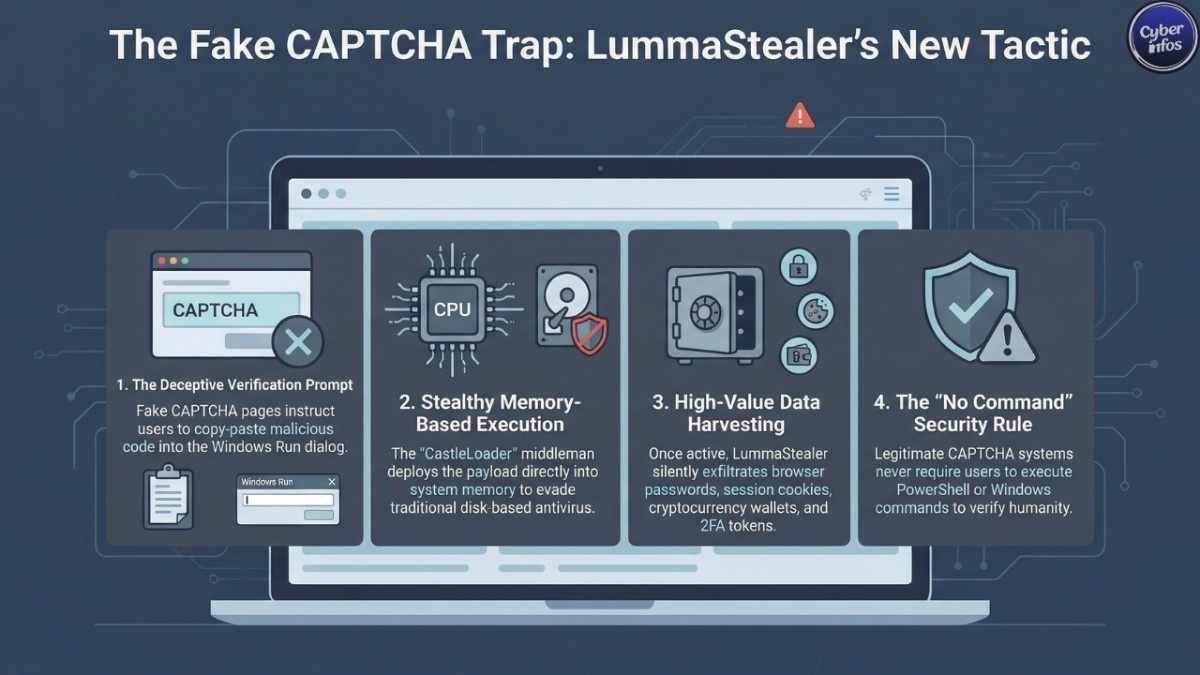
According to Bitdefender’s analysis, the threat actors have shifted from automated exploit kits to what researchers describe as “ClickFix” tactics. The idea is simple but highly effective: present a fake CAPTCHA page that instructs users to copy and paste a command into the Windows Run dialog or PowerShell. It feels like a harmless verification step. In reality, it launches the infection chain.
At the center of this campaign is a loader known as CastleLoader. Rather than immediately dropping LummaStealer malware onto a system, CastleLoader acts as a stealthy middleman. It prepares the environment, evades detection, and then delivers the final payload directly into memory.
This new infrastructure is more resilient and much harder to detect. By avoiding immediate file creation on disk, attackers reduce their digital footprint, making forensic investigations and remediation far more complicated.
For businesses, that means infections can linger longer before being discovered.
How the LummaStealer Malware Attack Works
Here’s how a typical infection unfolds:
- You land on a compromised or malicious website.
- A CAPTCHA challenge appears.
- You’re told to copy and paste a command to “verify.”
- CastleLoader executes.
- LummaStealer malware deploys in memory.
It’s the digital equivalent of being handed a key and unknowingly unlocking the door yourself.
The Technical Layer
CastleLoader is commonly delivered as a compiled AutoIt script AutoIt being a legitimate automation tool that attackers abuse to disguise malicious code.
Once executed, it:
- Obfuscates code using random variable names
- Inserts “dead code” to confuse security scanners
- Checks for sandbox environments
- Looks for virtualization tools like VMware or VirtualBox
- Terminates if it detects analysis environments
- Generates a failed DNS lookup artifact defenders can monitor
- Establishes persistence via startup shortcuts
Only after confirming it’s running on a real victim’s machine does it deploy LummaStealer malware.
From there, the malware harvests:
- Saved browser passwords
- Session cookies
- Cryptocurrency wallet information
- Two-factor authentication tokens
- Autofill and payment data
That information is then sold or weaponized for account takeovers, financial fraud, and identity theft worldwide.
Who Is at Risk?
LummaStealer malware primarily targets Windows users, but risk varies by behavior and environment.
Higher-risk groups include:
- Individuals downloading pirated or cracked software
- Cryptocurrency investors
- Small and mid-sized businesses without EDR tools
- Remote workers using personal devices for work
Small businesses face disproportionate impact. One compromised employee machine can expose cloud accounts, email systems, financial platforms, and customer data.
Because this campaign relies on social engineering rather than software vulnerabilities, even fully patched systems can be infected if a user follows the fake CAPTCHA instructions.
How to Protect Yourself from LummaStealer Malware
Immediate Actions (Do This Today)
- Never execute commands from a CAPTCHA page. Real CAPTCHA systems never require copy-paste commands.
- Close suspicious browser tabs immediately if prompted to open PowerShell or Run dialogs.
- Run a full system scan with updated security software.
- Change critical passwords if you suspect you executed a malicious command.
Short-Term Protections (This Week)
- Enable multi-factor authentication (MFA) on all important accounts.
- Update Windows, browsers, and security tools to the latest versions.
- Review startup programs for unfamiliar entries.
- Deploy endpoint detection and response (EDR) tools in business environments.
Long-Term Defensive Strategy
- Train employees to recognize fake CAPTCHA and social engineering techniques.
- Use a password manager instead of storing credentials in browsers.
- Restrict PowerShell execution policies where possible.
- Monitor DNS logs for unusual failed lookups tied to known indicators.
For additional guidance, see our guide to phishing prevention and our analysis of modern infostealer malware trends.
Expert Perspective
Bitdefender researchers note that CastleLoader’s anti-analysis capabilities signal growing sophistication in LummaStealer malware operations. The combination of social engineering and memory-based execution makes this campaign particularly dangerous.
Traditional signature-based antivirus tools may not catch every variant. Behavioral detection and layered defenses are increasingly essential.
The 2025 disruption may have slowed LummaStealer malware temporarily, but this resurgence proves how quickly threat actors adapt.
Additional Safety Tips
- Avoid pirated software it remains a primary malware distribution channel.
- Keep regular offline backups of critical files.
- Monitor financial and cryptocurrency accounts for unusual activity.
- Consider browser security extensions that block malicious scripts.
FAQ: LummaStealer Malware
What is LummaStealer malware?
LummaStealer malware is an information-stealing threat targeting Windows systems. It collects passwords, session cookies, cryptocurrency data, and authentication tokens to enable fraud and account takeover attacks.
How do fake CAPTCHA attacks spread LummaStealer malware?
Attackers create fake verification pages that instruct users to manually execute malicious commands. This bypasses traditional exploit methods and relies on user interaction.
How can I tell if I’m infected?
You may notice unusual login alerts, unauthorized financial activity, new startup entries, or disabled security tools. However, many infections operate silently run a security scan to confirm.
Is Windows Defender enough to stop LummaStealer malware?
Built-in protections help, but advanced memory-based attacks may evade basic detection. A layered security approach provides stronger protection.
What should I do if I ran the fake CAPTCHA command?
Disconnect from the internet immediately, run a full scan, change passwords from a clean device, enable MFA, and monitor sensitive accounts closely.
Final Thoughts
LummaStealer malware’s resurgence is a reminder that cybercriminals don’t need complex exploits when simple deception works.
By disguising malicious commands as CAPTCHA verification steps and using stealthy loaders like CastleLoader, attackers have created a campaign that blends manipulation with technical sophistication. The most powerful defense isn’t fear it’s awareness.
If a CAPTCHA ever asks you to run a command, stop. Close the page. Walk away. Staying informed and practicing basic cyber hygiene can dramatically reduce your risk even as threats continue to evolve.
Stay ahead of emerging threats: Join our WhatsApp Channel for real-time security alerts.
Follow us on LinkedIn for daily cybersecurity insights and breaking news.
