


Workflow automation tools are designed to save time, reduce manual effort, and quietly power business operations behind the scenes. But when these tools break, the damage can be far from quiet.
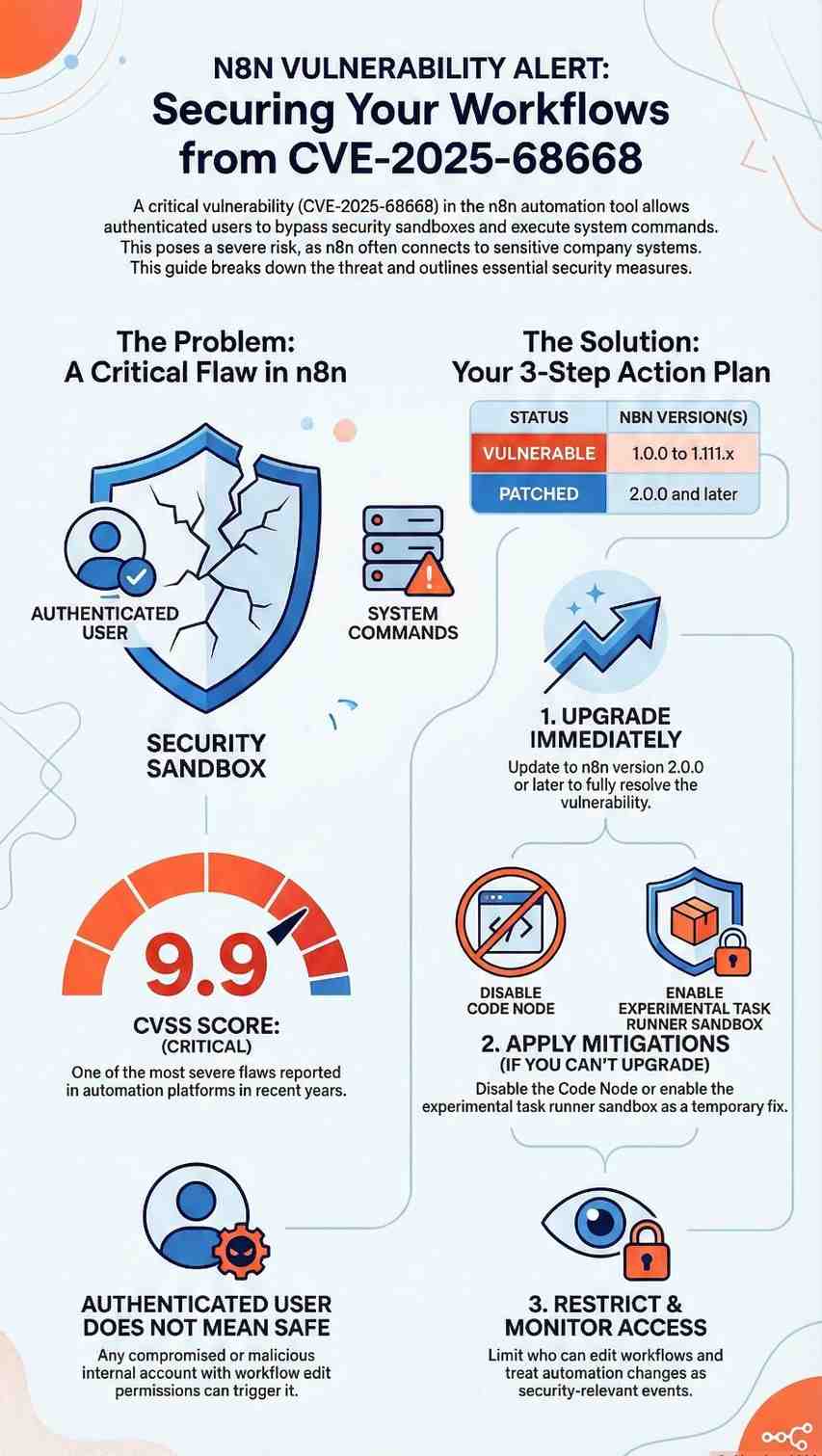
That’s exactly the concern surrounding CVE-2025-68668, a newly disclosed critical n8n vulnerability that allows authenticated users to execute arbitrary system commands on the host server. With a CVSS score of 9.9, this flaw is among the most severe issues reported in automation platforms in recent years.
What makes CVE-2025-68668 especially dangerous isn’t just its technical severity, it’s where n8n sits in modern organizations. From startups automating marketing workflows to enterprises integrating cloud services, n8n often has access to sensitive systems.
This article breaks down the vulnerability in simple terms, explains why it matters, and outlines what organizations especially small and mid-sized teams should do next.
What Is CVE-2025-68668?
CVE-2025-68668 is a sandbox bypass vulnerability in n8n’s Python Code Node, a feature that allows users to run Python logic as part of automated workflows.
The core issue
- The Python Code Node relies on Pyodide, a sandboxed Python execution environment.
- Due to a protection mechanism failure (CWE-693), this sandbox can be escaped.
- Once bypassed, an attacker can execute operating system commands directly on the server hosting n8n.
In plain language:
A user who is supposed to run “safe” workflow code can instead run system-level commands, breaking out of the intended security boundaries.
Who Is Affected by This n8n Vulnerability?
The scope of CVE-2025-68668 is wide:
- Affected versions: n8n 1.0.0 to 1.111.x
- Fixed version: n8n 2.0.0
- Access required: Authenticated user with permission to create or edit workflows
- Attack vector: Remote (network-based)
- User interaction: None beyond normal workflow execution
This means:
- You do not need admin access to exploit it.
- Any compromised or malicious internal account could trigger it.
- Internet-facing n8n instances are at higher risk, but internal deployments are not safe by default.
Why CVE-2025-68668 Is More Dangerous Than It Looks
1. Automation platforms are high-trust systems
n8n often connects to:
- Databases
- Cloud storage
- Internal APIs
- Email systems
- CI/CD pipelines
A successful exploit doesn’t just affect n8n—it can expose everything n8n touches.
2. “Authenticated” does not mean “safe”
Many organizations assume internal users are trustworthy. In reality:
- Credentials get stolen
- Insider threats exist
- Shared accounts are common in small teams
CVE-2025-68668 turns low-privilege access into high-impact compromise.
3. A troubling pattern
This disclosure follows another critical flaw, CVE-2025-68613, also enabling code execution in n8n. Together, these issues highlight a broader risk in workflow execution and sandbox design, not just a one-off bug.
Technical Breakdown (Simplified)
How the attack works
- Attacker logs in with workflow edit permissions
- Creates or modifies a workflow using the Python Code Node
- Crafts Python code that escapes the Pyodide sandbox
- Executes system commands as the n8n process user
Why sandbox bypasses matter
Sandboxes are meant to isolate code. When they fail:
- The boundary between “application” and “server” disappears
- Attackers can read files, access secrets, or install malware
- Lateral movement becomes possible
This is why CVE-2025-68668 earned a 9.9 CVSS score.
What n8n Has Done to Fix the Issue
n8n addressed the vulnerability by changing how Python code is executed:
Key fix in n8n 2.0.0
- Introduced a task runner-based native Python execution model
- Improved isolation between workflows and the host system
- Made the safer execution model default
Earlier versions (from 1.111.0) included this as an optional feature, but many users never enabled it—leaving thousands of deployments exposed.
Practical Security Tips for n8n Users
If you are running n8n today, here’s what you should do now.
1. Upgrade immediately
Best solution: Upgrade to n8n 2.0.0 or later
This fully resolves CVE-2025-68668
2. Apply mitigations if upgrade isn’t possible
Until you can upgrade:
- Disable the Code Node entirely using NODES_EXCLUDE
- Disable Python support with N8N_PYTHON_ENABLED=false
- Enable the task runner sandbox:
N8N_RUNNERS_ENABLED=true
N8N_NATIVE_PYTHON_RUNNER=true
3. Restrict workflow permissions
- Limit who can create or modify workflows
- Avoid shared user accounts
- Apply least-privilege access principles
4. Monitor workflow activity
- Watch for unexpected workflow changes
- Log command execution behavior
- Treat automation changes as security-relevant events
What This Means for Small Businesses
Small teams often rely heavily on automation—but lack dedicated security staff. That makes vulnerabilities like CVE-2025-68668 especially risky.
Key takeaway:
Convenience without visibility is a liability.
If your business uses n8n:
- Know where it’s deployed
- Know who can edit workflows
- Treat it like production infrastructure—not just a tool
Final Thoughts
CVE-2025-68668 is more than just another critical CVE. It’s a reminder that automation platforms are attack surfaces, not neutral helpers.
When workflow tools gain the ability to run code, connect systems, and move data automatically, security must be treated as a core requirement—not an afterthought.
Action steps:
- Audit your n8n deployments
- Patch or mitigate immediately
- Reassess trust boundaries in automation workflows
Stay informed. Stay patched. And never assume “internal” means “secure.”
Frequently Asked Questions (FAQ)
1. What is CVE-2025-68668 in simple terms?
It’s a critical n8n vulnerability that allows certain users to run system commands on the server instead of just workflow code.
2. Is this vulnerability exploited in the wild?
There are no confirmed public exploits yet, but the low complexity makes it highly attractive for attackers.
3. Do I need admin access to exploit it?
No. Workflow creation or modification permission is enough.
4. Which n8n version is safe?
n8n 2.0.0 and above fully address CVE-2025-68668.
5. Should I stop using n8n?
No—but you should upgrade, restrict access, and monitor usage to reduce risk.
