

The LinkedIn RAT malware campaign uncovered in January 2026 is a clear sign that phishing has outgrown email. Cybersecurity researchers revealed that attackers are now using LinkedIn private messages to distribute malware through DLL sideloading, quietly targeting professionals who rely on the platform for daily business communication.
Here’s the thing LinkedIn feels safe. Familiar. Routine. That assumption is exactly what makes this campaign effective. By exploiting trust rather than software flaws, attackers have found a low-friction path into corporate environments, one that many organizations still fail to monitor.
This article breaks down what’s happening, how the attack works, and what actually helps reduce risk.
Key Facts
- Date of discovery: January 2026
- Attack vector: LinkedIn direct messages combined with DLL sideloading
- Threat type: Remote Access Trojan (RAT)
- Affected sectors: Multiple industries with global exposure
- Discovery source: ReliaQuest cybersecurity research
- Current status: Active and ongoing
- Official guidance: Organizations urged to expand security monitoring beyond email
Short version?
This campaign isn’t theoretical. It’s live.
What We Know So Far about LinkedIn RAT Malware
Researchers identified the campaign after tracking suspicious LinkedIn outreach patterns that led to malware delivery rather than credential harvesting. Instead of sending links, attackers persuaded targets to download a WinRAR self-extracting archive disguised as legitimate business material.
That archive contained four components working together: a legitimate PDF reader application, a malicious DLL crafted for sideloading, a portable Python interpreter, and a decoy file meant to lower suspicion. On its own, none of this looks especially alarming. Combined, it’s effective.
Once the victim launches the PDF reader, Windows loads the malicious DLL automatically. No exploit prompt. No warning dialog. Just execution.
This technique has become increasingly popular because it blends in. Signed applications still carry implicit trust, and DLL sideloading takes advantage of that relationship in a way many security tools struggle to flag in real time.
Who Is Affected
ReliaQuest describes the operation as broad and opportunistic, and that assessment tracks. The campaign doesn’t focus on a single industry or geography. Instead, it targets professionals whose access could lead somewhere useful.
Think IT staff. Consultants. Engineers. Finance professionals. Anyone with internal access and a habit of downloading shared files.
Here’s the frustrating part: LinkedIn messages rarely pass through the same inspection layers as email. That lack of visibility makes it difficult to measure scope, delays detection, and increases dwell time once a system is compromised.
How the LinkedIn RAT Malware Works
The attack chain is straightforward, which is part of the problem.
First, attackers initiate contact through LinkedIn direct messages, posing as recruiters, partners, or industry peers. The goal isn’t speed it’s credibility.
Next, once rapport is established, the victim receives a WinRAR self-extracting archive framed as work-related content. Nothing flashy. Nothing urgent.
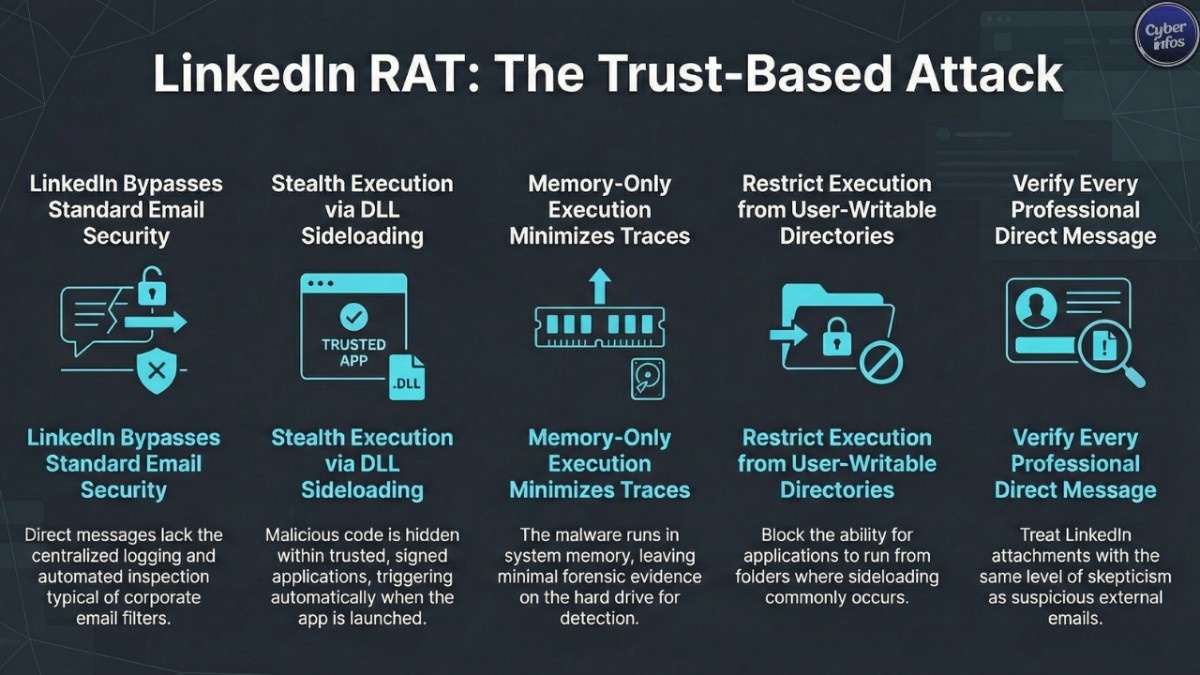
Then comes the critical moment. When the bundled PDF reader is launched, Windows loads the malicious DLL from the same directory. This DLL deploys a portable Python interpreter, creates a Registry Run key for persistence, and executes Base64-encoded shellcode directly in memory.
That last part matters. Memory-only execution leaves minimal forensic evidence on disk, making detection harder and response slower.
The final stage establishes command-and-control communication, giving attackers persistent remote access. From there, privilege escalation and lateral movement become options rather than obstacles.
What Experts Are Saying
Security analysts continue to point out the same uncomfortable truth: social media platforms are a blind spot.
Unlike email, LinkedIn private messages typically lack centralized logging, automated inspection, or alerting. Attackers know this. They’re acting on it.
Industry leaders warn that social engineering is no longer about tricking users with obvious red flags. It’s about embedding malicious activity into trusted workflows places where skepticism drops and routine takes over. That shift isn’t temporary. It’s strategic.
Immediate Actions to Take
You don’t need a complete security overhaul to reduce risk. Start with practical steps.
- Extend security awareness training to cover social media phishing, not just email
- Encourage verification of unexpected LinkedIn messages through secondary channels
- Restrict execution from user-writable directories where sideloading commonly occurs
- Deploy endpoint monitoring capable of detecting unusual DLL loading behavior
- Enable multi-factor authentication on all professional social media accounts
- Review application control policies and tighten where feasible
None of these steps are exotic. Together, they significantly raise the cost of attack.
What Happens Next
This campaign remains active, and there’s little reason to expect it will disappear quickly. As awareness grows, attackers will adapt messaging, not abandon the technique.
What’s more likely is expansion. Other professional platforms. Other delivery formats. Same underlying logic.
The cybersecurity industry has already seen this pattern before. When one channel becomes noisy, attackers quietly move to another.
Related Context: LinkedIn’s History as an Attack Vector
This isn’t LinkedIn’s first appearance in threat intelligence reporting. Over the past several years, sophisticated threat actors including North Korean-linked groups have repeatedly abused the platform for malware delivery and credential theft.
Campaigns such as CryptoCore and Contagious Interview relied on fake recruiter personas to distribute malicious tooling under the guise of job assessments or interviews. The current activity follows the same playbook, updated with more evasive execution methods.
Professional networking platforms are no longer peripheral risk. They’re established attack surfaces.
Frequently Asked Questions
What is DLL sideloading and why is it effective?
DLL sideloading exploits the way legitimate applications load libraries. Security tools trust the signed application, allowing malicious code to execute without immediate detection.
Can email security tools stop LinkedIn-based attacks?
No. Email defenses do not inspect social media private messages.
What should I do if I already downloaded a suspicious file?
Disconnect from the network immediately and contact your security team. Assume compromise until confirmed otherwise.
Are other platforms vulnerable to similar attacks?
Yes. Any business-used platform without proper monitoring can be abused using similar techniques.
Final Takeaway
Here’s the bottom line. The LinkedIn RAT malware campaign isn’t about exploiting software—it’s about exploiting trust. Attackers are meeting professionals where they already work, already network, already feel comfortable. Treat LinkedIn messages like email attachments. Verify first. Execute later.
That mindset shift alone stops more attacks than most tools ever will.
