


GitLab has fixed CVE-2026-97229, a critical flaw in the regular expression compiler that handles its CI/CD configuration. GitLab rates it CVSS 10.0, the highest possible score, and says that under certain conditions it could let an unauthenticated attacker run arbitrary code on the server. Patched releases arrived on October 12, 2026. If you run GitLab yourself, those updates should go in now.
This guide covers the bug, the affected and fixed versions, how to check your own instance, and a short emergency checklist. It also keeps confirmed facts apart from open questions, because the exploitation picture is still developing.
Quick Answer
CVE-2026-97229 affects self-managed GitLab CE and EE from 19.2 before 19.2.8, from 19.3 before 19.3.5, and from 19.4 before 19.4.2. Upgrade to 19.2.8, 19.3.5 or 19.4.2 immediately, starting with internet-facing servers. GitLab.com is already patched, and GitLab Dedicated customers need no action. Rapid7 reports no confirmed in-the-wild exploitation as of October 13.
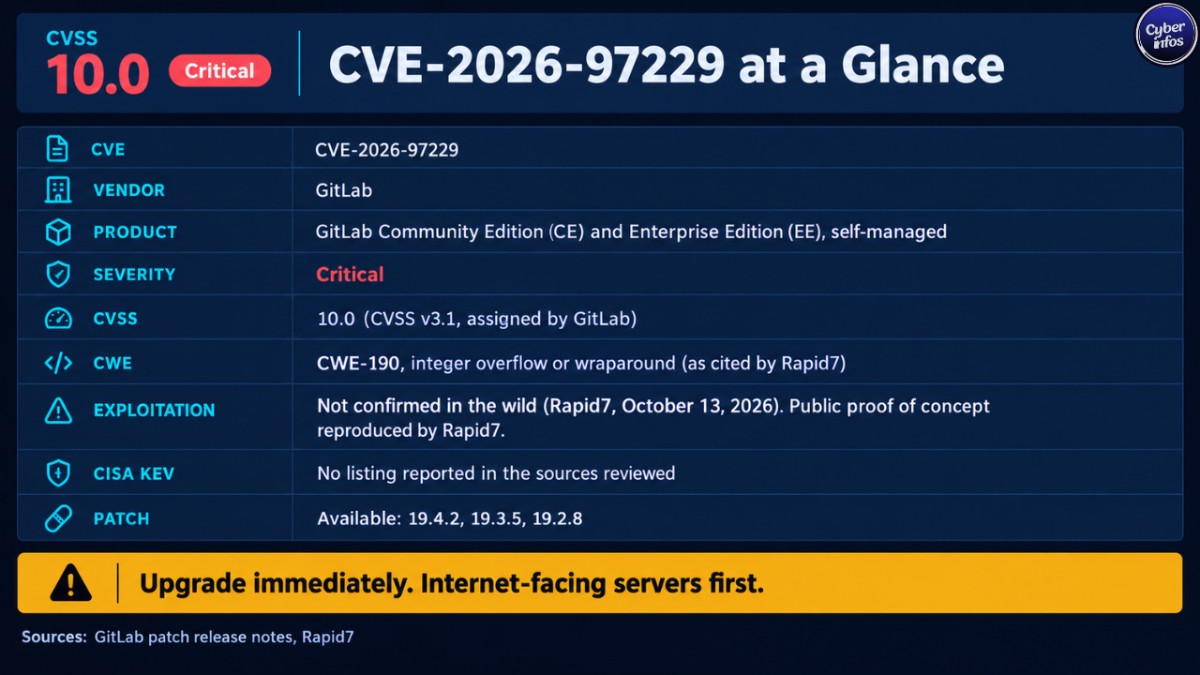
Vulnerability Facts
| Field | Information |
|---|---|
| CVE | CVE-2026-97229 |
| Product | GitLab Community Edition (CE) and Enterprise Edition (EE), self-managed |
| Vendor | GitLab |
| Severity | Critical |
| CVSS | 10.0 (CVSS v3.1), assigned by GitLab |
| CWE | CWE-190, integer overflow or wraparound (as cited by Rapid7) |
| Exploited in the wild | Not confirmed (Rapid7, October 13, 2026) |
| CISA KEV | No listing reported in the sources reviewed |
| Proof of concept | Reproduced by Rapid7, which linked a public repository on October 13 |
| Patch | Available: 19.4.2, 19.3.5, 19.2.8 |
| Reported by | joaxcar, through GitLab’s HackerOne bug bounty program |
What Is the Flaw?
GitLab’s patch release notes describe an integer overflow in the CI/CD Regular Expression Compiler. GitLab says a specially crafted regular expression in a CI/CD configuration could let an unauthenticated user execute arbitrary code on the GitLab server, because the expression is not validated sufficiently.
An integer overflow happens when a calculation produces a number too large for the space set aside for it. The value wraps around to something unexpected.
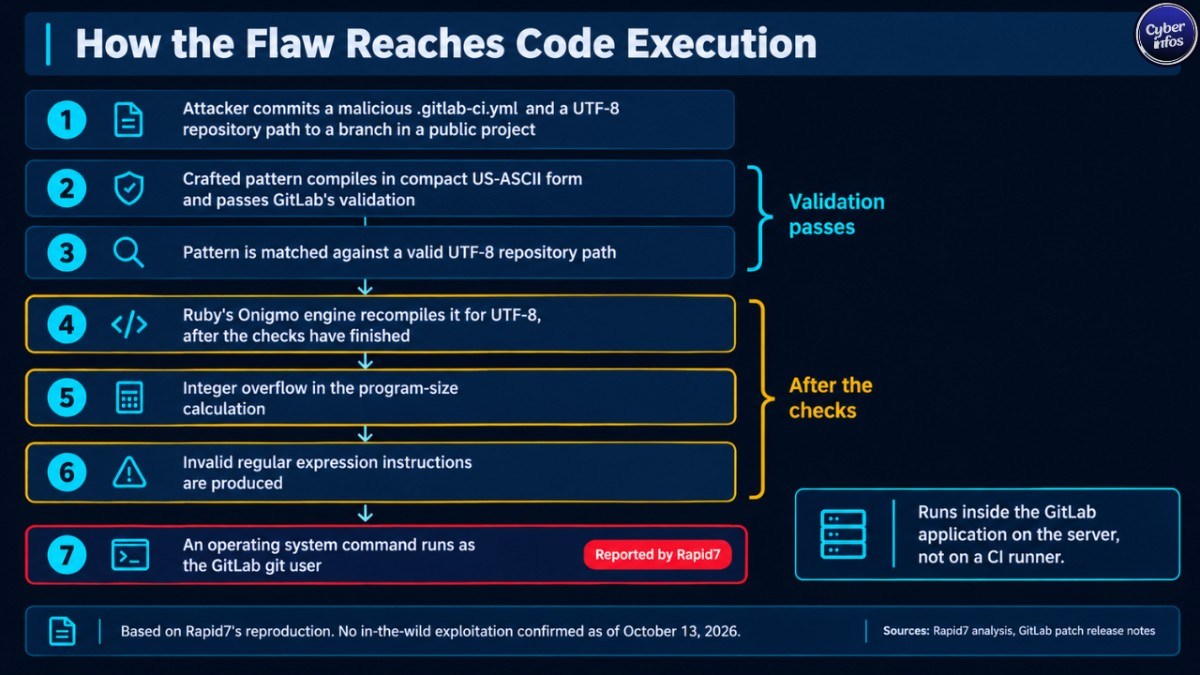
Rapid7’s analysis shows how that plays out here. A crafted pattern first compiles in a compact US-ASCII form and passes GitLab’s validation. Later, when it is matched against a valid UTF-8 repository path, Ruby’s Onigmo regular expression engine recompiles it for the new encoding, after the checks have finished. An overflow in the program-size calculation then produces invalid instructions. Rapid7 reports that this allowed an operating system command to run as the GitLab git user.
Two points matter for defenders. The code runs inside the GitLab application on the server, not on a CI runner. And although the vendor scores this GitLab CI/CD RCE as needing no privileges, a working attack still needs a way to place a malicious pipeline file in a repository.
How Unauthenticated Is the Attack in Practice?
GitLab’s CVSS vector lists no privileges and no user interaction required: CVSS:3.1/AV:N/AC:L/PR:N/UI:N/S:C/C:H/I:H/A:H. Rapid7 adds a practical caveat from reproducing the exploit. An attacker must first commit a malicious .gitlab-ci.yml file, plus a repository path containing UTF-8 characters, to a branch in a public project. On a self-managed instance that lets new users register and create public projects, an ordinary account is enough.
Why this matters: CyberInfos assesses that instances with open sign-up are the most urgent, because the barrier to entry is a free account. Restricted registration is not a guarantee of safety, though. Rapid7 says only that an attacker needs some mechanism to plant the configuration, and any other route to write access on a public project could serve the same purpose.
Affected and Fixed GitLab Versions
| Branch | Affected versions | Fixed version |
|---|---|---|
| 19.4 | All versions before 19.4.2 | 19.4.2 |
| 19.3 | All versions before 19.3.5 | 19.3.5 |
| 19.2 | All versions before 19.2.8 | 19.2.8 |
Three details are easy to miss:
- GitLab lists impacted versions starting at 19.2. Earlier branches are not listed as affected by this CVE.
- Some outlets name 19.3.4 as the fixed release, but GitLab’s notes and the CVE record say 19.3.5. GitLab says 19.3.4 had a merge request page bug when the Ona integration was enabled, so use 19.3.5.
- GitLab states that all deployment types are affected, including Omnibus, source and Helm chart installations.
For GitLab Community Edition security, note that CE is affected on the same terms as EE. CE users upgrade to the same version numbers.
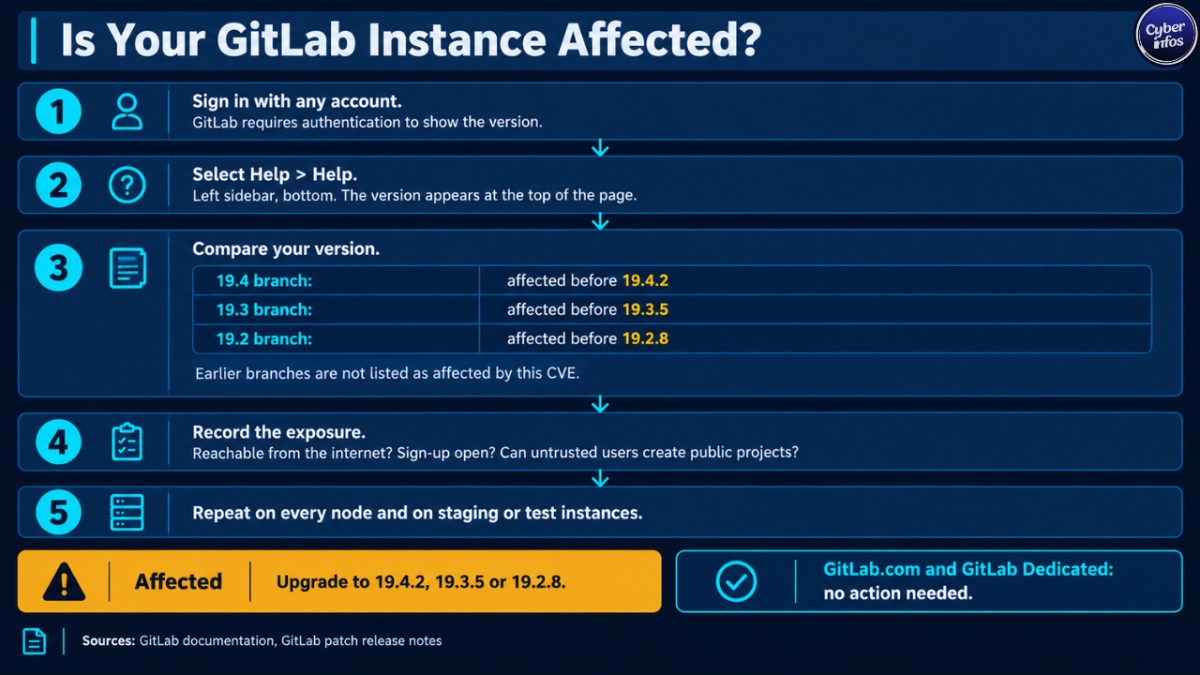
How to Check Whether Your Instance Is Vulnerable
- Sign in with any account. GitLab’s documentation says you must be authenticated to see the version.
- In the left sidebar, at the bottom, select Help > Help. The version appears at the top of the page.
- Compare it with the table above. Any version from 19.2 up to the fixed releases needs action.
- Record the exposure. Is the server reachable from the internet? Is sign-up open? Can untrusted users create public projects?
- Repeat the check on every node of a multi-node deployment, and on any staging or test instance that may have been forgotten.
Exploitation Status: What Is Confirmed
Confirmed: Rapid7 independently reproduced arbitrary code execution on an unpatched official GitLab CE 19.4.1 image. The same input did not work on the patched 19.4.2 image. Rapid7 also linked a proof-of-concept repository on October 13.
Not confirmed: In-the-wild exploitation. Rapid7 states that, as of its writing, none is confirmed. The sources reviewed for this article did not report a listing in CISA’s Known Exploited Vulnerabilities (KEV) catalog.
A public proof of concept is not active exploitation, and this article does not claim otherwise. It does shorten the time defenders have. GitLab’s separate September flaw, CVE-2026-85706, was reported as probed one day after its patch and added to the KEV catalog the same week. That activity does not carry over to this CVE. Still, CyberInfos reads it as a reminder of how fast attackers can move on GitLab flaws.
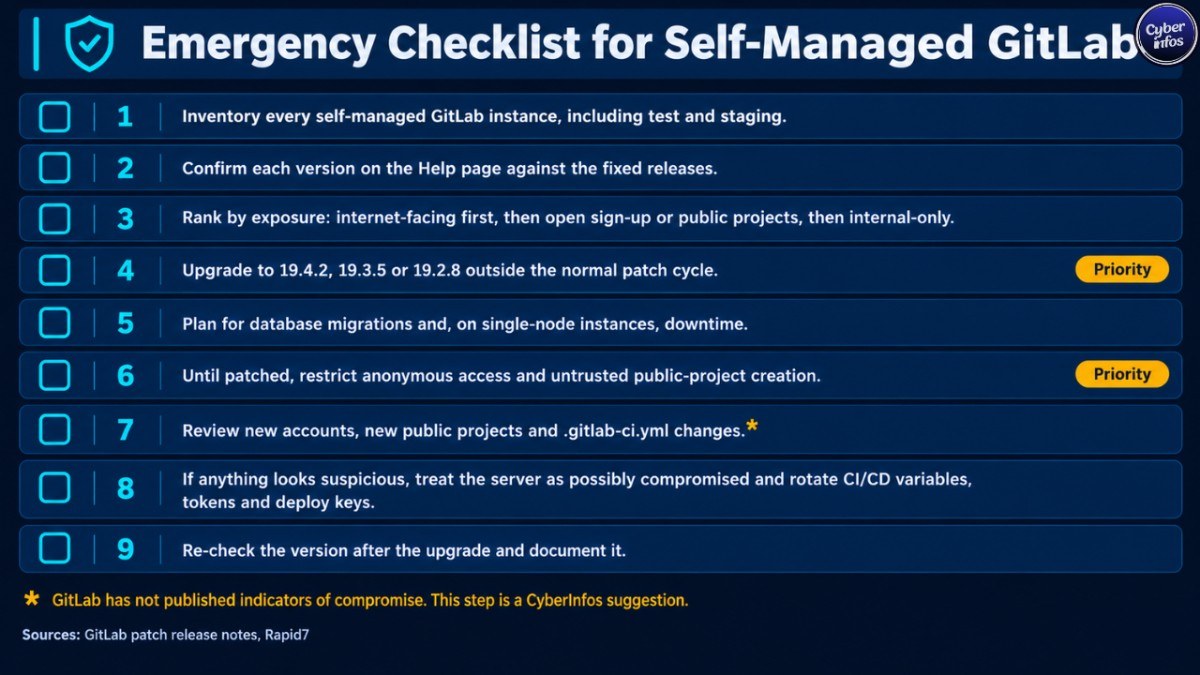
Emergency Checklist for Self-Managed GitLab
- Inventory every self-managed GitLab instance, including test and staging servers.
- Confirm each version on the Help page and compare it with the CVE-2026-97229 fixed releases.
- Rank by exposure: internet-facing first, then open sign-up or public-project instances, then internal-only.
- Upgrade to 19.4.2, 19.3.5 or 19.2.8 outside the normal patch cycle.
- Plan for database migrations and, on single-node instances, downtime.
- Until patched, restrict anonymous access and untrusted public-project creation.
- Review recent new accounts, new public projects and changes to
.gitlab-ci.yml. GitLab has not published indicators of compromise, so this is a CyberInfos suggestion. - If anything looks suspicious, treat the server as possibly compromised and rotate CI/CD variables, tokens and deploy keys.
- Re-check the version after the upgrade and document it.
Interim Risk Reduction If You Cannot Patch Today
Rapid7 suggests restricting anonymous access to public projects and preventing untrusted users from creating or writing to public projects. These steps only narrow the delivery path Rapid7 demonstrated. They do not fix the vulnerable compiler. Treat them as a short-term bridge, not a substitute for the CVE-2026-97229 patch.
Upgrade Notes
GitLab labels this a critical patch release and warns that it includes database migrations. Single-node instances will see downtime while migrations finish before GitLab starts. Multi-node instances can follow GitLab’s zero-downtime upgrade procedure. Version 19.3.5 also carries post-deploy migrations that can run after the upgrade.
CyberInfos Analyst Insight
CyberInfos assesses that the main risk is the position GitLab holds in the software supply chain. A GitLab server typically stores source code, CI/CD variables and deployment credentials, so a GitLab CI/CD RCE running as the git user could put all of them at risk. That is analysis, not a reported outcome, and we found no report of repository tampering or data theft tied to this flaw.
The same release fixes 23 other vulnerabilities, five of them rated High by GitLab. One, CVE-2026-14814, could let a user poison cached repository file responses and potentially expose protected CI/CD variables. Upgrading closes all of them together, which is one more reason to move quickly on this GitLab critical vulnerability.
FAQ
Is CVE-2026-97229 being exploited in the wild?
Rapid7 reports no confirmed in-the-wild exploitation as of October 13, 2026, but it has reproduced code execution and linked a public proof of concept. Treat the risk as real and patch urgently. Check GitLab, Rapid7 and CISA for updates, because this status can change quickly.
Does this GitLab critical vulnerability affect GitLab.com or GitLab Dedicated?
No action is needed. GitLab says GitLab.com already runs the patched version and Dedicated customers do not need to act. The risk applies to self-managed CE and EE installations from 19.2 up to the fixed releases.
Which version should I upgrade to?
Move to the fixed release for your branch: 19.4.2, 19.3.5 or 19.2.8. Avoid stopping at 19.3.4. GitLab recommends upgrading to the latest patch release for your supported version.
Can I reduce risk without upgrading?
Partly. Restrict anonymous access and stop untrusted users from creating or writing to public projects. These controls narrow only the path Rapid7 demonstrated and leave the vulnerability in place, so schedule the upgrade.
Final Thoughts
CVE-2026-97229 sits in a component many teams never think about, and a public proof of concept now exists. Confirm your version today, apply the CVE-2026-97229 patch to internet-facing and open-sign-up instances first, and treat any suspicious pipeline changes as a possible compromise. Watch GitLab’s patch notes for updates, because the exploitation picture may change.
