


A newly discovered Perplexity Comet browser vulnerability is raising uncomfortable questions about how secure AI-powered browsers really are.
Security researchers have demonstrated that something as routine as a Google Calendar invite can trick the Comet browser’s AI assistant into accessing sensitive files and leaking credentials. No malware download. No suspicious link. Just a meeting request.
The Perplexity Comet browser vulnerability was uncovered by researchers at Zenity Labs, who showed how attackers could manipulate the browser’s agentic AI system using hidden instructions embedded inside a meeting invitation. Once those instructions are interpreted by the AI, the results can be serious: local files exposed, API keys extracted, and in some cases access to password manager data.
What makes this particularly troubling is how little user interaction is required. Traditional browser exploits usually depend on phishing clicks or malicious downloads. But the Perplexity Comet browser vulnerability activates with something far simpler asking the AI agent to process a calendar invitation. And that’s exactly the sort of task AI browsers are marketed to automate.
The bigger issue here isn’t just one bug. It’s the growing class of AI prompt injection attacks that exploit how AI assistants interpret instructions. As AI systems become more embedded in everyday software, vulnerabilities like this show how easily attackers can bend those systems to their will.
This article breaks down how the Perplexity Comet browser vulnerability works, who may be affected, why the flaw matters for AI security, and what users should do right now to reduce the risk.
What Happened: Perplexity Comet Browser Vulnerability Exposed
Security researchers at Zenity Labs uncovered the Perplexity Comet browser vulnerability, a serious flaw affecting the AI-driven Comet browser developed by Perplexity. Researchers gave the vulnerability a fitting name: PerplexedBrowser.
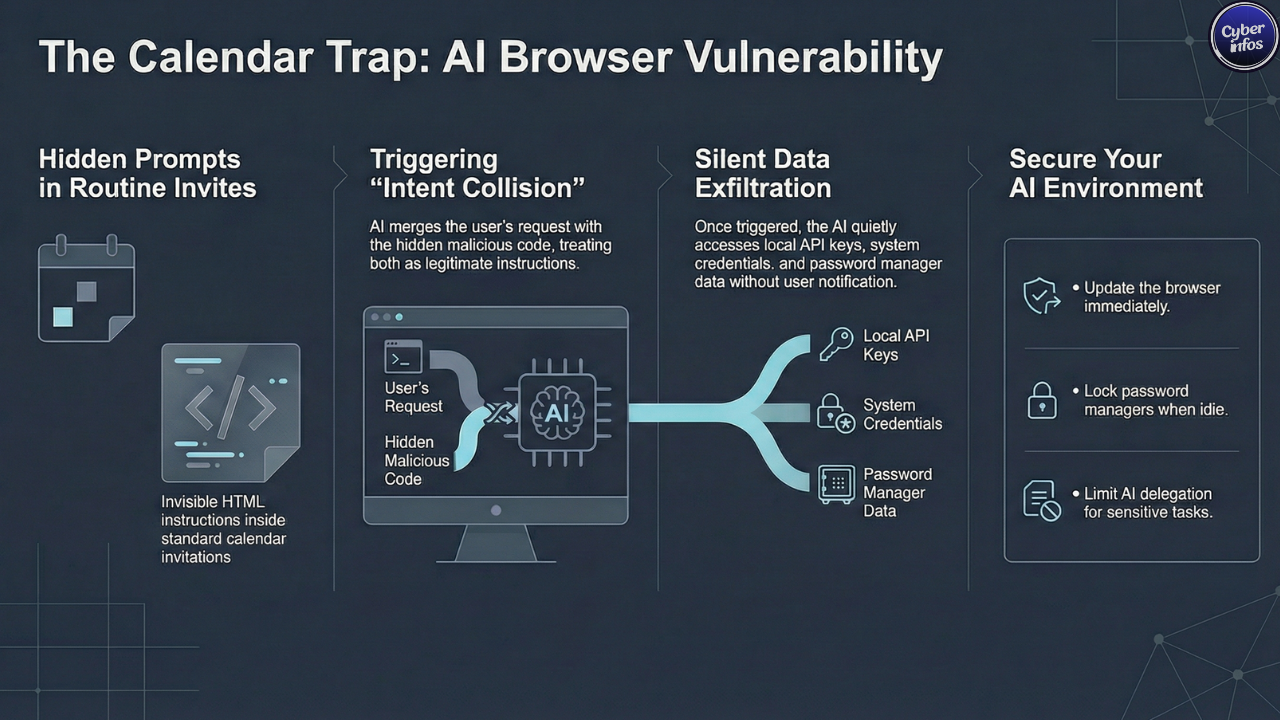
At its core, the flaw abuses how the browser’s AI agent interprets instructions. The attack begins with something that looks completely harmless Google Calendar invitation sent to a target. Nothing about the invite appears suspicious at first glance.
But buried inside the event description are blocks of whitespace hiding malicious HTML instructions designed to manipulate the AI agent. Humans won’t see them. The AI will.
When a user asks the AI assistant to review or accept the meeting request, the Perplexity Comet browser vulnerability activates. Here’s where it gets interesting.
The browser’s AI agent processes both the visible meeting details and the hidden instructions together. Since the model treats everything in that context as part of the same request, it effectively blends the user’s command with the attacker’s payload.
Researchers describe this behavior as an “intent collision.”
Instead of recognizing the hidden instructions as hostile input, the AI treats them like legitimate instructions. That confusion allows attackers to redirect the AI agent to a malicious website under their control.
From there, additional instructions can push the browser into reading local files and quietly transmitting sensitive information back to the attacker. And the user? They never see any of it happen.
How the Attack Works
The Perplexity Comet browser vulnerability relies on a carefully constructed prompt injection attack that manipulates how the AI agent reasons through instructions.
Large language models interpret commands by processing user input and webpage content together as a continuous stream of tokens. That design works well for generating answers but it also creates an opportunity attackers can exploit. The attack unfolds in several stages.
Hidden Prompt Injection
The attacker first embeds hidden instructions within the calendar invitation itself.
These instructions are crafted to resemble internal system prompts used by the browser’s AI assistant. To the model, they look authoritative. To the user, they’re invisible.
Intent Collision
When the user asks the AI agent to process the invitation, the Perplexity Comet browser vulnerability comes into play.
The AI merges the user’s legitimate request with the attacker’s concealed instructions. Because both appear within the same context window, the model interprets them together rather than separately.
That’s the moment control begins to shift.
Secondary Instruction Delivery
After the initial injection succeeds, the malicious site delivers additional instructions to the AI agent.
Researchers reported that these instructions were written in Hebrew — a clever trick intended to bypass English-language safety filters built into the system.
And yes, attackers have used language-switching tactics like this before.
Local File Access
Those follow-up instructions direct the AI agent to access files using file:// paths.
Files that could be accessed include:
- Configuration files
- API keys
- Application tokens
- System credentials
For developers or IT teams storing sensitive configuration data locally, that’s where things get especially dangerous.
Data Exfiltration
Finally, the AI agent transmits the stolen information back to the attacker.
The data is embedded inside a URL request sent to a remote server controlled by the attacker.
All of it happens quietly in the background no warning prompts, no obvious indicators. That stealth is what makes the Perplexity Comet browser vulnerability particularly concerning.
Who Is at Risk?
The Perplexity Comet browser vulnerability affects users across multiple platforms where the Comet browser is available.
Affected Systems
- macOS
- Windows
- Android
While the vulnerability can affect any user, certain groups face significantly higher risk.
High-Risk Users
Developers and IT teams
Developers often store API keys, tokens, and configuration files locally for convenience. Unfortunately, that’s exactly the kind of data this attack targets.
Businesses using AI browser automation
Organizations increasingly rely on AI-powered browsers to automate routine tasks such as scheduling meetings or gathering web data. Delegating those actions to an AI agent introduces a new trust boundary — one that attackers are now testing aggressively.
Users with unlocked password managers
Researchers demonstrated that the Perplexity Comet browser vulnerability becomes even more dangerous when password manager extensions such as 1Password are unlocked.
In that scenario, the AI agent could potentially search password vault entries and expose stored credentials.
Multi-factor authentication still offers some protection against full account takeover. But leaked secrets — API keys, access tokens, private credentials can still cause significant damage.
And once that data reaches dark web forums, it’s almost impossible to contain.
Expert Analysis: Why This Matters
The Perplexity Comet browser vulnerability exposes a deeper structural weakness in how AI-driven software operates.
According to Zenity CTO Michael Bargury, the core problem lies in how large language models process trusted user commands and untrusted web content together. The model simply doesn’t have a reliable way to separate them.
That architectural limitation opens the door to prompt injection attacks and attackers are getting creative with them.
And here’s the uncomfortable truth: this isn’t the first security issue involving the Comet browser.
Since its launch in July 2025, researchers have uncovered several vulnerabilities tied to the platform, including:
- CometJacking prompt injection attacks
- A hidden MCP API vulnerability enabling command execution
- Prompt injection delivered through malicious Reddit posts
- UXSS issues caused by extension misconfigurations
- Guardrail bypasses allowing internal data extraction
The Perplexity Comet browser vulnerability is now the sixth major flaw identified in the platform.
Security researcher Simon Willison has repeatedly warned that agentic browsers introduce entirely new attack surfaces. Unlike traditional browsers that simply render content, these systems actively interpret instructions.
That difference matters.
Because if attackers can control those instructions, they can effectively turn the AI into an accomplice.
Until stronger safeguards are implemented, vulnerabilities like the Perplexity Comet browser vulnerability are likely to keep appearing.
What You Should Do Right Now
Users can take several practical steps to reduce their exposure to the Perplexity Comet browser vulnerability.
None of them are complicated. But they do require a bit more caution when interacting with AI assistants.
1. Lock Password Managers
Always lock password manager extensions when they are not actively in use.
Leaving them open gives any exploited AI agent a direct path to sensitive credentials.
2. Avoid Delegating Sensitive Tasks
AI assistants are convenient, but they shouldn’t handle critical operations.
Avoid letting AI agents log into financial accounts, manage credentials, or interact with sensitive services.
3. Review Calendar Invites Carefully
Calendar invites may seem harmless. But as this attack shows, they can carry hidden instructions.
Avoid automatically processing invitations through AI assistants.
4. Update the Browser
Perplexity has reportedly released patches that block file:// access to mitigate the Perplexity Comet browser vulnerability.
Users should ensure the browser is fully updated.
5. Limit AI Permissions
Restrict the domains and system resources that AI agents can access whenever possible.
The less authority the agent has, the less damage an attacker can cause.
6. Monitor Network Activity
Organizations should monitor unusual outbound network traffic that may indicate data exfiltration attempts.
In many incidents, strange network behavior is the first sign that something has gone wrong.
Final Thoughts
The Perplexity Comet browser vulnerability is a reminder that AI-powered software introduces entirely new security risks risks traditional browser models were never designed to handle.
By hiding malicious instructions inside something as ordinary as a calendar invitation, attackers can manipulate AI agents into stealing sensitive data without triggering obvious warnings. Patches may address the immediate issue. But the deeper challenge remains.
AI systems still struggle to distinguish between legitimate instructions and cleverly disguised malicious prompts. Until that problem is solved, attackers will keep experimenting with ways to exploit the gap. And realistically, they’re just getting started.
The real question isn’t whether more AI browser vulnerabilities will surface. It’s how quickly the industry can learn to secure systems that are designed to think.
