

Passwords remain one of the most fragile points in modern security. Organizations often strengthen authentication by adding complexity length requirements, special characters, rotation rules but these controls frequently clash with human behavior. When passwords become hard to remember, users fall back on what feels familiar.
Where Targeted Wordlists Really Come From
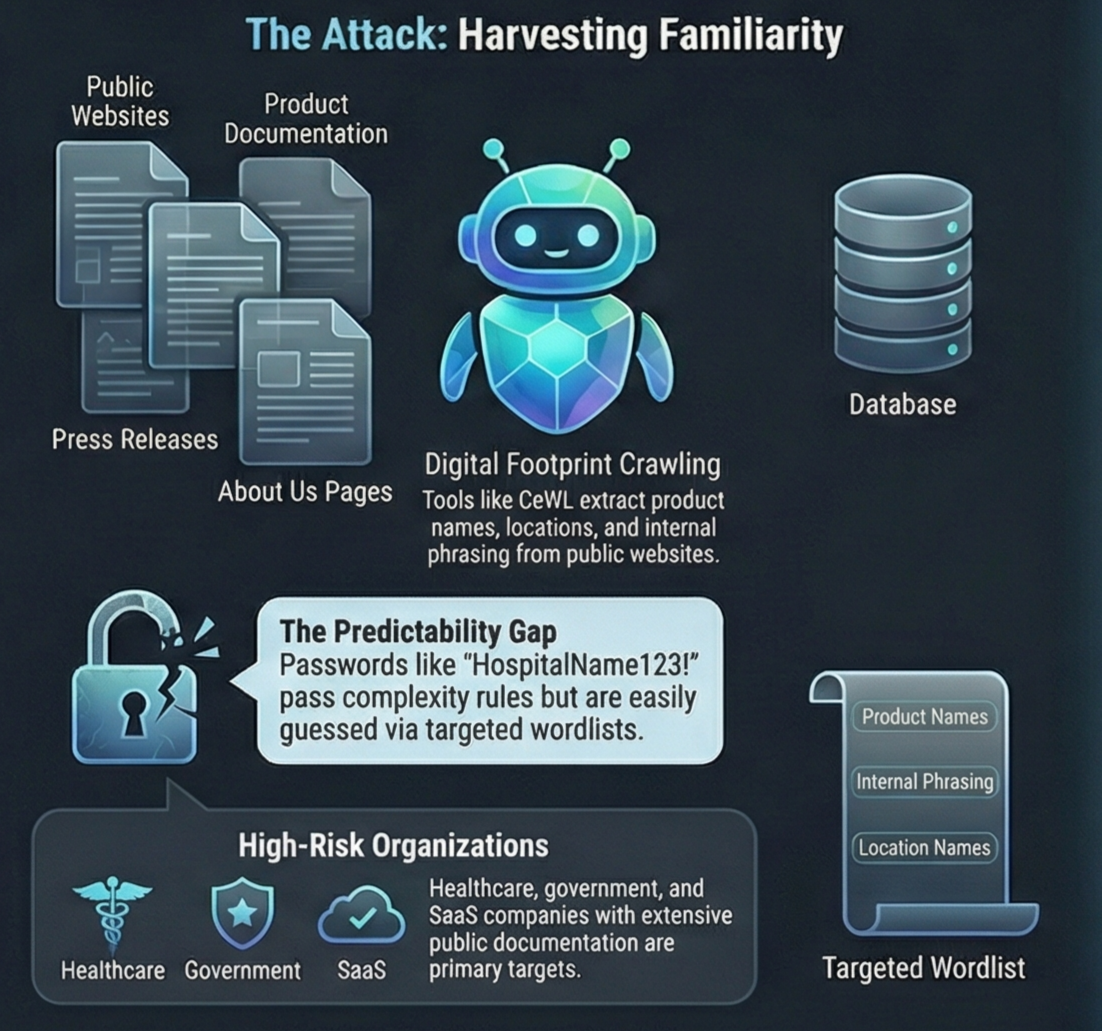
One of the most common tools used for this purpose is CeWL (Custom Word List generator). CeWL is an open-source web crawler that extracts words from websites and compiles them into structured lists. It comes preinstalled in popular penetration-testing distributions like Kali Linux and Parrot OS, which lowers the barrier to entry for both attackers and defenders.
Attackers use CeWL to crawl an organization’s public-facing digital footprint its website, documentation portals, blogs, and help pages. The goal isn’t volume, but relevance.
Typical output includes:
- Organization and product names
- Internal phrasing exposed in documentation
- Industry-specific terminology
- Location names and service descriptions
These terms rarely appear in generic password dictionaries, but they closely mirror the language users encounter daily. As a result, they disproportionately influence how passwords are constructed.
The effectiveness of this approach lies not in sophistication, but in precision.
From Public Content to Passwords Guesses
CeWL allows attackers to control crawl depth, minimum word length, and file types, filtering out low-value results. The harvested words become a high-confidence base set for password generation.
Consider a healthcare organization. Its public site may reference:
- The hospital’s name or abbreviation
- City or regional identifiers
- Medical services, treatments, or departments
These words are rarely used as standalone passwords. Instead, attackers apply predictable transformations: numeric suffixes, capitalization, seasonal patterns, or appended symbols.
Once password hashes are obtained often via third-party breaches or infostealer malware tools like Hashcat apply these mutation rules at scale. Millions of highly relevant candidates can be tested efficiently with far higher success rates than generic lists.
The same wordlists can also be used against live authentication services, where attackers rely on low-and-slow techniques to evade lockouts and monitoring.
Why Password Complexity Rules Still Fail
The critical problem is that many of these passwords technically meet complexity requirements.
A password such as HospitalName123! satisfies default Active Directory rules: length, uppercase, lowercase, numbers, and symbols. Yet within a healthcare environment, it is dangerously predictable.
Analysis of billions of compromised passwords consistently shows the same pattern: when passwords are built from familiar organizational language, added complexity does little to restore true unpredictability. The base term carries too much contextual meaning.
This is precisely the attack surface that CeWL-derived wordlists exploit.
Who Is Most at Risk
Organizations with a strong public presence are particularly exposed, including:
- Healthcare providers
- Educational institutions
- Government agencies
- SaaS companies with extensive documentation
- Enterprises with branded internal platforms
Risk increases when employees are encouraged to “make passwords memorable” without guidance on avoiding contextual language. The more an organization’s terminology appears in daily workflows, the more likely it is to appear directly or indirectly in passwords.
How to Defend Against Targeted Wordlist Attacks
1. Block context-derived and compromised passwords
Prevent users from creating passwords based on organization-specific language such as company names, products, internal projects, or industry terms. At the same time, block passwords already exposed in known data breaches.
Specops Password Policy allows organizations to enforce custom exclusion dictionaries and continuously scan Active Directory against more than 5.4 billion known-compromised passwords directly disrupting CeWL-style attacks.
2. Enforce meaningful length, not just complexity
Require passphrases of at least 15 characters. Length and unpredictability provide far more protection than symbol-heavy but context-based passwords.
3. Enable multi-factor authentication (MFA)
MFA does not prevent password compromise, but it dramatically limits impact. Even simple MFA significantly reduces the value of stolen credentials across Windows logon, VPNs, and RDP.
Align Password Policy With Real-World Attacks
Treat passwords as an active security control, not a static compliance checkbox. Policies that prevent context-derived, previously exposed, or easily inferred passwords remove much of the value attackers gain from targeted wordlists.
When combined with MFA, these controls reflect how credential attacks actually occur, rather than how we assume they do.
FAQ
What is a targeted password wordlist?
A targeted wordlist is built from organization-specific language harvested from public websites and documentation, making password guesses far more accurate.
Why are company names dangerous in passwords?
Attackers routinely collect and mutate company names, products, and locations, making these terms highly predictable.
Does password complexity still matter?
Yes, but only alongside length and unpredictability. Complexity alone does not protect against context-based guessing.
Can MFA stop wordlist attacks?
MFA doesn’t stop password guessing, but it prevents stolen credentials from being used on their own.
Final Thoughts
Password attacks rarely rely on randomness anymore. They rely on familiarity. By understanding how attackers weaponize an organization’s own language, defenders can move beyond outdated complexity rules and deploy controls that meaningfully reduce risk.
Blocking context-derived passwords, enforcing long passphrases, and enabling MFA creates an authentication strategy aligned with real-world threats without adding unnecessary friction for users.
Stay ahead of emerging threats: Join our WhatsApp channel for real-time security alerts.
Follow us on LinkedIn for daily cybersecurity insights and breaking news.
