

Citrix has patched CVE-2026-88779, a SAML-related flaw in NetScaler ADC and NetScaler Gateway that attackers were already using before a fix existed. If your appliances handle SAML sign-in for remote access, single sign-on or AAA, this NetScaler SAML vulnerability is urgent.
The timing makes it harder. The flaw arrives only days after two other exploited NetScaler bugs, so teams that have just finished patching now face a second upgrade.
This guide covers what is confirmed, which builds are affected, how to check your own appliances in about five minutes, and what to do if you see signs of abuse.
Quick Answer
CVE-2026-88779 is a memory buffer flaw in NetScaler ADC and Gateway appliances that use SAML authentication. Citrix rates it CVSS 8.7, describes the impact as denial of service, and confirms targeted attacks. Fixed builds are 14.1-73.41 and 13.1-64.28. Appliances already on the earlier emergency builds still need this update.
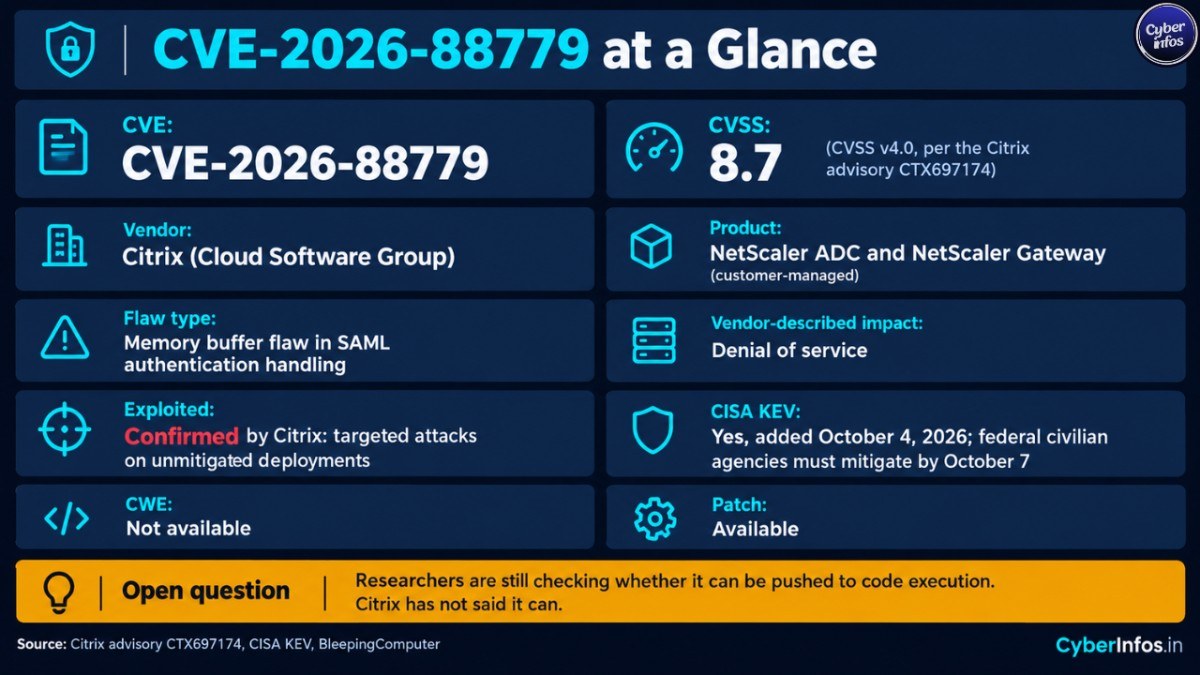
Vulnerability at a Glance
| Field | Information |
|---|---|
| CVE | CVE-2026-88779 |
| Vendor | Citrix (Cloud Software Group) |
| Product | NetScaler ADC and NetScaler Gateway (customer-managed) |
| Flaw type | Memory buffer flaw in SAML authentication handling |
| Vendor-described impact | Denial of service |
| CVSS | 8.7 (CVSS v4.0, per the Citrix advisory CTX697174) |
| CWE | Not specified in the sources reviewed |
| Exploited | Confirmed by Citrix: targeted attacks on unmitigated deployments |
| CISA KEV | Yes, added October 4, 2026; federal civilian agencies must mitigate by October 7 |
| Patch | Available: 14.1-73.41, 13.1-64.28, plus FIPS and NDcPP builds |
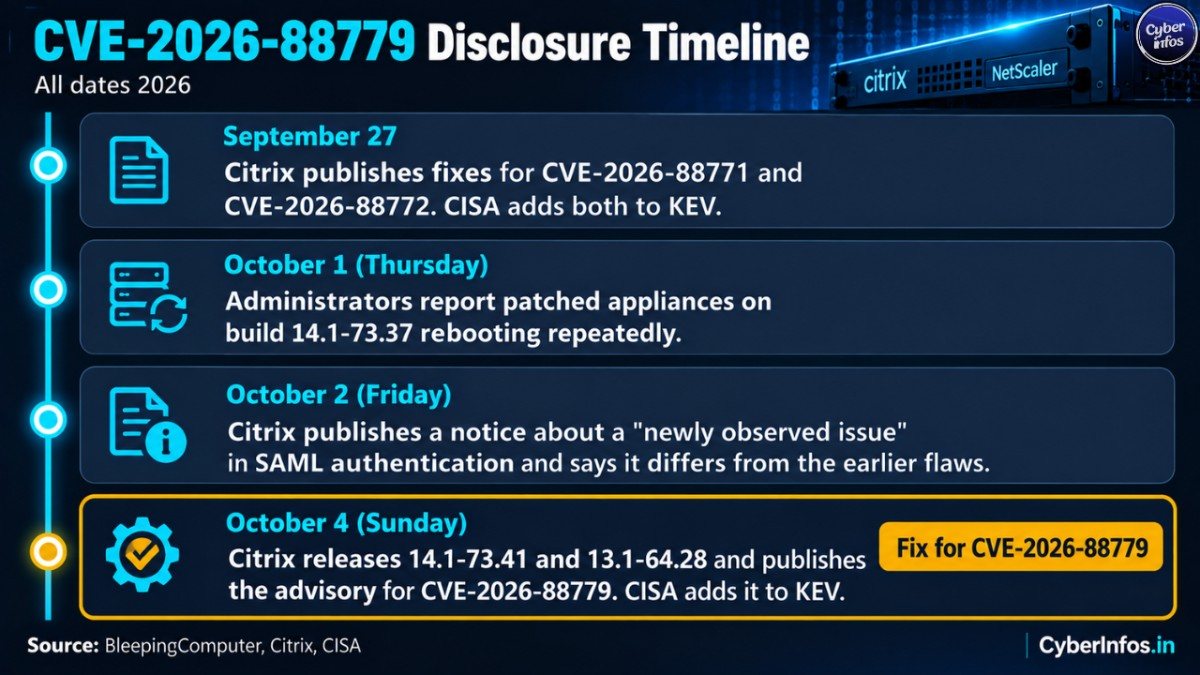
How the Attacks Unfolded
The order of events explains why recently patched appliances are still exposed.
| Date (2026) | Event |
|---|---|
| September 27 | Citrix publishes fixes for two earlier exploited NetScaler bugs, CVE-2026-88771 and CVE-2026-88772, and CISA adds both to its KEV catalog |
| October 1 (Thursday) | Administrators report patched appliances on build 14.1-73.37 rebooting repeatedly |
| October 2 (Friday) | Citrix publishes a notice about a “newly observed issue” in SAML authentication and says it differs from the earlier flaws |
| October 4 (Sunday) | Citrix releases 14.1-73.41 and 13.1-64.28, publishes the advisory for CVE-2026-88779, and CISA adds it to KEV |
Put plainly, this Citrix NetScaler zero day showed up in the field as crashes and reboots before the vendor had put a name to it.
Confirmed, Reported and Unconfirmed
Confirmed
- Citrix says it has observed targeted attacks on unmitigated NetScaler deployments that can cause denial of service. Repeated triggering may leave the service unavailable.
- Citrix says its analysis indicates an availability impact. It has not identified an impact on the integrity of customer data.
- CISA lists the flaw as exploited.
- watchTowr Labs reproduced the vulnerability but has not published technical details.
Reported but not independently confirmed
- One administrator reported crafted SAML authentication usernames that contained shell commands. The commands fetch a payload from 213.209.159[.]55, save it as
/vand run it. The administrator was careful to add that the logs show attempted exploitation and correlated crashes, not confirmed command execution. - Security researcher Kevin Beaumont reported that one of his patched honeypots was running a downloaded binary. If that holds up, the bug may reach beyond denial of service.
- Researchers are still checking whether a CVE-2026-88779 exploit can achieve remote code execution. Citrix has not said it can.
CyberInfos analysis
Read the “denial of service only” description of this NetScaler ADC vulnerability as the vendor’s current assessment, not a ceiling. Beaumont compared it to CVE-2025-6543, which was first described as a denial-of-service issue and was later used for remote code execution. That comparison is a caution. It is not proof that the same will happen here.
Is Your NetScaler Vulnerable? The 5-Minute Check
Run these five steps on every customer-managed appliance, including disaster-recovery and lab units that face the internet.
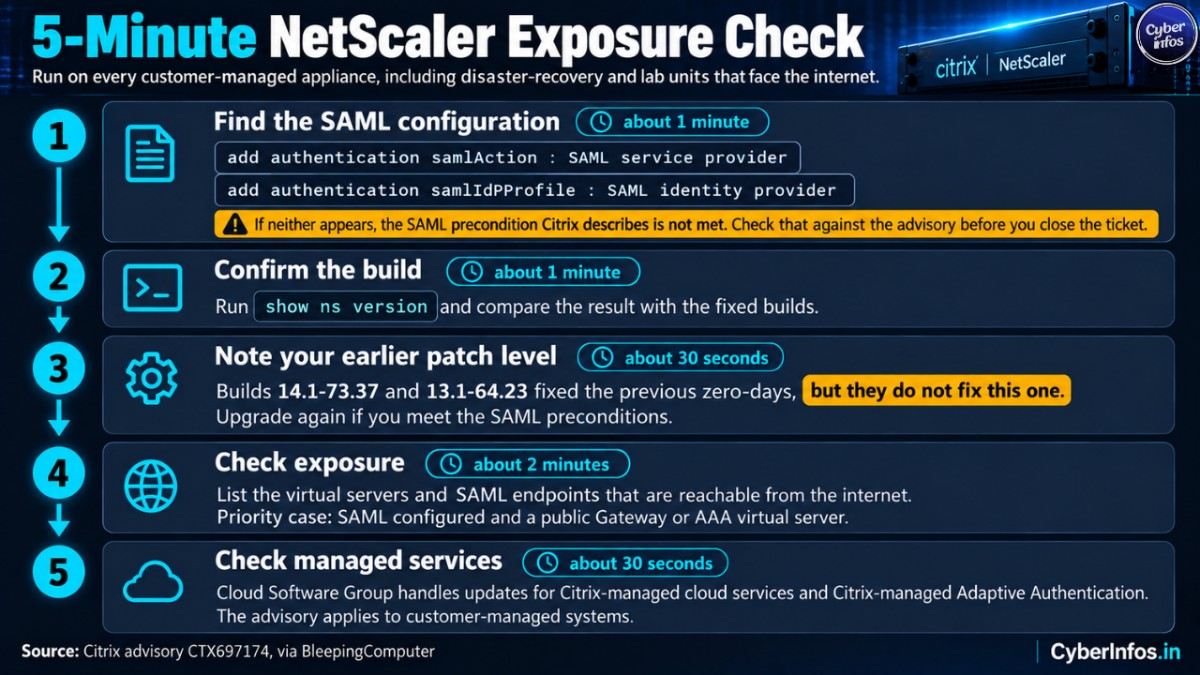
1. Find the SAML configuration (about 1 minute). Search the running configuration for either of these entries:
add authentication samlActionmeans the appliance acts as a SAML service provider.add authentication samlIdPProfilemeans it acts as a SAML identity provider.
If neither appears, the SAML precondition Citrix describes is not met. Check that against the advisory before you close the ticket.
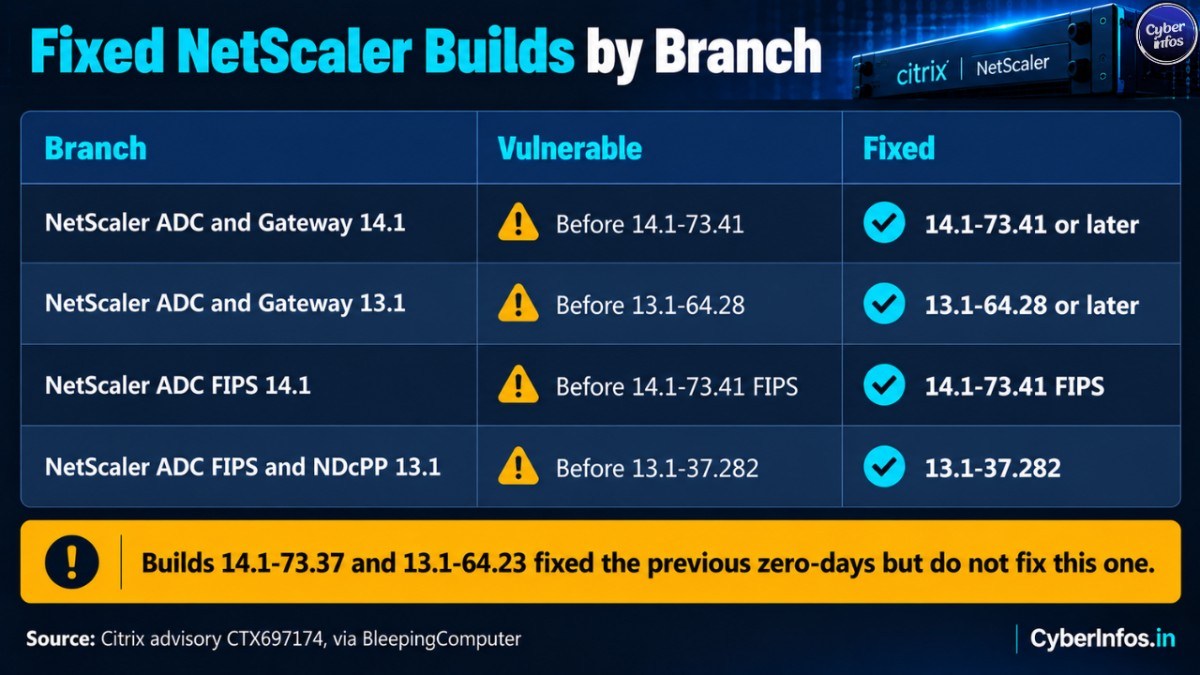
2. Confirm the build (about 1 minute). Run show ns version and compare the result with the table below.
| Branch | Vulnerable | Fixed |
|---|---|---|
| NetScaler ADC and Gateway 14.1 | Before 14.1-73.41 | 14.1-73.41 or later |
| NetScaler ADC and Gateway 13.1 | Before 13.1-64.28 | 13.1-64.28 or later |
| NetScaler ADC FIPS 14.1 | Before 14.1-73.41 FIPS | 14.1-73.41 FIPS |
| NetScaler ADC FIPS and NDcPP 13.1 | Before 13.1-37.282 | 13.1-37.282 |
3. Note your earlier patch level (about 30 seconds). Builds 14.1-73.37 and 13.1-64.23 fixed the previous zero-days, but they do not fix this one. Citrix tells customers who upgraded for CVE-2026-88771 through CVE-2026-88778, and who meet the SAML preconditions, to upgrade again.
4. Check exposure (about 2 minutes). List the virtual servers and SAML endpoints that are reachable from the internet. An appliance with SAML configured and a public Gateway or AAA virtual server is the priority case.
5. Check managed services (about 30 seconds). Citrix says Cloud Software Group handles updates for Citrix-managed cloud services and Citrix-managed Adaptive Authentication. The advisory applies to customer-managed systems.
How to Fix It
An exploited NetScaler ADC vulnerability deserves an emergency change window, not the next monthly cycle.
- Install the fixed build. Move to 14.1-73.41, 13.1-64.28 or the matching FIPS and NDcPP release. This is the permanent remediation.
- Upgrade again if you only applied the September 27 fixes. Being current as of last week does not protect you here.
- Use the Global Deny Lists as a stopgap. Citrix is providing lists that block known malicious IP addresses. Still, the company recommends installing the update as soon as possible, so treat the lists as a temporary measure.
- Plan for a bumpy upgrade window. Citrix warned during the earlier round that appliances with configured variables may enter a reboot loop when moving to 13.1-64.23. Read the release notes for your target build and keep a rollback path ready.
Detection and Threat-Hunting Pointers
Because this NetScaler SAML vulnerability has few public technical details, use these as general hunting guidance rather than a complete detection set.
- Unexplained reboots. Administrators described the
nsaaadauthentication process crashing repeatedly until the Pitboss watchdog hit its restart limit and rebooted the appliance. - Odd SAML authentication input. Look for usernames or SAML fields containing shell syntax such as download-and-execute commands.
- Outbound connections to the reported IP. Search firewall and proxy logs for 213.209.159[.]55. Remember this indicator comes from one administrator’s report and may not be the only infrastructure in use.
- Unexpected files on the appliance. A file named
/vwas mentioned in the same report. - Remote logging. Good Citrix Gateway security includes forwarding appliance logs to an external system, because attackers who gain code execution can tamper with local logs.
Citrix offers an initial indicator-of-compromise scan through NetScaler Console for the earlier zero-days, but cautions that it may miss attacks. A clean scan is not proof of a clean appliance.
If You Suspect Compromise
Citrix’s recovery guidance for the earlier NetScaler zero-days covers evidence preservation, isolation, credential rotation and rebuilding the appliance. The same sequence makes sense here:
- Preserve evidence first: a VPX snapshot where available, plus logs held on remote syslog servers and NetScaler Console.
- Isolate the appliance from the network.
- Rotate credentials and secrets the appliance could access, including LDAP bind accounts and SAML signing material.
- Rebuild from a known-good image and apply the fixed release before reconnecting.
Patching alone will not remove a foothold. A patch closes the entry point, but it does nothing to a payload that is already running.
Analyst Insight
This section is CyberInfos analysis, not confirmed fact.
The pattern is the real story. This Citrix NetScaler zero day follows a run of emergency fixes in just a few weeks, and it surfaced through crashing patched systems rather than a vendor warning. For SOC teams, CISOs and anyone responsible for Citrix Gateway security, that points to three standing practices: keep NetScaler logs off the box, track NetScaler as internet-facing critical infrastructure with its own patch SLA, and treat unexplained appliance reboots as a security event, not a hardware fault.
Why this matters. A SAML gateway sits in front of remote access, so even a denial-of-service condition can cut staff off from the services behind it. That is an operational problem before it is a data problem.
Mass scanning also appears to be underway. Beaumont described the activity against his honeypots as “sprayed and prayed,” which suggests opportunistic targeting of anything reachable, including appliances with expired certificates.
India context. Organisations in India that run NetScaler for remote access should keep CERT-In’s 2022 directions in mind, which require reporting specified cyber incidents within six hours of noticing them. A confirmed compromise of a gateway would likely qualify. This is general information, not legal advice, so check the current directions with your compliance team.
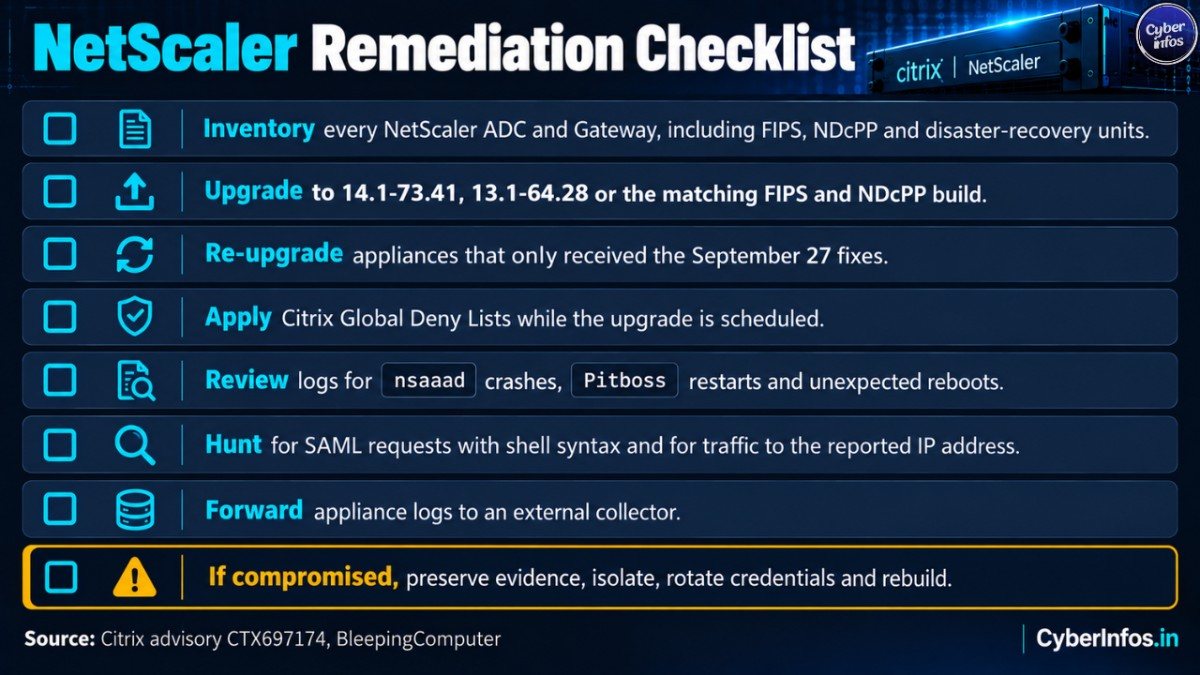
Remediation Checklist
- Inventory every NetScaler ADC and Gateway, including FIPS, NDcPP and disaster-recovery units.
- Search each configuration for
add authentication samlActionandadd authentication samlIdPProfile. - Record the current build with
show ns version. - Upgrade to 14.1-73.41, 13.1-64.28 or the matching FIPS and NDcPP build.
- Re-upgrade appliances that only received the September 27 fixes.
- Apply Citrix Global Deny Lists while the upgrade is scheduled.
- Review logs for
nsaaadcrashes, Pitboss restarts and unexpected reboots. - Hunt for SAML requests with shell syntax and for traffic to the reported IP address.
- Forward appliance logs to an external collector.
- If compromise is suspected, preserve evidence, isolate, rotate credentials and rebuild.
- Document the remediation and confirm the final build.
FAQ
Is CVE-2026-88779 a remote code execution flaw?
Citrix describes it as a denial-of-service vulnerability. Researchers are checking whether it can be pushed to code execution, and some field reports fit that possibility. Still, it is not confirmed.
Which NetScaler configurations are affected?
Customer-managed appliances configured with either a SAML service provider or a SAML identity provider, using Gateway or AAA functionality.
I patched last week. Am I safe?
Not necessarily. The fixes for CVE-2026-88771 and CVE-2026-88772 do not cover this flaw. Builds before 14.1-73.41 and 13.1-64.28 remain affected.
Is CVE-2026-88779 being exploited?
Yes. Citrix has confirmed targeted attacks, and CISA added the flaw to its Known Exploited Vulnerabilities catalog.
Final thoughts
The practical steps for CVE-2026-88779 are short: find the SAML configuration, check the build, upgrade, and hunt for crashes and unusual authentication input. Anything on a build older than 14.1-73.41 or 13.1-64.28 with SAML configured should move to the front of the queue. Watch Citrix and CISA for updates, because the severity picture for this NetScaler SAML vulnerability may change if code execution is confirmed.
