


Mobile apps ship faster than most security teams can keep up with. A build that passed review in January might carry a new authentication flow, a new SDK, or a new payment integration by June. Each of those changes reopens the attack surface, whether anyone remembers to retest it or not.
That’s the backdrop for mobile app penetration testing 2026, and it looks different from the annual check-the-box audits security teams got used to a few years ago. Regulation is tightening.
Attackers have largely moved on from brute-forcing the client and started going after APIs and the third-party code bundled inside apps. Continuous, release-aligned testing is turning into the baseline expectation, not the ambitious goal.
This guide walks through a working checklist built on the OWASP Mobile Application Security Verification Standard, or MASVS the closest thing the industry has to a shared standard for mobile app security. You’ll get what to test, why each piece matters, and how testers actually go about verifying it on a real build.
Quick Answer:
Mobile app penetration testing in 2026 pairs static analysis of a decompiled Android or iOS build with dynamic analysis of the running, instrumented app, checked against OWASP MASVS categories: storage, cryptography, authentication, network communication, platform interaction, and resilience. Backend API authorization gets tested right alongside the client, since that’s where most of the serious findings turn up.
What Is OWASP MASVS (and How It Fits With MASTG)
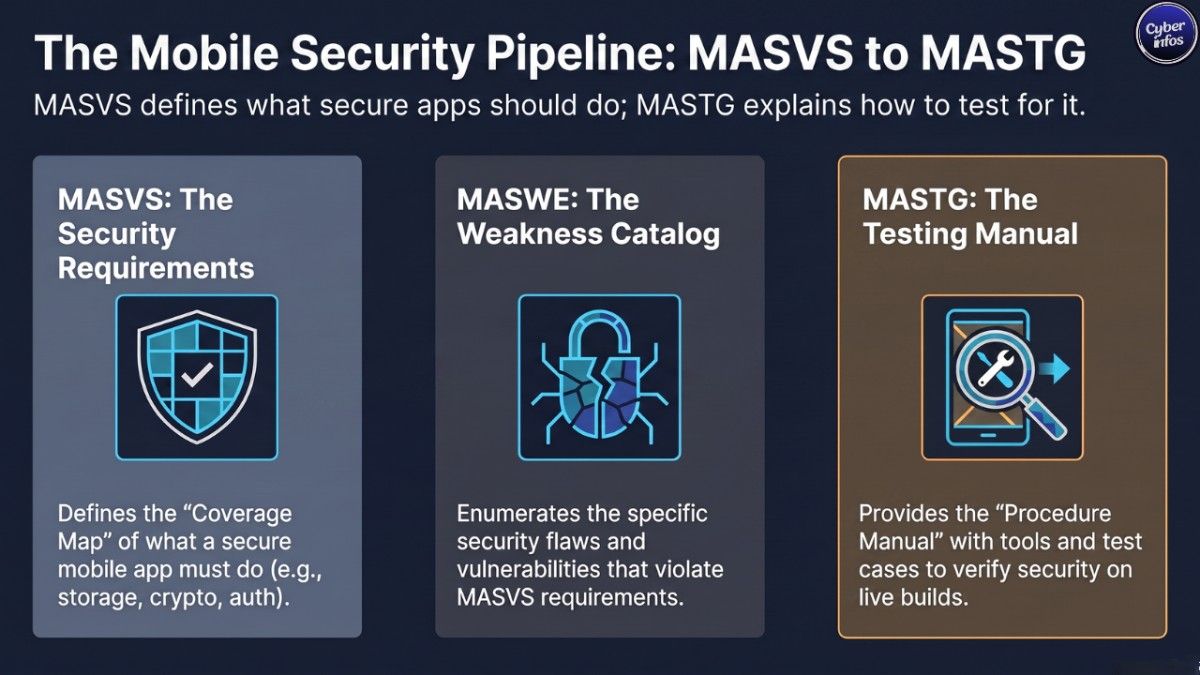
OWASP MASVS is a set of baseline security and privacy requirements for mobile apps. Developers use it to build secure apps in the first place. Testers use it to verify what got built. And procurement teams increasingly use it to set a minimum bar for whatever a third-party vendor hands them.
MASVS doesn’t do this alone. It’s one piece of a three-part project:
- MASVS defines what a secure app should do the requirements themselves.
- MASWE, the Mobile Application Security Weakness Enumeration, catalogs the specific weaknesses that break those requirements.
- MASTG, the Mobile Application Security Testing Guide, spells out how to actually test for each weakness, with real techniques, tools, and test cases.
The simplest way to think about it: MASVS is the coverage map, MASTG is the procedure manual. A tester works through MASVS categories to make sure nothing gets skipped, then pulls the matching MASTG test case to verify the control on a live Android or iOS build.
If you’re putting together an app security testing guide 2026 for your own team, this structure is worth borrowing directly. It turns “did we check everything” from a guess into something you can actually audit.
MASVS Verification Levels Explained
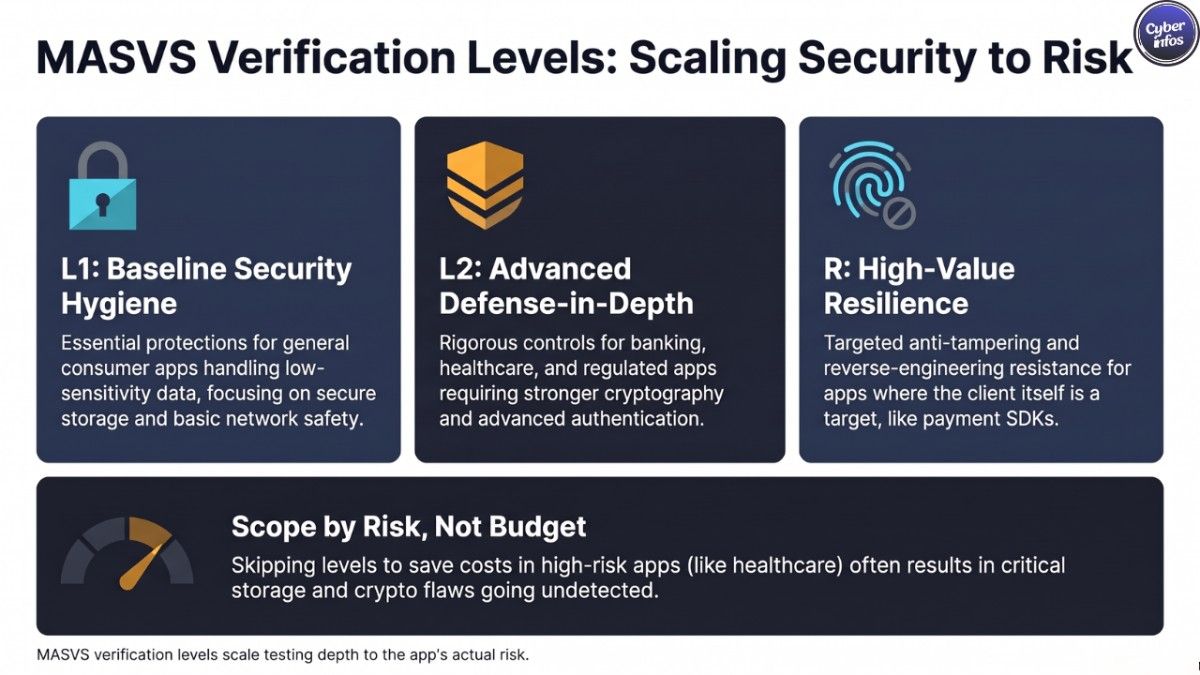
Not every app carries the same risk, so MASVS doesn’t demand the same depth of testing for all of them. It defines verification levels instead, so teams can scope an engagement to what the app actually handles:
| Level | Focus | Typical Use Case |
|---|---|---|
| L1 | Baseline security hygiene secure storage, basic network protections, standard platform APIs | General consumer apps, low-sensitivity data |
| L2 | Adds defense-in-depth controls stronger cryptography, resilience against reverse engineering, advanced authentication | Banking, healthcare, government, apps handling regulated or high-value data |
| R (Resilience) | Anti-tampering, anti-debugging, and reverse-engineering resistance | Apps where the client itself is a high-value target (DRM, payment SDKs) |
A retail loyalty app is probably fine at L1. A banking app touching PCI-scoped payment data needs L1 plus L2 at minimum, and R on top of that if the client is holding business-critical logic on the device.
CyberInfos Analyst Insight: The scoping mistake we see most often is treating MASVS levels like optional add-ons instead of risk-driven requirements. Cutting L2 controls from a healthcare app to save budget usually means the storage and cryptography findings that matter most never get looked at.
The 2026 Mobile App Threat Landscape
The mobile risk picture has shifted noticeably over the past year, and it’s shaping how testing scope gets defined heading into 2026.
- Regulation is tightening. PCI DSS v4.0 now mandates stronger testing for payment-handling apps. Healthcare and other data-heavy apps are facing more scrutiny over what their SDKs are actually doing and tracking.
- Attackers have moved to APIs and the supply chain. Instead of purely attacking the client, a lot of activity has shifted toward the APIs mobile apps talk to and the third-party libraries bundled inside them. Dependency-management incidents involving package ecosystems like CocoaPods showed exactly how one compromised library can ripple across thousands of apps at once.
- Fragmented OS versions are still a problem. A meaningful share of devices out there are still running outdated operating systems, which leaves known vulnerabilities wide open no matter how tight the app’s own code is.
These pressures map closely to the categories in the OWASP Mobile Top 10, and they’re not just theoretical. Verizon’s 2026 Data Breach Investigations Report found that mobile-centric phishing fake texts and voice calls has a 40% higher success rate than traditional email phishing, which is exactly the kind of social-engineering pressure that’s changing mobile app penetration testing 2026 priorities compared to a few years back.
Put those three together and it’s easy to see why annual audits are losing favor. A point-in-time test only tells you about the exact build that got tested and mobile apps change too often for that snapshot to stay useful for a full year.
Mobile App Pentest Methodology: Static and Dynamic Analysis
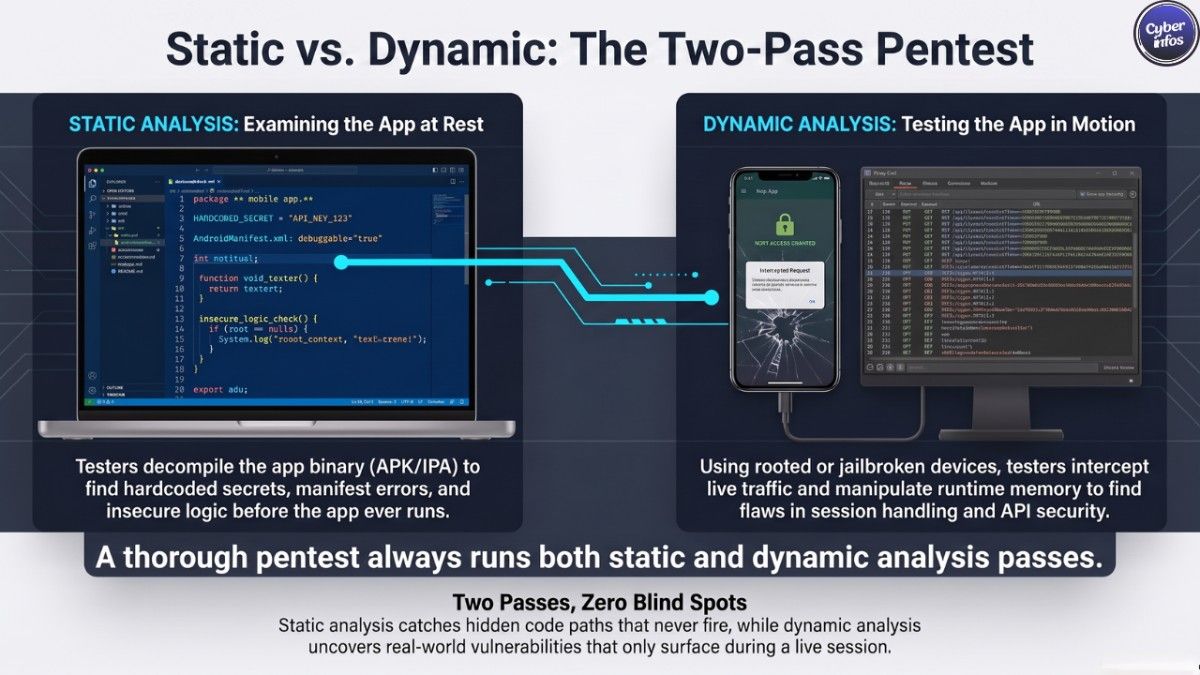
Any mobile pentest methodology worth trusting runs two passes over the same target, not one.
Static analysis looks at the app at rest. Android penetration testing usually starts with decompiling the APK to dig through source logic, hardcoded secrets, manifest permissions, and any insecure API usage all before the app ever launches. iOS penetration testing works from the IPA instead, checking binary structure, entitlements, and embedded configuration.
Dynamic analysis looks at the app while it’s actually running. Testers instrument it on a rooted or jailbroken device, intercept network traffic, poke at runtime memory, and manipulate application state to see how it holds up under abuse.
Skip either pass and you’re missing something. Static analysis catches things dynamic testing might not a hardcoded API key sitting in a code path that never fires during a typical session, for instance. Dynamic testing catches what static review can’t, like how the app behaves the moment an attacker manipulates a live session or intercepts a call it assumed was safe.
A mobile app security test rarely stands alone, either. It’s usually one part of a bigger assessment that includes the client-server architecture and the backend APIs the app leans on. A perfectly locked-down client sitting in front of a broken backend is still a broken system — the client just didn’t cause the problem.
The OWASP MASVS Testing Checklist by Category
Here’s the OWASP MASVS checklist, broken down by category. Each item ties back to a specific MASTG test case you can run to verify it hands-on.
Storage Testing
- Confirm sensitive data isn’t sitting unencrypted in shared preferences,
NSUserDefaults, or plaintext files - Verify Android apps use Android Keystore and EncryptedSharedPreferences (via Jetpack Security) for secrets
- Verify iOS apps use Keychain with an appropriate accessibility class, such as
kSecAttrAccessibleWhenUnlockedThisDeviceOnly - Check whether sensitive data is leaking into app logs, crash reports, or backups
- Confirm cached data screenshots, clipboard, keyboard cache doesn’t expose sensitive fields
Cryptography Testing
- Confirm the app leans on vetted, platform-standard cryptographic libraries instead of a custom implementation
- Check key management are encryption keys generated securely, and are any hardcoded?
- Verify the algorithm and key length actually fit the sensitivity of the data being protected
Authentication and Session Testing
- Test session token handling: expiration, invalidation on logout, secure storage
- Verify biometric authentication doesn’t quietly fall back to a weak PIN
- Test for broken authentication logic that lets client-side manipulation bypass server-side checks
Network Communication Testing
- Confirm TLS is enforced across all sensitive traffic, with no plaintext fallback
- Test certificate validation logic for bypass conditions
- Assess how the app behaves if certificate pinning fails or gets bypassed
Platform Interaction Testing
- Review exported Android components activities, services, broadcast receivers for unauthorized access
- Check iOS URL scheme and universal link handling for injection or hijacking risk
- Verify permission requests actually follow least-privilege principles
Code Quality and Resilience Testing
- Test for injection flaws in any WebView or local database usage
- Assess anti-tampering and anti-debugging controls where R-level resilience applies
- Confirm third-party SDKs and libraries are current and free of known CVEs
Certificate Pinning: What It Actually Protects
Certificate pinning testing gets treated like a silver bullet a lot more often than it deserves. It isn’t one.
Pinning is a resilience control, plain and simple. It slows down interception and blocks casual, automated attacks, and that’s genuinely worth having. But a motivated tester with a rooted device and the right tooling will get past it. And once it’s bypassed, pinning does nothing at all for insecure local storage, weak cryptography, or a backend that trusts whatever the client hands it.
CyberInfos Analyst Insight: We test every app assuming pinning is already defeated, because a determined attacker with the binary in hand will defeat it too. If bypassing the pin turns up an API with broken authorization, the pinning was never the real protection the vulnerability was sitting in the backend the whole time. MASVS files pinning under resilience for exactly this reason. It’s defense-in-depth. It’s not a substitute for a backend that enforces its own rules.
Backend and API Authorization Testing
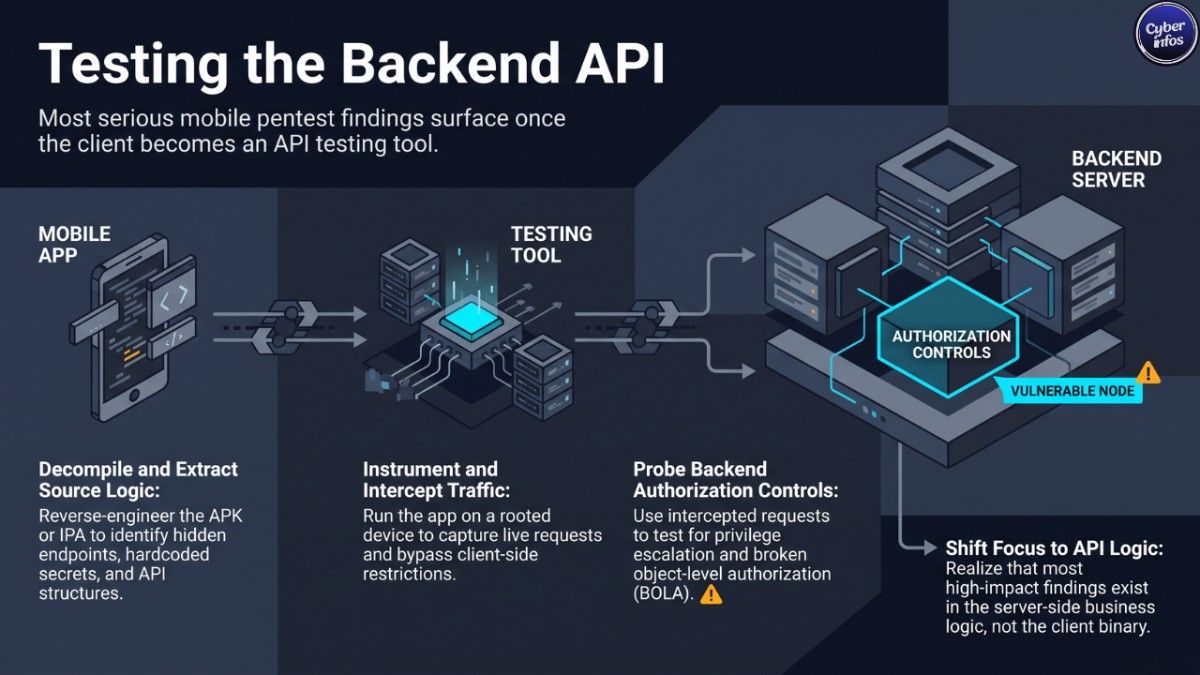
Most of the serious findings in a mobile app pentest don’t come from the client at all. They come from the API the app is talking to.
Once a tester has the client fully in hand decompiled, instrumented, traffic intercepted they’re effectively an authenticated (or unauthenticated) API client with a clear view of every request the app makes. That’s usually when broken object-level authorization, missing rate limiting, and privilege-escalation bugs in the backend start surfacing.
A mobile app vulnerability assessment that stops at the client and never pressure-tests the backend is only doing half the job. Any engagement scope should explicitly cover the app’s API surface, not just whatever binary got installed on the test device.
Industry-Specific Testing Considerations
| Industry | Key Driver | Testing Emphasis |
|---|---|---|
| Fintech | PCI DSS v4.0 | Stronger testing cadence, payment data storage, tokenization review |
| Healthcare | HIPAA, heightened SDK/tracking oversight | Data-at-rest encryption, third-party SDK data flows |
| Government | NIST SP 800-163 | Formal verification against federal mobile app security guidelines |
| India-based apps | DPDP Act | Consent handling, data localization, mobile data-collection practices |
| SMB / Enterprise | Budget and scope | Right-sizing MASVS level (L1 baseline vs L2 defense-in-depth) to actual risk |
How Often You Should Test
The old rule of thumb was once a year. That’s no longer enough, and honestly it probably wasn’t enough a few years ago either.
Test at least annually, and again after any significant change a new authentication flow, a payment feature, a major backend integration. Mobile apps ship fast, and each release can quietly reintroduce old bugs or open new attack surface. A single point-in-time test only tells you about the exact build that got assessed that week.
For apps under active development, lining testing up with release cycles works better than waiting for the calendar. Even a lightweight, targeted retest ahead of a major release catches regressions before they hit production, instead of surfacing a year later in the next full audit.
Choosing a Vendor vs Building In-House Capability
Some organizations build internal mobile AppSec capability. Most still lean on external testers for periodic, independent validation, and there’s nothing wrong with that. Whichever route you take, the mobile pentest methodology matters more than who’s running it, a thorough in-house process beats a shallow external one, and vice versa. A few things worth checking before you sign with a vendor:
- Do they test both static and dynamic layers, or just one?
- Is backend API testing actually in scope, or only the client binary?
- Can they map findings back to MASVS categories and verification levels, not just hand you a generic severity score?
- Do they explain why a finding matters to the business, not just that it technically exists?
A checklist-only engagement that never goes past MASVS categories is a floor, not a ceiling. The findings that actually move the needle usually come from app-specific business logic no generic standard could have predicted and that’s where experienced testers earn their fee.
What a Good Pentest Report Includes
A useful report is more than a list of vulnerabilities with severity ratings attached. Look for:
- A clear mapping of each finding to the relevant MASVS control and verification level
- Reproduction steps detailed enough for developers to confirm and fix the issue without a back-and-forth
- Business-impact framing, not just a technical severity score
- A retest section confirming which findings actually got remediated
- An executive summary a CISO can hand off without translating it first
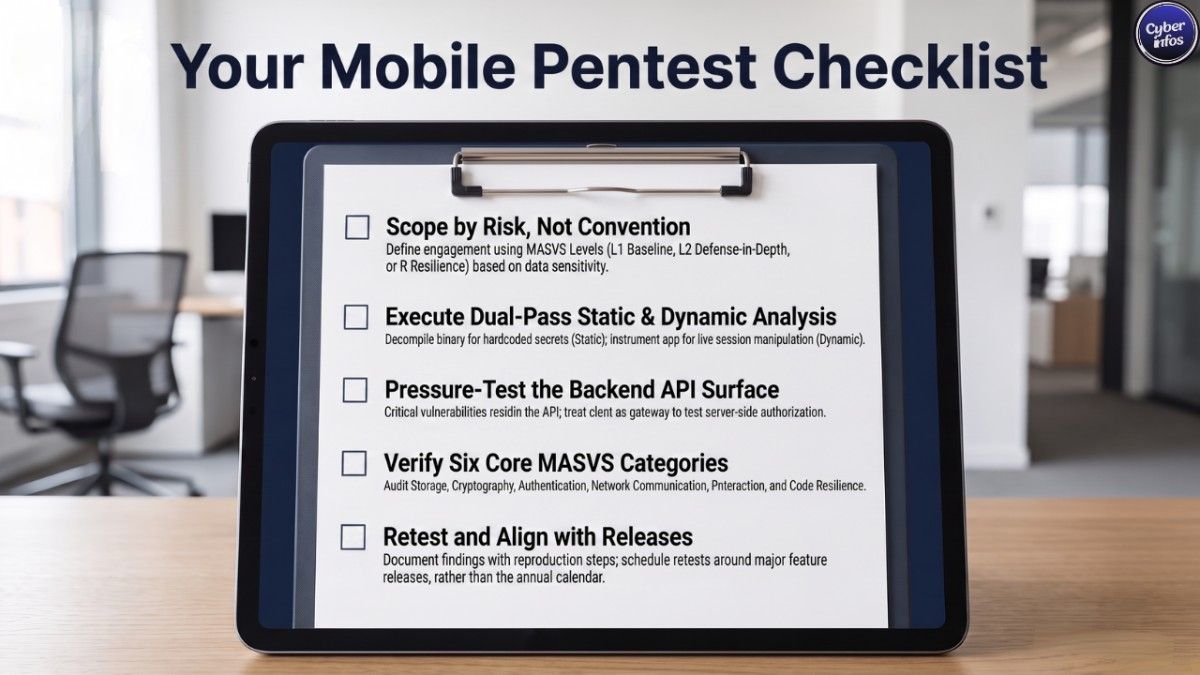
Actionable Mobile App Pentest Checklist
Treat this as the working core of any mobile app vulnerability assessment scope against it, test against it, and document findings against it every time.
- Scope the engagement against the correct MASVS level (L1, L2, or R)
- Collect APK/IPA, permissions list, backend endpoints, and third-party SDK inventory
- Run static analysis on the decompiled build before dynamic testing begins
- Run dynamic analysis on a rooted/jailbroken device with traffic interception
- Test backend API authorization alongside the client
- Verify storage, cryptography, authentication, network, platform, and resilience controls
- Confirm certificate pinning behavior, but don’t treat it as a standalone control
- Document findings mapped to MASVS categories with reproduction steps
- Retest after remediation before closing the engagement
- Schedule the next test around the next major release, not just the calendar year
Frequently Asked Questions
What is OWASP MASVS?
OWASP MASVS, the Mobile Application Security Verification Standard, defines baseline security and privacy requirements for mobile apps. Developers, testers, and organizations all use it as a benchmark for how secure a mobile app should be.
What’s the difference between MASVS and MASTG?
MASVS defines the security requirements what a secure app should do. MASTG, the Mobile Application Security Testing Guide, explains how to verify those requirements through specific, hands-on test cases and techniques.
Does certificate pinning prevent mobile app hacking?
No. It slows down interception and blocks casual or automated attacks, but a determined attacker with a rooted device will get past it. Treat it as one layer of defense-in-depth, not a substitute for secure storage, cryptography, or backend authorization.
How often should mobile apps be penetration tested?
At minimum, annually, and after any significant change such as a new authentication flow, payment feature, or backend integration. Continuous, release-aligned testing is increasingly the norm rather than a once-a-year audit.
What is MASVS Level 1 vs Level 2?
L1 covers baseline security hygiene for general-purpose apps. L2 adds defense-in-depth controls like stronger cryptography and resilience testing, meant for apps handling sensitive or regulated data banking and healthcare apps, for example.
What tools are used for mobile app penetration testing?
Testers typically combine decompilation tools for static analysis, instrumentation frameworks for dynamic analysis on rooted or jailbroken devices, and traffic-interception proxies to inspect what’s actually moving between the app and its backend.
Is mobile app pentesting different from API pentesting?
They overlap quite a bit. A thorough mobile app pentest includes testing the backend APIs the app depends on, since a lot of the serious findings broken authorization, for one only show up once the client is fully in hand and effectively working as an API testing tool itself.
What is MASWE?
MASWE, the Mobile Application Security Weakness Enumeration, catalogs the specific weaknesses that violate MASVS requirements. It sits between the standard (MASVS) and the testing guide (MASTG) in OWASP’s mobile security project.
How long does a mobile app pentest take?
It varies by scope and MASVS level, but an engagement covering both static and dynamic analysis plus backend API testing typically runs one to three weeks, depending on how complex the app is.
Do mobile app pentests cover backend APIs?
They should. A pentest scoped only to the installed binary misses the backend authorization flaws that surface once a tester has full client access and that’s often where the findings that actually matter to the business are hiding.
Should SMBs follow the same MASVS checklist as large enterprises?
The checklist categories apply across the board, but the verification level should scale to risk rather than company size. Most SMB apps are appropriately scoped at L1, while any app handling regulated or high-value data warrants L2 regardless of how big the company behind it is.
Final Thoughts
Mobile app penetration testing 2026 isn’t about running through a static list once a year and calling it done. It’s a continuous, MASVS-anchored process that pairs static and dynamic analysis with real backend API testing because the client is fully in the attacker’s hands the moment it ships, and the findings that actually matter usually live in business logic no generic checklist could have predicted.
Use the OWASP MASVS categories as your coverage map, MASTG as your procedure manual, and scope your verification level to actual data sensitivity instead of convenience. Align testing to your release cycle rather than the calendar, and don’t let certificate pinning stand in for the backend authorization work that’s actually protecting your users.
Stay ahead of the next mobile threat cycle subscribe to the CyberInfos weekly cybersecurity roundup for practitioner-focused analysis delivered straight to your inbox.
