


Most Android bugs that reach production are not exotic. An exported activity trusts an intent extra it should not. A deep link handler checks a hostname with the wrong string method. A WebView loads whatever it is handed. Static tools flag hundreds of candidates for patterns like these, and then a human has to work out which ones an attacker can actually reach.
On September 28, 2026, the GitHub Blog published a write-up by Kevin Stubbings that shows a practical way to do AI Android security testing. Working with an open-source AI security agent built by GitHub Security Lab, he reported 24 vulnerabilities in Android applications. Two stand out: a location-tracking flaw in the OsmAnd navigation app and an account-takeover chain in the Wikipedia app.
The number is not the interesting part. The design is. Small, staged prompts give the model a mobile threat model before it goes hunting for bugs, and human review comes after. This guide covers how the taskflow works, which Android attack surfaces it targets, why false positives still happen, how to run it yourself, and how to adapt the pattern to a different application.
Quick answer: AI Android security testing works best when a large language model is guided through fixed steps: map the app’s entry points, list likely Android vulnerability classes for each one, then audit each suspicion against the source code. GitHub Security Lab used this method to report 24 Android vulnerabilities, but every finding still needed review by a mobile security researcher.
What Is AI Android Security Testing?
AI Android security testing is the practice of using a large language model (LLM) to read an Android app’s source code, reason about how untrusted data reaches sensitive code, and propose or confirm vulnerabilities.
It differs from a traditional Android vulnerability scanner in one way that matters. A scanner matches known code patterns. An LLM can follow logic across files and judge what a component is supposed to do.
Mobile apps make that judgment harder than it looks. Android components talk to each other through intents, which are messaging objects used to request an action from another app component. Any installed app can send an intent to a component that is exposed.
The GitHub Blog post points out that mobile vulnerability classes are less widely known than web ones, and that LLMs are non-deterministic. So the researchers do not just tell the model to find bugs. They spell out which Android vulnerability classes to consider for each entry point.
An AI security agent is the software layer that makes this repeatable. It wraps an LLM with tools, storage and an ordered list of tasks, so a multi-step audit runs without anyone pasting prompts in one at a time.
What GitHub Security Lab Published
The GitHub Blog article was published on September 28, 2026. It describes auditing taskflows built on the GitHub Security Lab Taskflow Agent, an open-source framework the team created so researchers can automate, package and share the prompts and workflows that work for them.
Early in the post, the author says he reported more than 20 Android vulnerabilities, and he gives a total of 24 by the time of writing. A handful are critical. Many of the rest are simple issues such as path traversal. He also notes that Android app security is strong overall, so the bug types are the ones an experienced researcher would expect: cross-app scripting in a WebView and exposed JavaScript bridges.
Two limits are worth stating up front. The post does not say how many apps were scanned, so nobody can calculate a hit rate for Android. And the framework is not new. The same team described its web-application audits in a March 6, 2026 post by Man Yue Mo and Peter Stöckli, and the Android taskflows add mobile-specific guidance on top of that work.
The lab’s AI-agents advisory page also lists Android advisories from other researchers. One is an intent-redirection issue in the website build of Signal for Android, tracked as GHSL-2026-102. It shows the same bug class turning up in other apps.
How the Taskflow Architecture Works
A taskflow is a YAML file that describes a series of tasks for an LLM. According to GitHub Security Lab’s March 2026 post, the seclab-taskflow-agent runs those tasks in order and hands each result to the next one. Why not one giant prompt? The team says LLMs have limited context windows and tend to skip steps in complex jobs, and separate tasks are easier to control and debug.
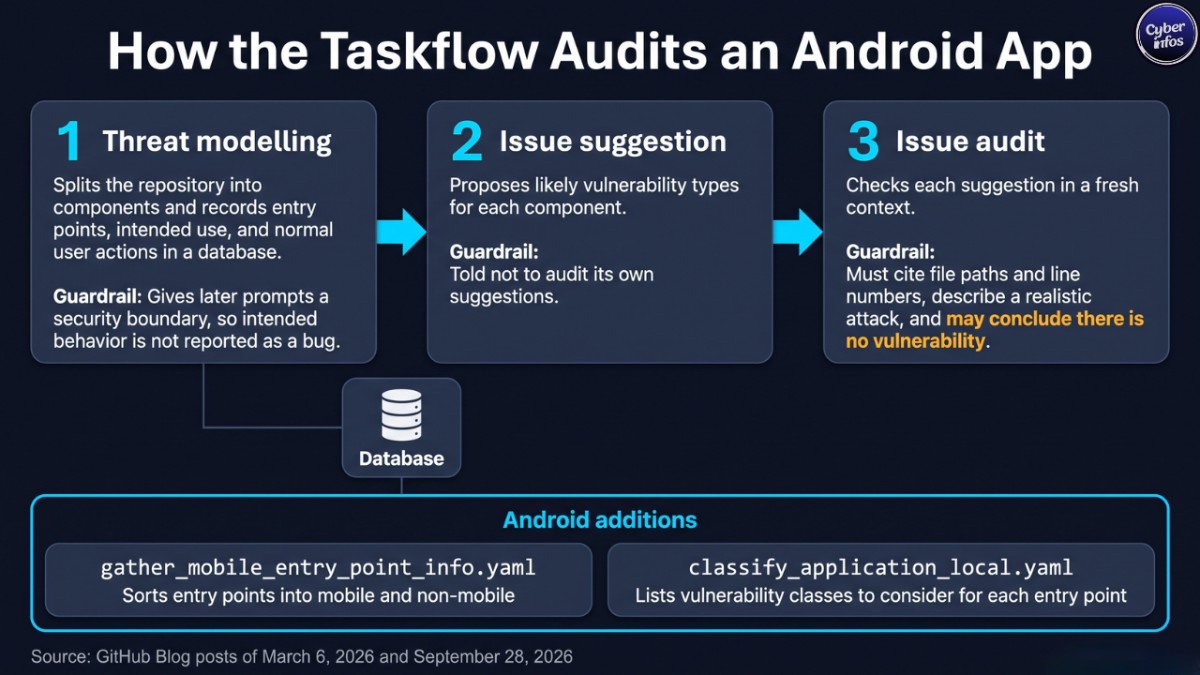
The general audit design has three stages:
| Stage | What the model does | Guardrail against hallucination |
|---|---|---|
| 1. Threat modelling | Splits the repository into components and records entry points, intended use and normal user actions in a database | Gives later prompts a security boundary, so intended behavior is not reported as a bug |
| 2. Issue suggestion | Proposes likely vulnerability types for each component | Told not to audit its own suggestions |
| 3. Issue audit | Checks each suggestion in a fresh context | Must cite file paths and line numbers, describe a realistic attack, and may conclude there is no vulnerability |
Stage three treats every suggestion as unverified, which imitates a triage setting where an external tool raised the alert. Splitting brainstorming from verification is what makes AI vulnerability detection tractable. The first stage is allowed to be wrong. The second exists to prove it wrong.
For Android, the post adds two changes. The first is a new taskflow, gather_mobile_entry_point_info.yaml, which sorts entry points into mobile and non-mobile so a single repository can hold an Android app next to web servers or desktop code.
The second is an update to the existing classify_application_local.yaml, which now carries a list of popular vulnerability classes the model must consider for each entry point. Find an intent-based entry point, for example, and the model checks for problems such as confused deputy and insecure broadcasts.
The author then runs a strict prompt and a broad one across multiple runs. The strict prompt keeps obvious bugs from slipping through. The broad prompt gives the model room to be creative.
Android Attack Surfaces the Taskflow Targets
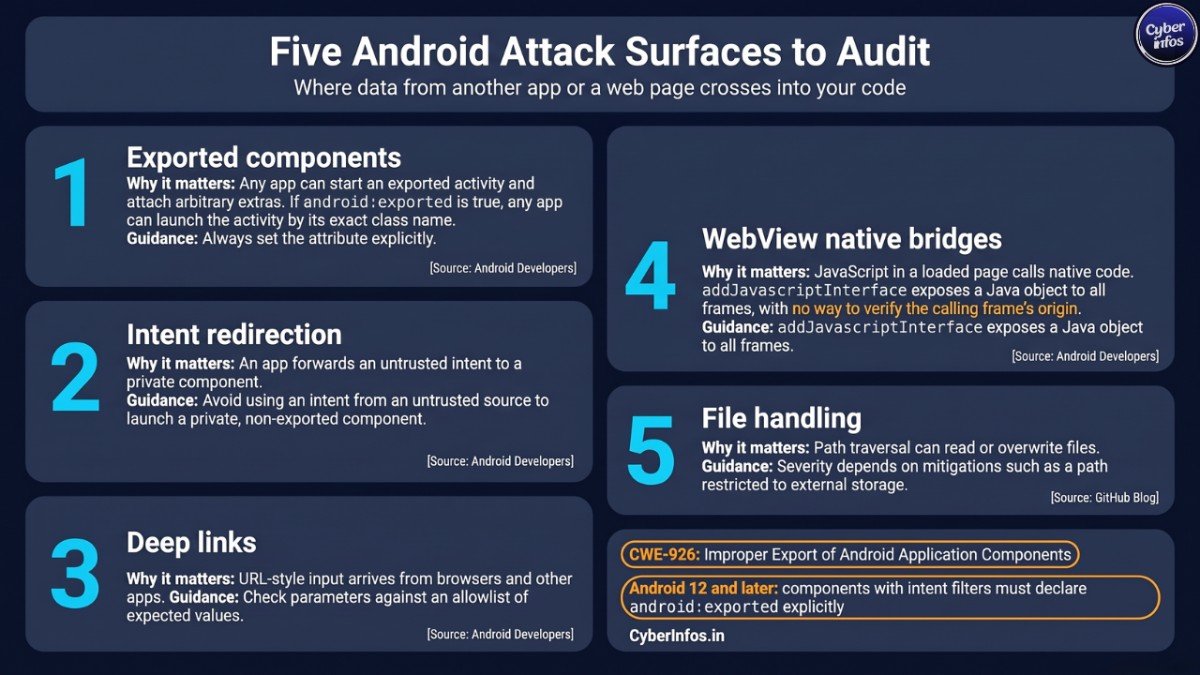
The mobile taskflows concentrate on the places where data from another app or a web page crosses into your code. Android’s own documentation covers each one.
| Attack surface | Why it matters | What the documentation says |
|---|---|---|
| Exported components | Any app can start an exported activity and attach arbitrary extras | Android Developers states that if android:exported is true, any app can launch the activity by its exact class name, and advises always setting the attribute explicitly |
| Intent redirection | An app forwards an untrusted intent to a private component | Android’s intent security guidance defines it as using an intent from an untrusted source to launch a private, non-exported component |
| Deep links | URL-style input arrives from browsers and other apps | Android’s guidance on unsafe deep link use says to check parameters against an allowlist of expected values |
| WebView native bridges | JavaScript in a loaded page calls native code | Android Developers explains that addJavascriptInterface exposes a Java object to all frames, with no way to verify the calling frame’s origin |
| File handling | Path traversal can read or overwrite files | The GitHub post shows severity depends on mitigations such as a path restricted to external storage |
Two pieces of background help here. First, Android’s intent documentation warns that an intent filter is not a secure way to stop other apps from starting your components. It also says apps that use intent filters must declare android:exported explicitly, or they cannot be installed on Android 12 and later.
Second, on the standards side, MITRE’s CWE-926, Improper Export of Android Application Components, is the weakness entry for the first row, and OWASP’s MASVS platform-interaction category covers deep links and similar mechanisms.
If your team owns Android app security, these five surfaces make a sensible review checklist even before any AI is involved.
Case Study: OsmAnd Location Tracking
OsmAnd is a third-party navigation app built on OpenStreetMap data. The GitHub Blog says the Android version has more than 10 million downloads and that the taskflows found three vulnerabilities in it. The most interesting of the three lets a malicious app track the device’s location.
The root cause is a trust assumption. OsmAnd exports an activity called MapActivity that opens settings files and deep links. When it imports settings, it reads four intent extras that the code expects to arrive only from an AIDL service, an Android inter-process interface. But as the post stresses, any app can attach arbitrary extras to an intent sent to any exported activity, and Android has no way to restrict which extras a caller sets.
That is enough for an app that holds no permissions to trigger a silent settings import, with no user confirmation. The post shows this used to swap the map-tile source for a server the attacker controls, which reveals which tiles the user loads. The same access exposes the origin and destination of routes. The user sees nothing change.
Fix pattern (CyberInfos guidance, following the post’s lesson): keep components that need no outside callers non-exported. If a component must be exported, guard it with a signature-level permission and pass trusted data over an in-process channel instead of intent extras. The post does not list fixed OsmAnd versions, so check the project’s advisories before assuming a given release is safe.
For Android app security reviews, the lesson is blunt: a feature built for one trusted caller quietly became an open API.
Case Study: Wikipedia Account Takeover via a Deep Link
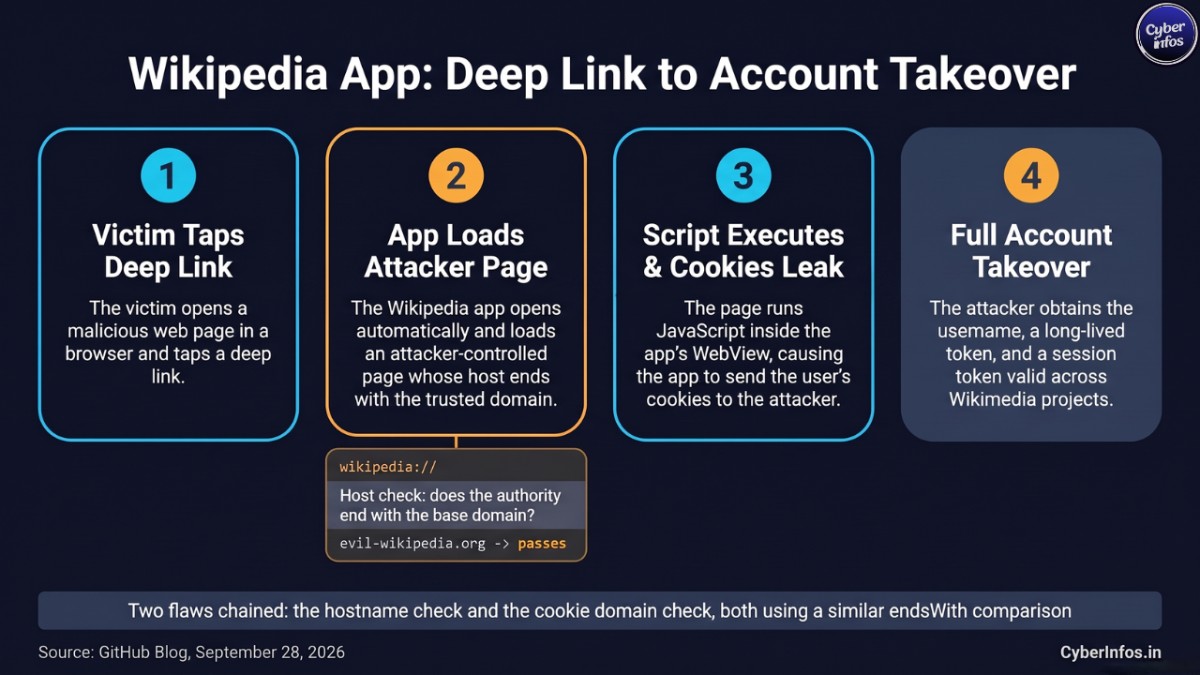
The Wikipedia Android app registers a wikipedia:// deep link so links can open articles in the app. The GitHub Blog explains that a logic bug in the hostname check let the app load non-Wikipedia pages. The code tested whether the link’s authority ended with the base domain, so an attacker-controlled host such as evil-wikipedia.org passed.
The same pattern shows up a second time in the app’s cookie manager, which checks cookie domains with a similar endsWith comparison. Chained together, the two flaws produce the attack the post describes:
- The victim opens a malicious web page in a browser and taps a deep link.
- The Wikipedia app opens automatically and loads an attacker-controlled page whose host ends with the trusted domain.
- The page runs JavaScript inside the app’s WebView, and the app sends the user’s cookies to it.
- The attacker obtains the username, a long-lived token and a session token valid across Wikimedia projects.
This is a good example of AI vulnerability detection finding a logic flaw rather than a textbook injection. Nothing here is malformed input. It is a string comparison that means less than its author assumed.
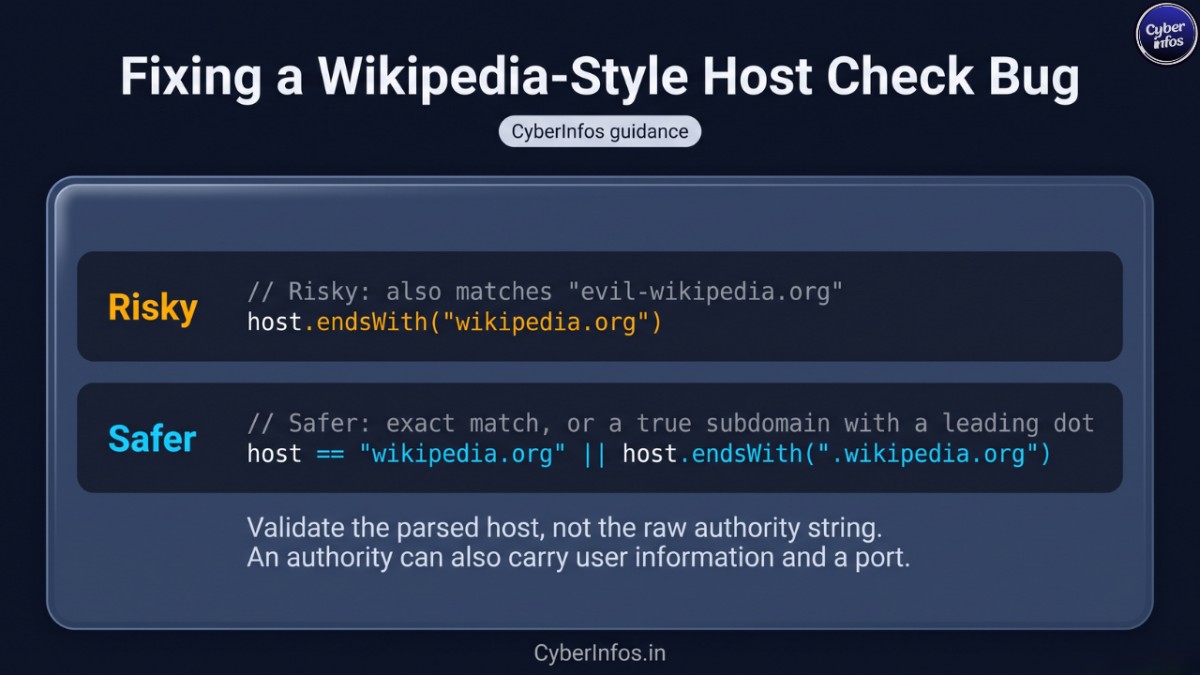
Safer host check (CyberInfos guidance):
// Risky: also matches "evil-wikipedia.org"
host.endsWith("wikipedia.org")

// Safer: exact match, or a true subdomain with a leading dot
host == "wikipedia.org" || host.endsWith(".wikipedia.org")
Validate the parsed host, not the raw authority string, because an authority can also carry user information and a port.
Why False Positives Still Happen
The post is candid about its limits. The author says the model returns low-severity bugs even when told not to, and it often flags issues that depend on states almost impossible to reach in real use. It also estimates severity badly, because mitigating factors are hard for a model to see. That is why the post says a security researcher who knows mobile applications should review every finding.
The path traversal example shows the problem. A traversal bug restricted to external storage is low severity, but a model may not notice that restriction unless it is told to build a proof of concept. Even then it can get it wrong. Suppose an app reads from both internal and external storage and prefers internal data.
An attacker-controlled external file may never take effect, which means there is no vulnerability at all. According to the post, the only fixes today are to give the model a debugger so it can run the proof of concept, or to have a researcher prompt for these cases directly.
Treat the output like any Android vulnerability scanner report: a list of leads, not a list of confirmed bugs. AI vulnerability detection is strongest at generating candidates and weakest at judging impact.
| Finding pattern | Why the model may misjudge it | Human check |
|---|---|---|
| Path traversal | Misses storage restrictions or read priority | Reproduce on a test device and confirm the file is actually used |
| Exported component | Assumes any exported component is exploitable | Confirm a second app can reach it and control the input |
| WebView issue | Overlooks origin checks or disabled JavaScript | Load a controlled test page and observe |
| Any high-severity claim | Ignores mitigating factors | Rate severity yourself with CVSS after reproduction |
Hands-On AI Android Security Testing: Run the Taskflow on Your Own App
Know the constraints before you start. The post says a GitHub Copilot license is required, the prompts use premium model requests, and runs can make many tool calls that burn through a lot of tokens. The seclab-taskflows README adds two warnings: run in a sandboxed environment, and expect audit runs to take several hours and cost a non-trivial amount on larger projects.
The steps below follow the post:
- Open the seclab-taskflows repository and start a Codespace.
- Wait a few minutes for it to initialize. The README says it is ready when
(.venv)appears before the terminal prompt. - Run
./scripts/audit/run_mobile.sh myorg/myrepo, replacing the argument with your own repository. - Wait. A medium-sized repository can take an hour or two.
- When it finishes, an SQLite viewer opens. Open the
audit_resultstable and look for rows with a checkmark in thehas_vulnerabilitycolumn. - Run it again. GitHub’s March post notes that LLM non-determinism means a second run can produce different results, and suggests using a different model for the second pass.
- Validate every checkmark by hand before you report or patch anything.
Private repositories work too, but the March post says you have to change the Codespace configuration to allow access. The agent uses the Copilot API by default, and the README explains that setting AI_API_ENDPOINT points it at a different AI API. One rule applies regardless: only test code you own or have written permission to test.
Adapting the Workflow to Another Application
The design behind AI Android security testing is portable, so you do not need Android to reuse it. The steps below are CyberInfos analysis built on the principles in GitHub’s two posts, not a copy of its files.
- Write an entry-point pass for your platform. On Android that means exported components, deep links and bridges. A desktop app might rely on custom URL handlers or local IPC. Be careful there: the March post says desktop threat modelling was the weakest area, because it is often unclear whether other processes on the machine are trusted.
- Tie vulnerability classes to entry-point types. The Android taskflow does this with intent-based entry points, and your list should be equally specific.
- Keep suggestion and audit separate. Let the first task speculate and forbid it from auditing. Make the second task start with fresh context.
- Demand evidence. Require file paths, line numbers and a realistic attack scenario, and explicitly allow “no vulnerability” as an answer.
- Add a severity step. Ask for a proof of concept, or give the model a debugger. GitHub’s March post also describes a filter taskflow that removed roughly half of the low-severity findings. The catch: it also marked a couple of borderline reportable bugs as low.
- Run more than once, on more than one model.
An illustrative suggestion-stage prompt, written by CyberInfos and not taken from GitHub:
You are reviewing one component of an Android app. Using the recorded
entry points and intended purpose, list which of these classes could apply:
exported-component abuse, intent redirection, insecure broadcast,
deep-link validation, WebView or JavaScript-bridge exposure, path traversal.
Do not audit. Output a short list of suspicions with a reason for each.
And an audit-stage prompt:
Treat every suspicion as unverified. Check the source code and record
file paths and line numbers. Describe a realistic attack from an app with
no permissions. If no attack exists, conclude there is no vulnerability.
The real prompts live in the seclab-taskflows repository. Read them before you write your own.
CyberInfos Analyst Insight
This section is analysis and opinion, not reported fact.
The value is workflow design, not model magic. The GitHub Security Lab post keeps returning to the same idea: split the research into steps and feed the model mobile-specific knowledge it may lack. CyberInfos assesses that a team with a weaker model and a well-staged taskflow may beat a strong model handed one vague prompt, though the post does not test that comparison.
The missing denominator matters. Twenty-four findings sounds strong. But without the number of apps scanned, the number of runs and the false positive rate for Android, readers cannot judge efficiency. Treat the post as a credible proof of concept, not a benchmark.
Classic tools still have a job. Conventional Android vulnerability scanners already catch simple misconfigurations such as implicitly exported components, and CodeQL ships a query for exactly that case. The AI approach earns its place on logic bugs, like the hostname comparison in the Wikipedia app.
Why this matters for product teams. CyberInfos assesses that both case studies share one risk pattern: user data exposed through a component built for a friendlier caller. Location data is at stake in one, session tokens in the other. For a product team, that turns a code-review gap into a privacy and account-security problem, which is a harder conversation than a lint warning. This is analysis, not a reported finding.
Common mistakes to avoid:
- Treating a
has_vulnerabilitycheckmark as a confirmed finding. - Running the audit once and stopping.
- Skipping proof of concept and rating severity from the model’s summary.
- Running the agent outside a sandbox.
- Testing code you are not authorized to test.
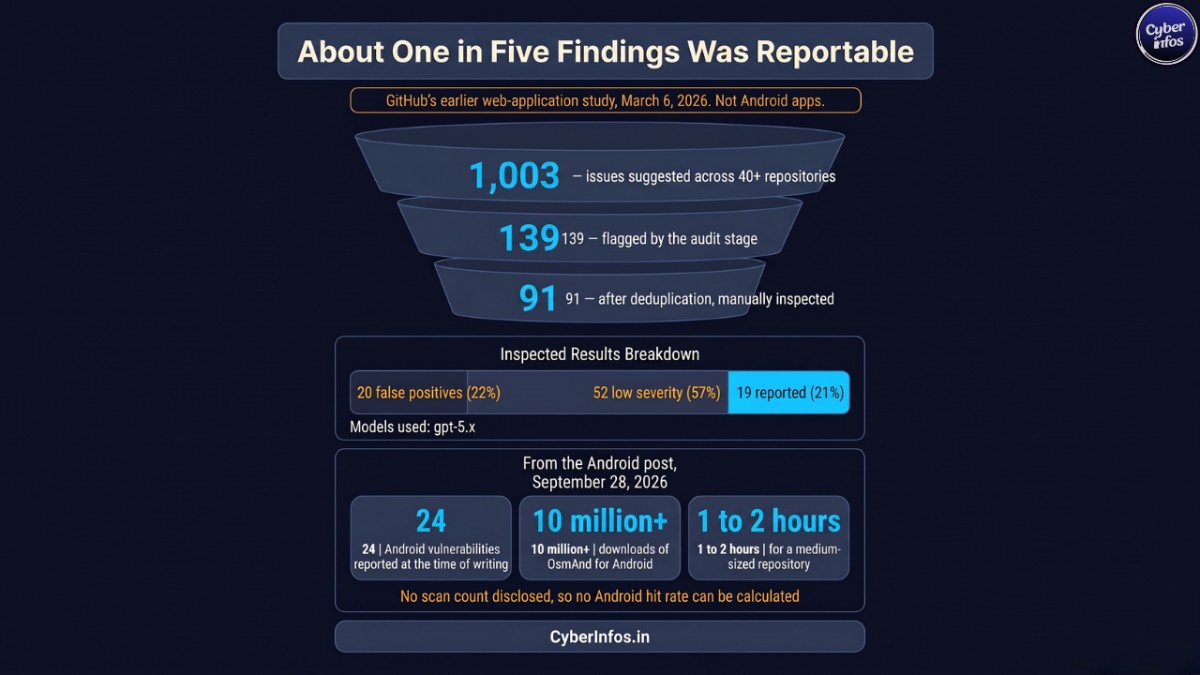
Key Numbers Behind the Research
The figures below separate what is known about AI Android security testing from what belongs to GitHub’s earlier web-application study. Keep them apart when you quote them, because the web figures do not describe Android apps.
| Figure | Source and context | What it means |
|---|---|---|
| 24 Android vulnerabilities | The GitHub Blog post of September 28, 2026 says this many were found at the time of writing | A proof of concept from one researcher’s runs, with no scan count disclosed |
| 10 million+ downloads | The same post says this about the Android version of OsmAnd | A flaw in one exported activity can reach a very large user base |
| 1 to 2 hours | The post says this is how long a medium-sized repository can take | Cheap in time, but the premium-request cost is real |
| 1,003 suggested issues in 40+ repositories | GitHub’s March 6, 2026 post on web applications, using gpt-5.x models |
The suggestion stage deliberately over-generates |
| 139 flagged, 91 after deduplication | Same March post | The audit stage filters heavily, but not enough to skip review |
| 20 false positives (22%), 52 low severity (57%), 19 reported (21%) | Same March post, from 91 manually inspected results | Only about one in five model-confirmed results was worth reporting |
| 25% rate for business logic issues | Same March post’s category table | Logic flaws are where the approach looks strongest |
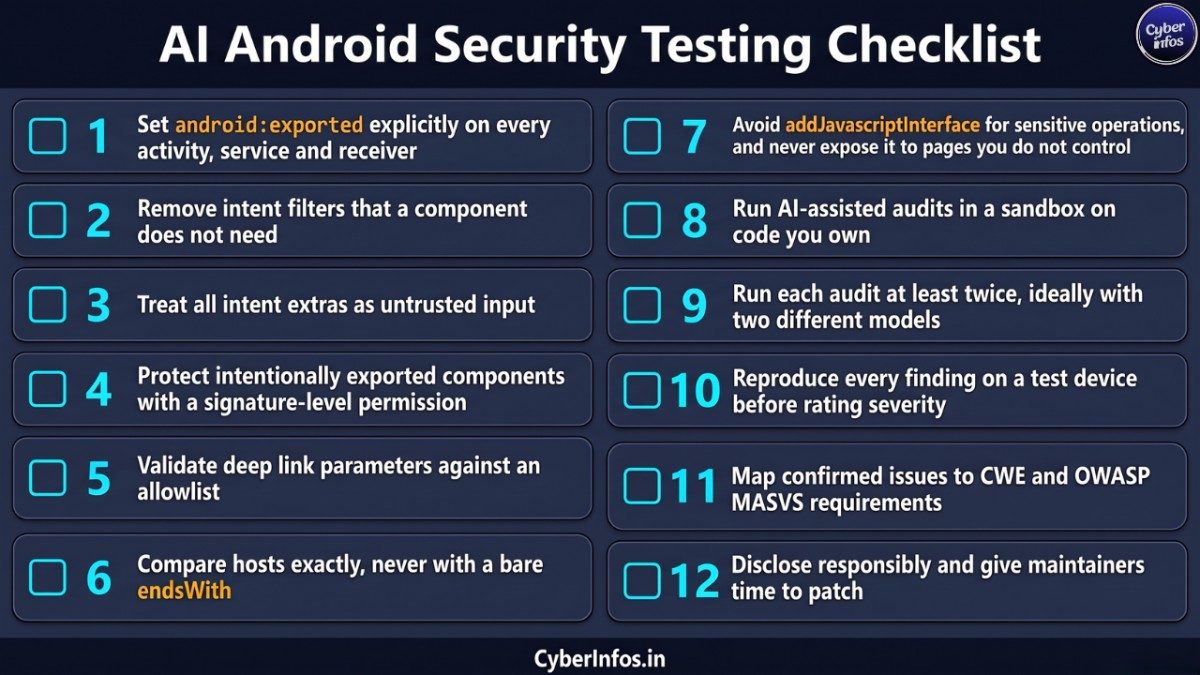
Actionable Checklist
- Set
android:exportedexplicitly on every activity, service and receiver - Remove intent filters that a component does not need
- Treat all intent extras as untrusted input
- Protect intentionally exported components with a signature-level permission
- Validate deep link parameters against an allowlist
- Compare hosts exactly, never with a bare
endsWith - Avoid
addJavascriptInterfacefor sensitive operations, and never expose it to pages you do not control - Run AI-assisted audits in a sandbox on code you own
- Run each audit at least twice, ideally with two different models
- Reproduce every finding on a test device before rating severity
- Map confirmed issues to CWE and OWASP MASVS requirements
- Disclose responsibly and give maintainers time to patch
FAQ
What is AI Android security testing?
AI Android security testing is the use of a large language model to audit an Android app’s source code for vulnerabilities. The model maps entry points such as exported components and deep links, suggests likely weaknesses, and checks each suspicion against the code. GitHub Security Lab’s September 2026 write-up shows the approach yielding 24 Android vulnerabilities, with human researchers reviewing every result. It complements static analysis, dynamic testing and the OWASP MASVS and MASTG checklists rather than replacing them.
What is an AI security agent?
An AI security agent is software that pairs a language model with tools, memory and a fixed sequence of tasks so it can complete multi-step security work, such as auditing a repository. Unlike a single chat session, it can run the same prompt across many components and store results in a database. The GitHub Security Lab Taskflow Agent is an open-source example, and its taskflows are plain YAML files that researchers can share and edit.
How many Android vulnerabilities did GitHub’s agent find?
The GitHub Blog post reports 24 Android vulnerabilities at the time of writing, after saying earlier that more than 20 had been reported. The author describes a handful as critical, including the OsmAnd location-tracking issue and the Wikipedia account-takeover chain, and says many others were simpler bugs such as path traversal. The post does not state how many apps were scanned, so the figure should not be read as a detection-rate benchmark.
What do I need to run the taskflows?
You need a GitHub Copilot license, access to the seclab-taskflows repository and a sandboxed environment such as a Codespace. The post warns that runs use premium model requests and can consume many tokens. The repository README lists Python 3.11 or later for local runs and Docker for container-backed taskflows, and it explains that the AI_API_ENDPOINT environment variable points the agent at a different AI API. Start with a small repository you own.
How long does a run take?
A medium-sized repository can take an hour or two, according to the GitHub Blog post. The repository README adds that audit taskflows may run for several hours on larger projects and make many AI requests, which can cost a non-trivial amount. Because LLM output varies from run to run, GitHub’s earlier post recommends running each audit more than once, optionally with a different model for the second pass, and comparing what comes back.
Is this a replacement for an Android vulnerability scanner?
No. A traditional scanner or static analysis tool is still the faster, cheaper way to catch known misconfigurations such as implicitly exported components, and CodeQL includes a query for that case. AI-assisted review adds value where the bug is logical, such as a hostname check that accepts the wrong domain. Use both. Then confirm findings dynamically on a test device before you rate severity or write a report.
Does AI vulnerability detection produce false positives?
Yes. The post says the model often reports low-severity issues even when told not to, and misjudges severity because it misses mitigating factors. In GitHub’s earlier web-application study, the team rejected 20 of 91 reviewed findings as false positives and 52 as low severity, keeping 19. Asking the model to build a proof of concept, or giving it a debugger, helps, but it does not remove the need for human validation by someone who knows mobile apps.
How do I fix an exported activity vulnerability?
Set android:exported to false for any component that other apps do not need to start, and remove unnecessary intent filters. Android’s documentation says an intent filter is not a secure way to keep other apps out. If the component must be exported, protect it with a signature-level permission, treat every extra as untrusted input, and never let an extra switch off confirmations or other security checks.
How do I prevent a Wikipedia-style deep link bug?
Compare the parsed host exactly, or require a subdomain suffix that begins with a dot, instead of checking whether a string ends with your domain name. Validate deep link parameters against an allowlist, as Android’s developer guidance advises, and avoid exposing JavaScript bridges to pages you do not control. The Wikipedia example shows why: a lookalike domain that merely ended with the trusted name passed the check.
Which standards should guide mobile app security testing?
OWASP’s MASVS defines what a secure mobile app should do, and the MASTG describes how to test each requirement. MASVS groups requirements into areas such as storage, cryptography, authentication, network communication and platform interaction, the last of which covers deep links and inter-app communication. Use them as the yardstick for your Android app security program, and map confirmed issues to CWE identifiers such as CWE-926 for exported components.
Can I run this on apps I do not own?
Only with written permission or through a program that authorizes testing. The GitHub research targeted open-source projects and reported findings through advisories, which is the responsible pattern to copy: test in a lab, keep proof-of-concept code private, contact maintainers, and allow time to patch before publishing. This is general guidance, not legal advice, and rules differ by country, so check applicable law and any program terms first.
Conclusion
The GitHub Blog research is best read as a design lesson. AI Android security testing produced real, disclosed vulnerabilities because the taskflow gave the model a threat model, forced it to separate speculation from verification, and demanded evidence. Humans still handled severity and validation.
Your next steps are simple. Run the taskflow on an app you own, review every checkmark by hand, and fix the patterns it exposes: unnecessary exported components, weak host checks and exposed WebView bridges. Over the longer term, build your own staged workflow around your platform’s entry points, and keep the OWASP MASVS as the yardstick for your results.
To keep up with AI-assisted security research and mobile threats, follow CyberInfos for practitioner-focused coverage.
Sources and Further Reading
- How we found 24 Android vulnerabilities using our open source AI security agent (GitHub Blog)
- How to scan for vulnerabilities with GitHub Security Lab’s open source AI-powered framework (GitHub Blog)
- GitHub Security Lab: AI agents advisories
- seclab-taskflows repository
- Android Developers: android:exported
- Android Developers: Intents and intent filters
- Android Developers: Unsafe use of deep links
- Android Developers: WebView native bridges
- OWASP MASVS
- OWASP MASTG
