


Eight new offensive tools dropped in a single release and one of them quietly signals where hacking is headed next.
If you’ve been relying on the same playbooks, Kali Linux 2026.1 changes the ground under your feet. The update isn’t just another toolkit refresh; it folds in deeper automation, sharper web exploitation capabilities, and early-stage AI integration that alters how penetration testers approach engagements.
Ignore it, and you’re not just missing features you’re falling behind attackers who are already adapting faster than most defensive teams can track. That gap shows up in missed detections, failed assumptions, and real-world breaches tied to overlooked vectors like WordPress plugins and modern XSS chains.
This breakdown walks you through all 8 additions, what they actually do in practice, and how they fit into modern ethical hacking tools and workflows. By the end, you’ll know exactly where tools like Metasploit MCP and new web scanners slot into your next assessment and why they matter now.
What’s New in Kali Linux 2026.1 – Quick Overview
The release builds on Kali Linux 2025.4 from December, which shipped with kernel 6.16 and Xfce 4.20.5. This time, Kali Linux 2026.1 moves to Linux kernel 6.18 and Xfce 4.20.6.
The changelog isn’t short. It includes:
- 8 new hacking tools added to the repositories
- 25 new packages, 183 updates, and 9 removals
- 2026 annual theme refresh across system visuals
- BackTrack mode via Kali-Undercover
- Kali NetHunter updates and bug fixes
Short version: this is a heavy release. And quietly, it reflects where offensive tooling is heading more automation, more integration, less manual grind.
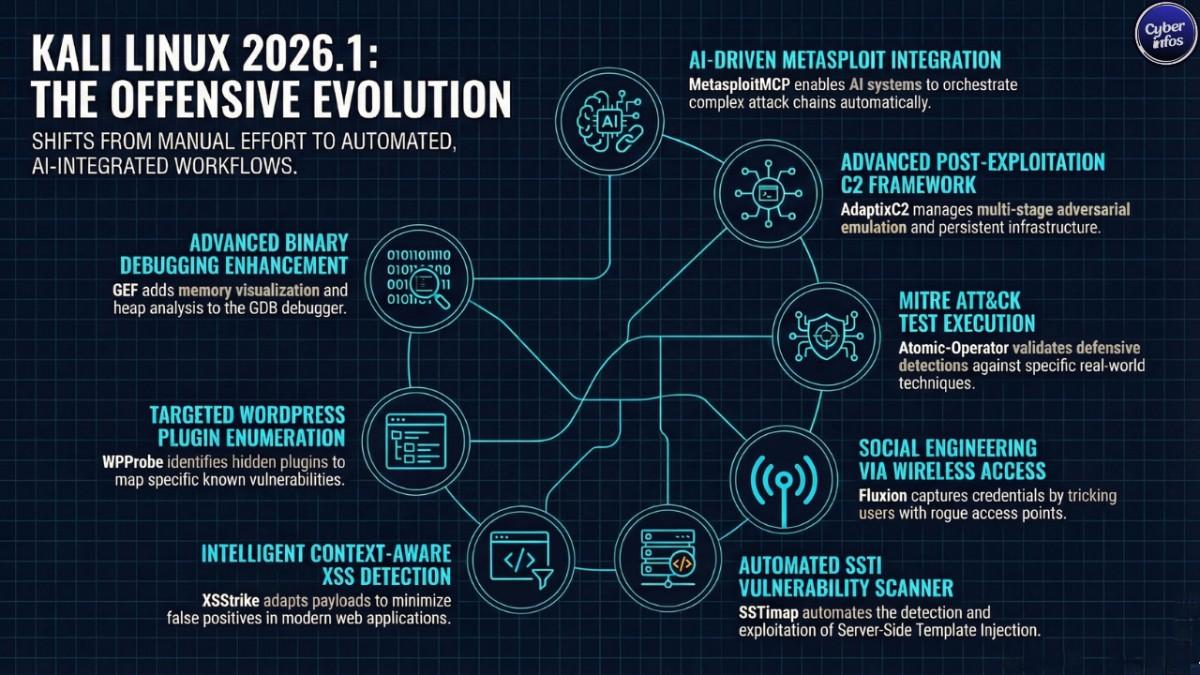
8 New Hacking Tools in Kali Linux 2026.1
This is where most users will spend their time. The eight additions cut across red teaming, wireless attacks, web exploitation, and debugging workflows.
1. AdaptixC2 – Red Team C2 Framework
AdaptixC2 drops in as a flexible post-exploitation and adversarial emulation platform. It handles command-and-control infrastructure, multi-stage operations, and coordinated attack simulation.
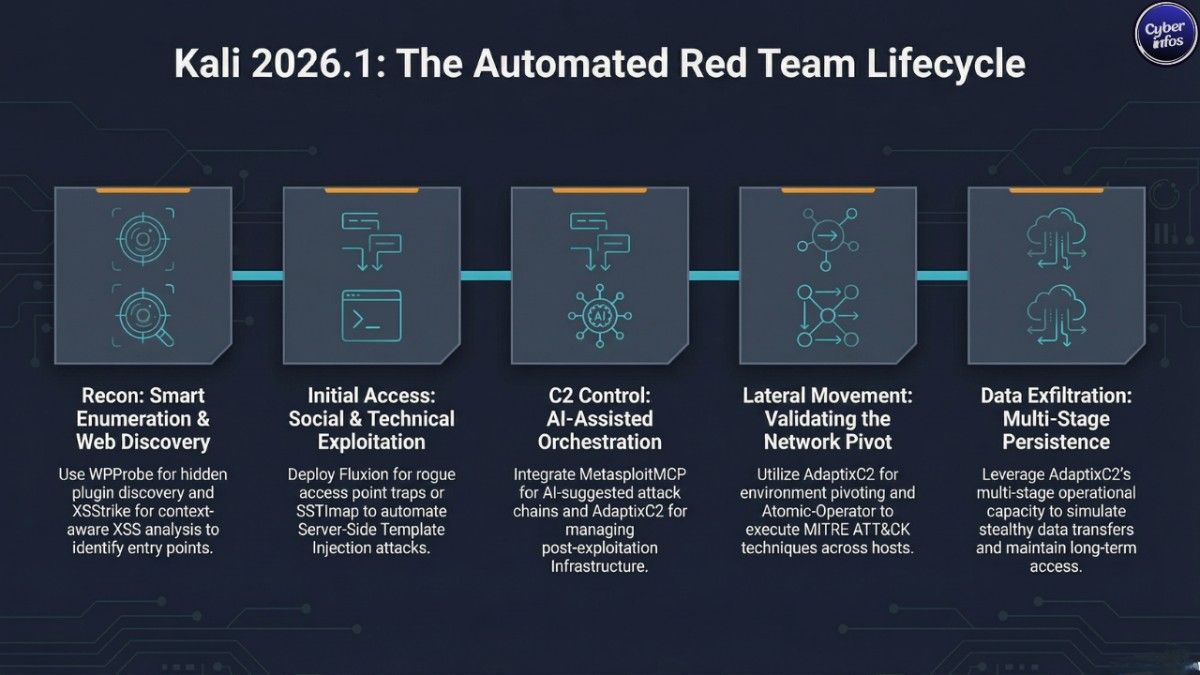
In practice, this means operators can orchestrate campaigns that behave more like real intrusions pivoting hosts, maintaining persistence, and blending activity across environments instead of running isolated exploits. That gap has been obvious in Kali for a while.
2. Atomic-Operator – MITRE ATT&CK Test Executor
Atomic-Operator acts as a centralized runner for Atomic Red Team tests. It maps directly to the MITRE ATT&CK framework, letting defenders validate whether detections actually fire when real techniques are executed.
Here’s the uncomfortable part: many environments claim ATT&CK coverage, but fail basic atomic tests. This tool makes that failure visible fast.
3. Fluxion – Wireless Security & Social Engineering
Fluxion focuses on human behavior, not brute force. Instead of cracking WPA keys, it sets up rogue access points and tricks users into handing over credentials through captive portals.
Anyone within Wi-Fi range a visitor, a contractor, a compromised device can be pulled into that trap. That’s the point. Security controls don’t help much if users willingly give up the password.
4. GEF (GDB Enhanced Features) – Advanced Binary Debugger
GEF upgrades GDB into something far more usable for exploit development. It layers in memory visualization, heap analysis, register tracking, and smarter breakpoints.
Debugging raw binaries is messy work. GEF doesn’t make it easy but it removes enough friction that researchers can focus on the vulnerability instead of fighting the tooling.
5. MetasploitMCP – AI-Powered Metasploit Integration
MetasploitMCP is where things start to shift. It’s an MCP server designed to let AI systems interact directly with the Metasploit Framework.
That opens the door to AI-assisted penetration testing querying modules, generating attack chains, even suggesting exploitation paths. It sounds efficient. It also raises questions about how much of red teaming becomes automated in the next year.
6. SSTImap – Server-Side Template Injection Scanner
SSTImap automates detection and exploitation of Server-Side Template Injection flaws. It handles payload generation, engine fingerprinting, and execution paths across templating systems like Jinja2 or Twig.
These bugs are often overlooked during testing. But when they hit, they don’t stay small SSTI frequently leads straight to Remote Code Execution.
7. WPProbe – WordPress Plugin Enumerator
WPProbe zeroes in on WordPress plugin discovery. It identifies installed plugins even those not publicly exposed and maps them against known vulnerabilities.
Given how often WordPress environments are misconfigured, this is less of a niche tool and more of a default starting point. Enumeration still breaks more systems than exploitation does.
8. XSStrike – Advanced XSS Vulnerability Scanner
XSStrike takes a more intelligent approach to XSS detection. It analyzes responses, adapts payloads, and reduces false positives across GET, POST, headers, and JSON inputs.
Basic scanners miss context. XSStrike doesn’t always but it gets closer than most, especially in modern apps where input handling is inconsistent.
2026 Annual Theme Refresh
Kali’s .1 releases always bring a visual overhaul. This one follows the pattern.
- New GRUB and boot splash design
- Refreshed installer UI
- Updated login screen and wallpapers, including Kali Purple variants
- Fix for live image boot animation freezing
It looks cleaner. More consistent, too. Still, aesthetics aren’t why most people upgrade but they do make daily use less painful.
BackTrack Mode – Celebrating 20 Years of History
There’s some nostalgia baked into this release. BackTrack mode, accessible through kali-undercover, recreates the look of BackTrack 5.
Activation is simple:
kali-undercover --backtrackRun it again to revert.
It’s a small feature, technically. But it marks 20 years since BackTrack Linux, and for long-time users, that lineage still matters more than the UI itself.
Kali NetHunter Mobile Upgrades
NetHunter gets practical improvements this cycle.
- Fixes for WPS scanning, HID permissions, and navigation issues
- Android 16 kernel support for Redmi Note 8
- Restored wireless firmware support on Samsung S10 devices
- A working wireless injection patch for QCACLD-3.0 chipsets
That last one stands out.
For years, modern Qualcomm devices lacked reliable packet injection. Now, thanks to researcher @Loukious, that limitation is starting to crack opening up a much larger pool of usable mobile hardware.
Known Issue: SDR Tools Broken
Not everything is stable.
The kali-tools-sdr metapackage is currently affected by breakage in the GNU Radio stack. Tools like gr-air-modes and gqrx-sdr aren’t functioning as expected.
If SDR is part of your workflow, upgrading right now is a risk. Waiting for the next patch cycle might save you time and frustration.
How to Upgrade to Kali Linux 2026.1
No reinstall needed.
sudo apt update && sudo apt -y full-upgradeThen verify:
grep VERSION /etc/os-release
uname -r
You’re looking for VERSION="2026.1" and kernel 6.18.12+kali-amd64.
Final Thoughts
This release draws a line. Kali Linux 2026.1 isn’t just adding tools it’s reshaping how those tools get used. The arrival of MetasploitMCP pushes AI into the workflow, while AdaptixC2 and Atomic-Operator deepen simulation capabilities tied to real-world adversary behavior.
Meanwhile, tools like XSStrike, SSTImap, and WPProbe reflect a simple truth: web applications remain the easiest way in. The question isn’t whether to upgrade.
It’s how quickly attackers will start using the same capabilities and whether defenders will notice in time.
🔗 Download Kali Linux 2026.1: click
💡 Pro Tip for Cyber Infos readers: Bookmark this page and follow our weekly cybersecurity roundups for the latest tool updates, CVE alerts, and ethical hacking tutorials.
